Notifications from pornography and/or malicious websites on my computer
Mage2Feu
Posted messages
4
Status
Member
-
Malekal_morte- Posted messages 178136 Registration date Status Moderator, Security Contributor Last intervention -
Malekal_morte- Posted messages 178136 Registration date Status Moderator, Security Contributor Last intervention -
Hello,
I've been getting notifications from porn sites and/or containing viruses (like "Your computer is infected!" or "new message from the Post Office") from a site or whatever called spirationsstrated.com for a month now. I thought it would stop, believing it was in my email box.
Avira and the firewall detect nothing, no viruses, and the notifications keep coming anyway.
So what is it? An adware? Please help me, I'm at my wit's end! I keep accidentally clicking on them, and my history is filled with porn sites!
I've been getting notifications from porn sites and/or containing viruses (like "Your computer is infected!" or "new message from the Post Office") from a site or whatever called spirationsstrated.com for a month now. I thought it would stop, believing it was in my email box.
Avira and the firewall detect nothing, no viruses, and the notifications keep coming anyway.
So what is it? An adware? Please help me, I'm at my wit's end! I keep accidentally clicking on them, and my history is filled with porn sites!
3 answers
-
Hello,
Try this: https://fr.malwarebytes.com/adwcleaner/
Generally pretty effective against adwares! -
Hello/Good evening,
To read to avoid being fooled: https://www.malekal.com/supprimer-publicites-notifications-chrome-firefox-opera-smartphone/
Here is the procedure to follow.
On the blue links, you will find explanatory tutorials with all the details to follow the steps.
1)
Fix the affected web browsers:- Fix Mozilla Firefox (first paragraph)
- Fix Google Chrome (only the first paragraph).
(do not use zoek and perform a manual reset)
2) To check your computer for possible infections and get a general status of the system:
Follow the FRST tutorial by clicking on this blue link. ( take the time to read carefully - everything is well explained ).
Download and run the FRST scan,
Wait for the scan to finish, a message will indicate that the analysis is complete.
Three FRST reports will be generated:- FRST.txt
- Shortcut.
- Additional.txt
Send these 3 reports to the site https://pjjoint.malekal.com/ and return with the 3 pjjoint links that lead to the reports here in a new response so that we can consult them.
(The blue links lead to step-by-step explanatory tutorials, click on them for more precise instructions to follow).
-
- reset the web browsers properly.
Let's see if all of this is useful:
Avira Phantom VPN
Avira Privacy Pal
Avira Safe Shopping
Avira Software Updater
Avira System Speedup
Java
Wargaming.net Game Center (is it useful, do you play it?)
World_of_Warships_Eu (is it useful, do you play it?)
Since you are on Windows 10, you can switch from Avira to Windows Defender.
It doesn't offer to install a bunch of useless programs.
-
Hello,
You don’t say which browser you are using.
1- If you are using Google Chrome, open Google Chrome, click on the three dots in the upper right, then settings==>advanced settings==>content settings==>notifications delete spirationsstrated.com by clicking on the three dots in front of this notification.
2- Restart Google Chrome and then reset it https://support.google.com/chrome/answer/3296214?hl=en
Check and let me know if your issue is still present.
Then:
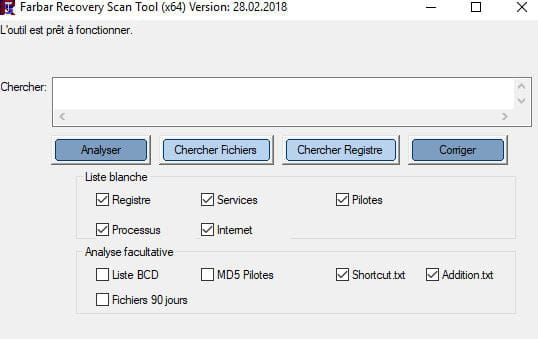
3- Download FRST once downloaded save it to your desktop then open it, you will see this:
Then check the shortcut box like this:
Click on Analyze at the end of the analysis, you will have three text files on your desktop FRST, Addition, and Shortcut send these reports to https://pjjoint.malekal.com/ see this tutorial paragraph Send analysis reports to pjjoint then provide the three links generated by Pjoint in your next message.
--
bazfile
Moderator/Contributor security.-
-
We're a lot on it, I'll leave you with Malekal, he arrived 1 minute before me so he has priority :D
I think the notifications will stop as soon as you do what is indicated at the beginning of my message.
Message for Malekal: In case you're not aware and if a case comes up, read this page. -
I hadn't seen it.
-