Office 2011 Activation?
Solved
zboub
Posted messages
93
Status
Member
-
Tibone -
Tibone -
Hello,
Microsoft's services have just informed me that my Office 2011 is no longer activatable on the new iMac I just bought and they are telling me that I need to switch to the newer versions.
Has anyone else heard this before?
And what can be done to bypass this issue since my product works perfectly on an old MacBook with the key that no longer works for the new Mac?
.
Microsoft's services have just informed me that my Office 2011 is no longer activatable on the new iMac I just bought and they are telling me that I need to switch to the newer versions.
Has anyone else heard this before?
And what can be done to bypass this issue since my product works perfectly on an old MacBook with the key that no longer works for the new Mac?
.
3 answers
-
Hello,
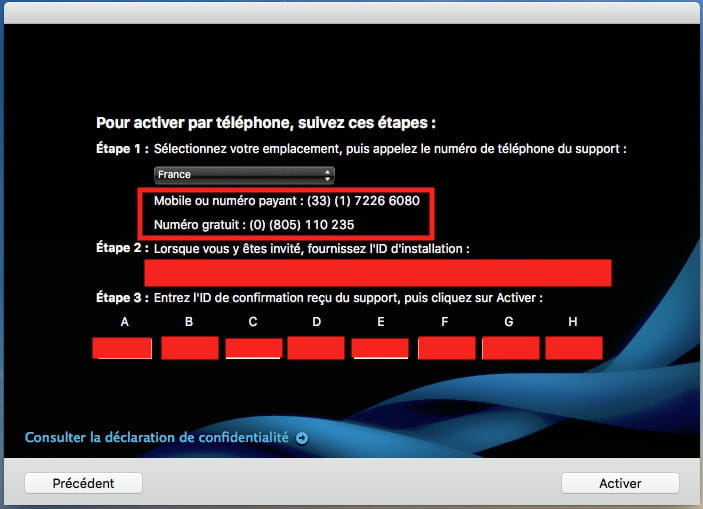
it's been a while since the online activation server has been down for MS Office 2011.
But fortunately, it is still possible to activate this suite, which was quite expensive at the time, by calling the phone number indicated on the activation window. I have done this several times (every time I have reinstalled MS Office 2011 after reinstalling my OS from scratch), and it works very well via this phone number. It’s a robot that is our interlocutor. Make sure to note the numbers given for the different fields at the end of the procedure. This will allow you to reuse those numbers for a future reinstallation.
Best regards.
EDIT:

-
-
-
Good evening Francis, 1000 thanks for your help, I couldn't activate Office 2011 on the MacBook Air that I had just given to my daughter. So I called 08.05.11.02.35, and in the end Office 2011 works perfectly (on Mac OS Mojave 10.14.5). The phone procedure is simple but long because you have to go through entering the 48 digits into the dialog box (the one you included in your post), but Ms. Microsoft gives them to you in blocks of 6 digits with the preliminary option of choosing the speed of speech! I didn't activate this option, and you have to be quick with your ears and fingers... So if I had to do it again, I would choose the option "Go slow, it's all good"...! But no panic, if you mess up you can start all over again. Once you've entered this digital horde, you just need to click on "Activate" at the bottom right of the window and unless I'm mistaken, a dialog box will display the message: "Your copy of Office for Mac is now activated." As you pointed out, it's wise to write down the ID number located at the bottom of the screen, but in case you forget, no worries, you can find it in one of the Office programs: for example, open Word and in the menu bar, click Word > About Microsoft Word... An info window opens with the ID at the bottom. The same procedure applies to the other Office programs (XL, PP...). Best regards. YJ
-
-