Vibox (Le processus critique est mort)

Smegmaster
Posted messages
8
Status
Member
-
Malekal_morte- Posted messages 178136 Registration date Status Moderator, Security Contributor Last intervention -
Malekal_morte- Posted messages 178136 Registration date Status Moderator, Security Contributor Last intervention -
Hello,
I have been the owner of a Vibox PC (link at the bottom) for about 2 years and I am having major problems with it.
So, this computer was purchased to run Flight Simulator. I also play other games like LoL, Dofus, and Apex.
However, it has become really slow, as if it were rusty, and furthermore, every day, it restarts with a lovely BSOD that says "Your computer has encountered a problem, it will restart...etc" and <critical_process_died> at the end of the message. This happens very often, I have tried several things to try to fix it but I don't even know where it could be coming from.
Thank you in advance for your responses...
https://www.fnac.com/mp24922197/VIBOX-PC-Gamer-Dragon-10-4-5GHz-Intel-Quad-Core-Carte-Graphique-Nvidia-GeForce-GTX-1060-3-Go-32-Go-Memoire-RAM-DDR4-2133MHz-Disque-Dur-Sata-III-7200rpm-2-To-2000-Go-PSU-85-Boitier-Gamer-Vibox-Vert-Windows-10/w-4#int=S:Suggestion|FA:MIC:Fiche%20Article|NonApplicable|24922197|BL0|L1</critical_process_died>
I have been the owner of a Vibox PC (link at the bottom) for about 2 years and I am having major problems with it.
So, this computer was purchased to run Flight Simulator. I also play other games like LoL, Dofus, and Apex.
However, it has become really slow, as if it were rusty, and furthermore, every day, it restarts with a lovely BSOD that says "Your computer has encountered a problem, it will restart...etc" and <critical_process_died> at the end of the message. This happens very often, I have tried several things to try to fix it but I don't even know where it could be coming from.
Thank you in advance for your responses...
https://www.fnac.com/mp24922197/VIBOX-PC-Gamer-Dragon-10-4-5GHz-Intel-Quad-Core-Carte-Graphique-Nvidia-GeForce-GTX-1060-3-Go-32-Go-Memoire-RAM-DDR4-2133MHz-Disque-Dur-Sata-III-7200rpm-2-To-2000-Go-PSU-85-Boitier-Gamer-Vibox-Vert-Windows-10/w-4#int=S:Suggestion|FA:MIC:Fiche%20Article|NonApplicable|24922197|BL0|L1</critical_process_died>
3 answers
-
ok,
Blue screens or BSODs are Windows crashes that can no longer continue to operate.
These crashes have several possible sources:
- software sources: crash of a device driver such as those for the graphics card, an antivirus crashing, or any other software that can load "at a low level" on Windows.
- hardware sources: hardware issues with the hard drive, defective memory modules, or incompatibilities, etc.
You must check if these crashes occur at particular times, for example, if it happens when you launch a video in your web browser or a game, there is a chance that it is the graphics card driver. You will then need to reinstall the graphics card drivers.
Also unplug any other peripherals than the keyboard/mouse (game controller, USB webcam, USB printer, etc.), if you have any of these devices, mention it, as it could be a source.
More information on these blue screens can be found on the following page: https://www.malekal.com/bsod-ecran-bleu-windows/
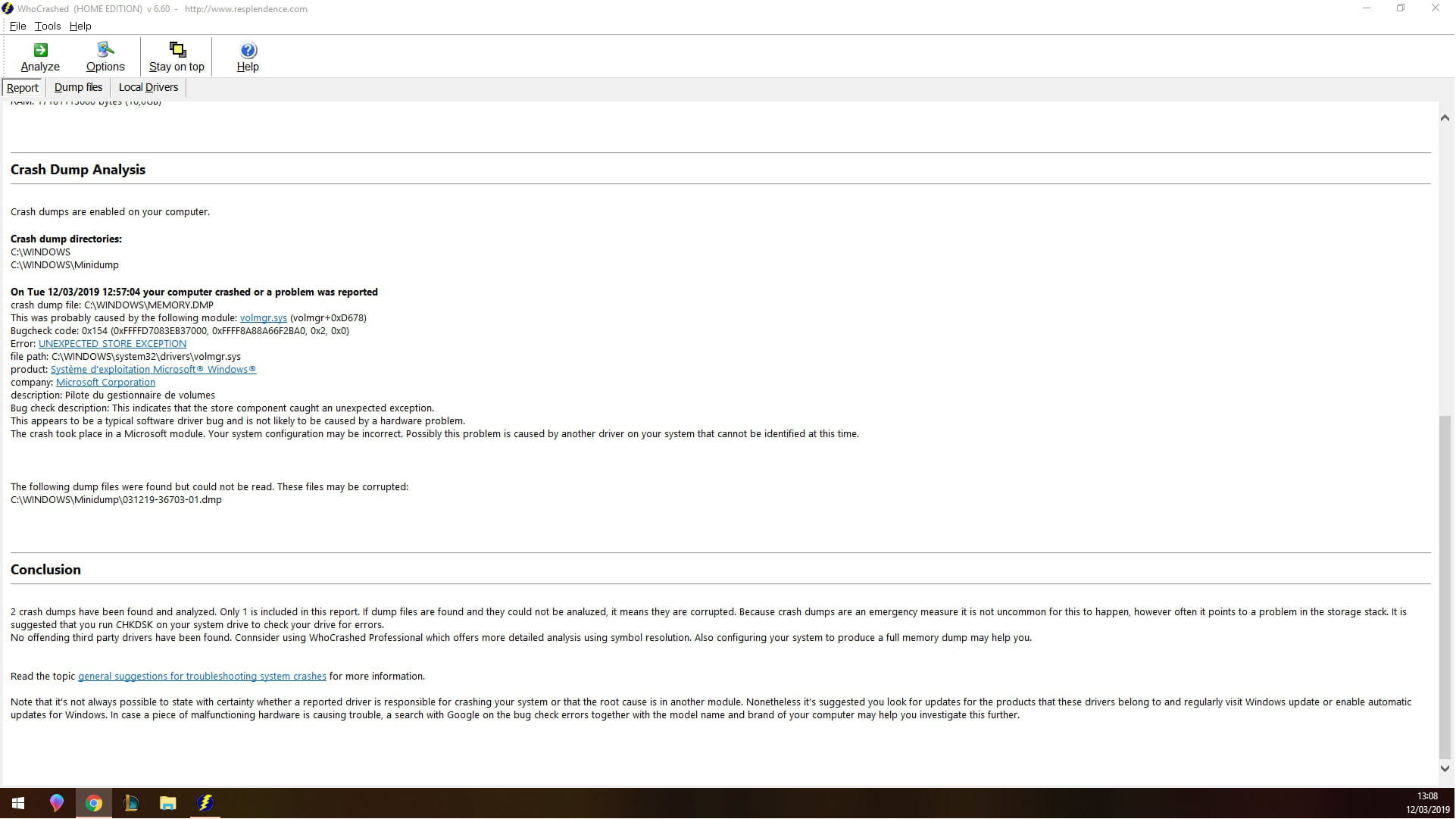
You can also use WhoCrashed to obtain information about these crashes.
Download and run WhoCrashed: Download WhoCrashed
=> WhoCrashed Tutorial
Copy and paste the content here as indicated in the tutorial.
2)
Try using the driver verifier manager: https://www.malekal.com/verifier-pilotes-windows/
Follow the tutorial and see if you can trigger a crash with DRIVER_VERIFIED_DETECTED_VIOLATION (xxxxx.sys).
You must then indicate the xxxxx.sys responsible.
There is a test where you check a series of items and another test with all non-Microsoft drivers.
Finally:
To check your computer for possible infections and get a general status of the system:
Follow the FRST tutorial by clicking on this blue link. ( take the time to read carefully - everything is well explained there ).
Download and run the FRST scan,
Wait for the scan to finish, a message will indicate that the analysis is complete.
Three FRST reports will be generated:- FRST.txt
- Shortcut.
- Additional.txt
Send these 3 reports to the site https://pjjoint.malekal.com/ and reply with the 3 pjjoint links leading to the reports here in a new response so that we can consult them.
(The blue links lead to step-by-step explanatory tutorials, click on them for more precise instructions to follow).
-
Thank you very much for this comprehensive response.
Here are the reports:
- FRST : https://pjjoint.malekal.com/files.php?id=FRST_20190311_i15w6y7q6n13
- Addition : https://pjjoint.malekal.com/files.php?id=20190311_q11f5z11g6z13
- Shortcut : https://pjjoint.malekal.com/files.php?id=20190311_9f8p7o815
Additionally, crashes happen at random times. But always when I am busy with a game or an app (chrome). -
Here is the correction to be made with FRST. You can consult this explanatory note with screenshots.
Restart FRST, then on your keyboard press the CTRL + Y keys.
The notepad will open, copy/paste this.
Start
CloseProcesses:
CreateRestorePoint:
HKU\S-1-5-21-3413023625-4206870505-2318102653-1001\...\Run: [Chromium] => c:\users\mouloud\appdata\local\chromium\application\chrome.exe [829440 2017-02-15] (The Chromium Authors) [Unsigned file]
c:\users\mouloud\appdata\local\chromium
HKLM-x32\...\Run: [Wondershare Helper Compact.exe] => C:\Program Files (x86)\Common Files\Wondershare\Wondershare Helper Compact\WSHelper.exe
 S3 WsDrvInst; C:\Program Files (x86)\Wondershare\Video Converter Ultimate\Transfer\DriverInstall.exe [X]
Hosts:
EmptyTemp:
RemoveProxy:
Reboot:
End
Save the content via the file menu then save.
Close the notepad, return to FRST and click the "Fix" button.
A restart may be necessary and automatic.
A text file will appear, copy/paste the content here in a new message.
Restart the computer.
Finally, to ensure that the hard drive does not have a hardware issue.
Check the hard drive: How to check the health of the hard drive
With CrystalDiskInfo
- Download CrystalDiskInfo
The status must be blue; otherwise, it's not a good sign.
More explanations: CrystalDiskInfo. -
-
For the driver tester, it must have crashed, so forget about it.
And with every restart, the system performs a check of the drive (C:)
Yes, I saw the found folders in FRST, there are a lot of them too.
It's not normal, do you let the check run to the end?
It's possible that the partition is damaged and that's causing crashes.
The drive seems okay according to CrystalDiskInfo. -
-
Hello,
To begin with, check if this update is installed: https://forum.malekal.com/viewtopic.php?f=11&t=62341
If so, uninstall it and block it to see.
--
Please press a key to continue the disinfection... -
Hi, yesterday I was in the process of installing FSX, which wouldn't complete the installation due to Gameuxinstallhelper.dll, but that's another problem, and I crashed again... again with a Critical process died. I'm attaching the report

-
I think the best thing to do is to reset: Reset Windows 10;
If it continues, it's probably hardware.
-