bonjour et merci pour votre réponse rapide!!!
voila le rapport WhoCrashed
Welcome to WhoCrashed (HOME EDITION) v 6.02
--------------------------------------------------------------------------------
This program checks for drivers which have been crashing your computer. If your computer has displayed a blue (or black) screen of death, suddenly rebooted or shut down then this program might help you find the root cause of the problem and a solution.
Whenever a computer suddenly reboots without displaying any notice or blue (or black) screen of death, the first thing that is often thought about is a hardware failure. In reality, on Windows a lot of system crashes are caused by malfunctioning device drivers and kernel modules. In case of a kernel error, many computers do not show a blue or black screen unless they are configured for this. Instead these systems suddenly reboot without any notice.
This program will analyze your crash dumps with the single click of a button. It will tell you what drivers are likely to be responsible for crashing your computer. It will report a conclusion which offers suggestions on how to proceed in any situation while the analysis report will display internet links which will help you further troubleshoot any detected problems.
To obtain technical support visit www.resplendence.com/support
Click here to check if you have the latest version or if an update is available.
Just click the Analyze button for a comprehensible report ...
--------------------------------------------------------------------------------
Home Edition Notice
--------------------------------------------------------------------------------
This version of WhoCrashed is free for use at home only. If you would like to use this software at work or in a commercial environment you should get the professional edition of WhoCrashed which allows you to perform more thorough and detailed analysis. It also offers a range of additional features such as remote analysis on remote directories and remote computers on the network.
Please note that this version of WhoCrashed is not licensed for use by professional support engineers.
Click here for more information on the professional edition.
Click here to buy the the professional edition of WhoCrashed.
--------------------------------------------------------------------------------
System Information (local)
--------------------------------------------------------------------------------
Computer name: SARTOX-PC
Windows version: Windows 10 , 10.0, build: 17763
Windows dir: C:\WINDOWS
Hardware: Z370 AORUS Ultra Gaming, Gigabyte Technology Co., Ltd., Z370 AORUS Ultra Gaming-CF
CPU: GenuineIntel Intel(R) Core(TM) i5-8600K CPU @ 3.60GHz Intel586, level: 6
6 logical processors, active mask: 63
RAM: 17123246080 bytes total
--------------------------------------------------------------------------------
Crash Dump Analysis
--------------------------------------------------------------------------------
Crash dumps are enabled on your computer.
Crash dump directories:
C:\WINDOWS
C:\WINDOWS\Minidump
On Sun 27/01/2019 10:26:48 your computer crashed or a problem was reported
crash dump file: C:\WINDOWS\Minidump\012719-13546-01.dmp
This was probably caused by the following module: ntoskrnl.exe (nt+0x1B1B40)
Bugcheck code: 0x133 (0x1, 0x1E00, 0xFFFFF8013A7F0380, 0x0)
Error: DPC_WATCHDOG_VIOLATION
file path: C:\WINDOWS\system32\ntoskrnl.exe
product: Microsoft® Windows® Operating System
company: Microsoft Corporation
description: NT Kernel & System
Bug check description: The DPC watchdog detected a prolonged run time at an IRQL of DISPATCH_LEVEL or above. This could be caused by either a non-responding driver or non-responding hardware. This bug check can also occur because of overheated CPUs (thermal issue).
The crash took place in the Windows kernel. Possibly this problem is caused by another driver that cannot be identified at this time.
On Sun 27/01/2019 10:26:48 your computer crashed or a problem was reported
crash dump file: C:\WINDOWS\MEMORY.DMP
This was probably caused by the following module: corsairgamingaudioamd64.sys (corsairgamingaudioamd64+0x1039c)
Bugcheck code: 0x133 (0x1, 0x1E00, 0xFFFFF8013A7F0380, 0x0)
Error: DPC_WATCHDOG_VIOLATION
file path: C:\WINDOWS\system32\drivers\corsairgamingaudioamd64.sys
product: Corsair Gaming Headset Drivers
company: Corsair Components, Inc.
description: Corsair Gaming Headset drivers package
Bug check description: The DPC watchdog detected a prolonged run time at an IRQL of DISPATCH_LEVEL or above. This could be caused by either a non-responding driver or non-responding hardware. This bug check can also occur because of overheated CPUs (thermal issue).
A third party driver was identified as the probable root cause of this system error. It is suggested you look for an update for the following driver: corsairgamingaudioamd64.sys (Corsair Gaming Headset drivers package, Corsair Components, Inc.).
Google query: corsairgamingaudioamd64.sys Corsair Components, Inc. DPC_WATCHDOG_VIOLATION
On Sat 26/01/2019 18:43:41 your computer crashed or a problem was reported
crash dump file: C:\WINDOWS\Minidump\012619-13640-01.dmp
This was probably caused by the following module: hal.dll (hal+0x42667)
Bugcheck code: 0x124 (0x0, 0xFFFFC983FAFDC028, 0xB2000000, 0x30005)
Error: WHEA_UNCORRECTABLE_ERROR
file path: C:\WINDOWS\system32\hal.dll
product: Microsoft® Windows® Operating System
company: Microsoft Corporation
description: Hardware Abstraction Layer DLL
Bug check description: This bug check indicates that a fatal hardware error has occurred. This bug check uses the error data that is provided by the Windows Hardware Error Architecture (WHEA).
This is likely to be caused by a hardware problem.
The crash took place in the Windows kernel. Possibly this problem is caused by another driver that cannot be identified at this time.
On Sat 26/01/2019 15:54:42 your computer crashed or a problem was reported
crash dump file: C:\WINDOWS\Minidump\012619-13718-02.dmp
This was probably caused by the following module: ntoskrnl.exe (nt+0x1B1B40)
Bugcheck code: 0x133 (0x1, 0x1E00, 0xFFFFF8014DBE3380, 0x0)
Error: DPC_WATCHDOG_VIOLATION
file path: C:\WINDOWS\system32\ntoskrnl.exe
product: Microsoft® Windows® Operating System
company: Microsoft Corporation
description: NT Kernel & System
Bug check description: The DPC watchdog detected a prolonged run time at an IRQL of DISPATCH_LEVEL or above. This could be caused by either a non-responding driver or non-responding hardware. This bug check can also occur because of overheated CPUs (thermal issue).
The crash took place in the Windows kernel. Possibly this problem is caused by another driver that cannot be identified at this time.
On Sat 26/01/2019 13:31:12 your computer crashed or a problem was reported
crash dump file: C:\WINDOWS\Minidump\012619-13656-01.dmp
This was probably caused by the following module: ntoskrnl.exe (nt+0x1B1B40)
Bugcheck code: 0x133 (0x1, 0x1E00, 0xFFFFF805749EB380, 0x0)
Error: DPC_WATCHDOG_VIOLATION
file path: C:\WINDOWS\system32\ntoskrnl.exe
product: Microsoft® Windows® Operating System
company: Microsoft Corporation
description: NT Kernel & System
Bug check description: The DPC watchdog detected a prolonged run time at an IRQL of DISPATCH_LEVEL or above. This could be caused by either a non-responding driver or non-responding hardware. This bug check can also occur because of overheated CPUs (thermal issue).
The crash took place in the Windows kernel. Possibly this problem is caused by another driver that cannot be identified at this time.
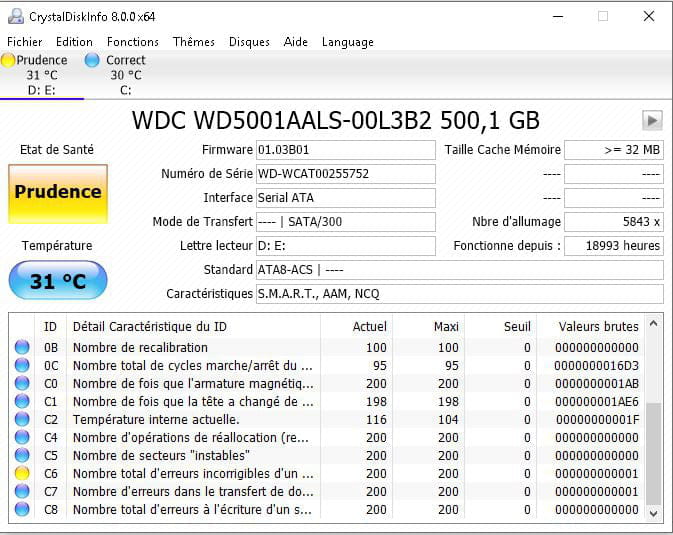
Avec CrystalDiskInfo:
j'ai une ligne en jaune
pour info le disque qui a des erreur n'est pas mon disque ou windows est installer mais celui ou je stock mes fichier photo/film/musique etc