
Ccleaner starts at boot. - Page 2
Solved
Previous
- 1
- 2
- 3
Next
-
Hello again!
I've checked everything again!
I uninstalled CCleaner with Revo
I have the latest version of CCleaner (5.51)
I followed the tutorial completely and rechecked the various steps...
...and CCleaner keeps coming back! -
pistouri Posted messages 19011 Registration date Status Contributor Last intervention Ambassadeur 8 725
Incredible that CCleaner is causing trouble!
--
pistouri -
pistouri Posted messages 19011 Registration date Status Contributor Last intervention Ambassadeur 8 725
-
pistouri Posted messages 19011 Registration date Status Contributor Last intervention Ambassadeur 8 725
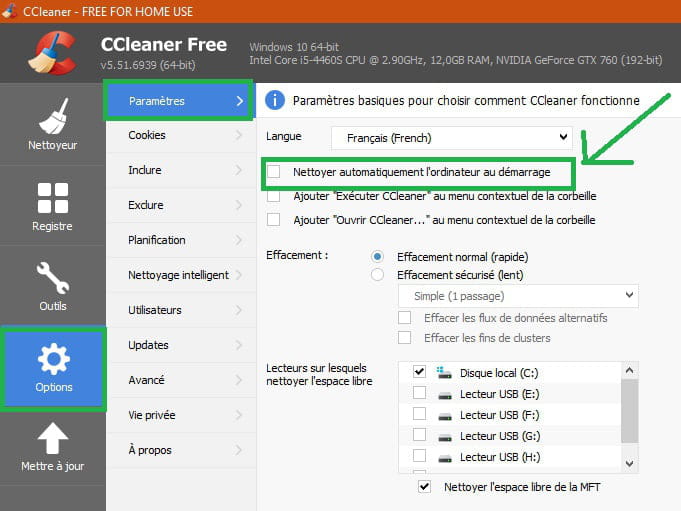
Check this option again in CCleaner
Options → Settings
Make sure this box is unchecked → Clean the computer automatically at startup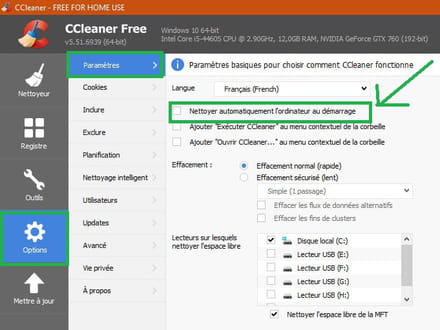
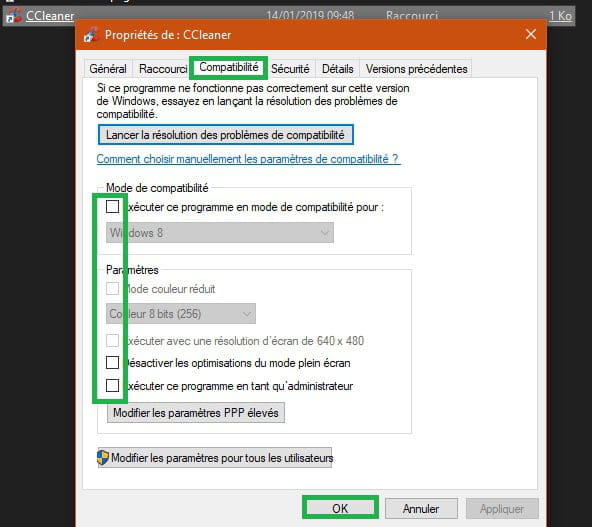
You will check the CCleaner shortcut.
Right-click on the CCleaner shortcut on your Desktop.
Go to the tab → Compatibility
Uncheck all boxes
→ None are checked in my case.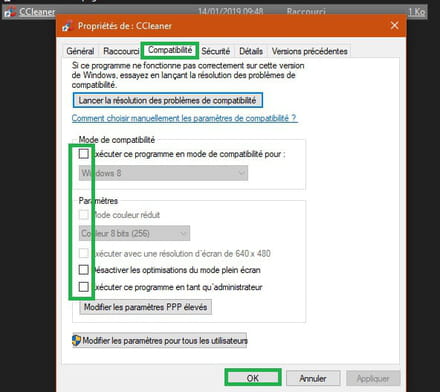
Restart the PC after making these changes.
--
pistouri -
pistouri Posted messages 19011 Registration date Status Contributor Last intervention Ambassadeur 8 725
Revisit msconfig
What antivirus do you have?
Some antivirus programs can manage software entries or similar options, Avast has this feature but you said you didn't have it installed.
A+
--
pistouri -
I have had AVIRA PRO as my antivirus for a long time, but the issue encountered with Ccleaner is recent.
-
pistouri Posted messages 19011 Registration date Status Contributor Last intervention Ambassadeur 8 725
Check the procedures for messages 43, 44, 45.
Run Malwarebytes and let us know after restarting the PC if CCleaner launches on startup.
You need to configure Malwarebytes.
Open it:
Settings → Account Information → then Disable the premium trial → then Yes.
A window opens → Select → I don't need real-time protection, then OK.
Settings → Protection? then by configuring Scan Options.
Check or enable:
- Scan for rootkits
- Scan archives
- Use signature-independent anomaly detection for enhanced protection.
Protection against potential threats
Potentially unwanted programs (PUP)
- Always detect PUPs (recommended)
Potentially unwanted modifications (PUP)
- Always detect PUPs (recommended)
Startup options
disable → Start Malwarebytes at Windows startup
Go to the Scan tab, then at the bottom of the window → Start Scan.
If there are any detected malware, check all (the small boxes) and click on "Quarantine selected."
If asked to restart, you agree.
See you later.
-
pistouri Posted messages 19011 Registration date Status Contributor Last intervention Ambassadeur 8 725
-
pistouri Posted messages 19011 Registration date Status Contributor Last intervention Ambassadeur 8 725
If CCleaner does not open or no longer opens at startup, you will now need to click on yes
Confirm with yes the dialog box → Do you want to allow the following program (ccleaner) to make changes to this computer?
It's simply because in the shortcut the box is unchecked → Run this program as an administrator
Basically, it's the UAC (the security if you prefer)
Before checking it again, let us know the status of CCleaner when opening the PC
To check it again:
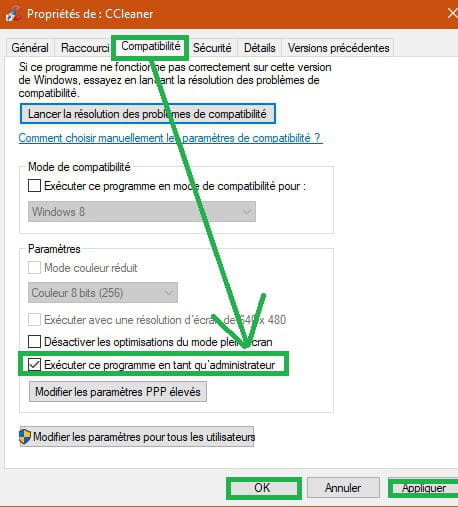
Right-click on the CCleaner shortcut
Tab → Compatibility
Check → Run this program as an administrator
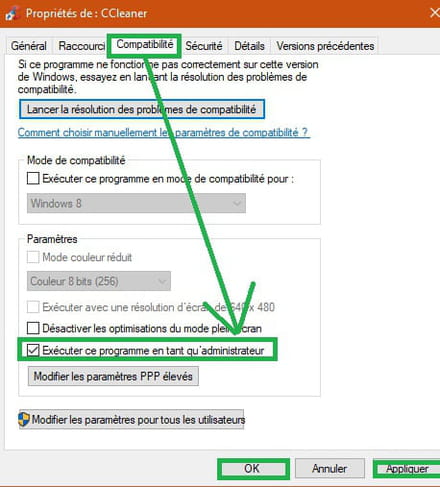
See you later.
-
pistouri Posted messages 19011 Registration date Status Contributor Last intervention Ambassadeur 8 725
Waiting for the result Malwarebytes
Make sure to restart, Malwarebytes will indicate if it found one or more infections that will be placed in quarantine. It's up to you to remove the quarantine; if you have any doubts, post the report, it will surely find a little bug here and there.
Don't uninstall it yet.
See you later.
--
pistouri -
Hello, thank you for your patience with me!
Malwarebytes: clean
I checked "run this program as an administrator" in the ccleaner dialog box but THE DIALOG BOX KEEPS COMING BACK -
pistouri Posted messages 19011 Registration date Status Contributor Last intervention Ambassadeur 8 725
Hello,
Check carefully if you see a CCleaner entry with Autoruns
you will need to unzip the archive using something like 7-Zip
How to unzip here
Once launched go to the tab → Logon
This is what runs at startup
If you see CCleaner highlighted (pink color) uncheck the box.
Also check the tab → Everything
same, check if you see the CCleaner entry or process highlighted in pink.
→I checked "run this program as administrator " in the ccleaner dialog box but THE DIALOG BOX KEEPS COMING BACK
Uncheck it and restart the PC, let us know if CCleaner starts at boot or if the dialog box just appears or nothing at all, that’s the purpose of the operation.
Talk later.
-
pistouri Posted messages 19011 Registration date Status Contributor Last intervention Ambassadeur 8 725
-
pistouri Posted messages 19011 Registration date Status Contributor Last intervention Ambassadeur 8 725
You must find the spark to your problem
For the moment still in the clouds
I will prepare a little tutorial for you to check in another path.
See you later.
--
pistouri -
pistouri Posted messages 19011 Registration date Status Contributor Last intervention Ambassadeur 8 725
Check if you see CCleaner in the depths of Windows
To do this, display hidden files and folders like this
Windows 7
 Select the Start button, then select Control Panel > Appearance and Personalization.
 Select Folder Options, then the View tab.
 Under Advanced settings, select Show hidden files, folders, and drives, then OK.
Then go to this path:
Computer then Drive C:\Users\*****\AppData\Roaming\Microsoft\Windows\Start Menu\Programs\Startup
Look in → Startup
Remember to hide the hidden files and folders again once the check is done.
Or with the keyboard keys Windows + X
In the Run command, paste and then OK
shell:startup
Do you see CCleaner?
Another method is to check the CCleaner startup entry in the registry.
Be careful with the Windows registry if you need to modify it
1- Create a restore point
2- Back up the registry as this
Then go to the key:
HKEY_LOCAL_MACHINE / SOFTWARE / Microsoft / Windows / CurrentVersion / Run
Let us know if you see CCleaner.
Its name is also → Piriform
Don't delete anything, just give us a simple comment.
Seen or not seen.
See you later.
--
pistouri -
Let there be light! Alas,
I think I’m going to give up!
I don’t have the necessary knowledge to follow you! I should have taken lessons, but you were a fantastic personal coach and I thank you infinitely.
Noëlle -
Hello,
don't you have someone around you who could help you?
--
One can find happiness by accepting things that cannot be changed.
No responses will be available from 5-6 PM, thank you for your understanding :) -
pistouri Posted messages 19011 Registration date Status Contributor Last intervention Ambassadeur 8 725
Not quite done with you scottie52
We will simplify the method with Autoruns, which will detect all potential entries from CCleaner
If you have uninstalled it, download it again here
Once in your Downloads folder, drag or move it to the Desktop (minimize the window)
Or you can launch it directly with a double-click (no need to unzip the archive)
Click OK to extract the files
Confirm the dialog boxes if prompted (do you want to run... this program)
You will see a whole series of lines
The one that interests us ends with the word → Application
It is the second line → Autorun.exe (size 729840) Application
Click on it or double-click, it will extract the files and the software will launch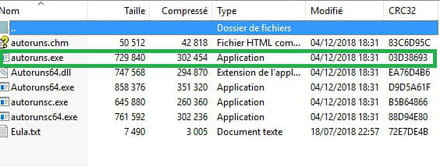
You should now see a box at the top of the software → Filter
Type or paste → ccleaner
Then press the Enter key on your keyboard
Check if CCleaner is present.

Uncheck the box, then in the small dialog box click on → Run as Administrator
Type ccleaner again in the Filter box
Press the Enter key on your keyboard again.
Other CCleaner entries may appear
Uncheck the boxes and close Autoruns.
Restart the PC
It works without problems with a 64-bit Windows, so there's no question with a 32-bit Windows version.
Ps: I thank the Contributor fabul for this idea in PM that could clarify or even truly resolve your CCleaner startup issue.
The Filter box escaped me.
If I missed a step, feel free to leave a comment for Autoruns.
You see scottie52, your CCleaner problem is not insensible to us.
Others may suggest another idea.
It's not won yet, but nothing is lost.
If you don’t want to proceed now, try it later or tomorrow morning.
See you later for a comment
-
Hello, press CTRL+SHIFT+ESC
In Startup, you can see which applications start or not, and you can modify them
Cdr-
Hello SlatigiD,
With the mouse or the touchpad:
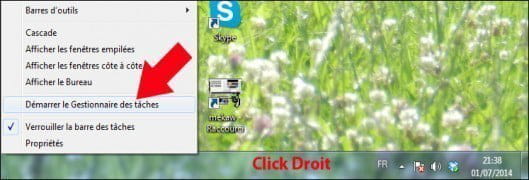
you can also open the task manager by right-clicking on the Windows 7 taskbar and selecting the option to start the task manager.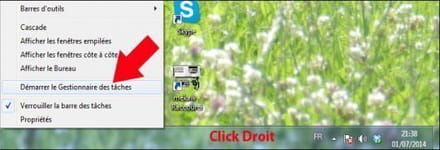
Not everyone has fairy fingers. -
Hooray! You are amazing! CCleaner no longer starts up!
I took pictures with my phone of the different steps and followed the instructions to the letter:
In AUTORUN ENTRY, I had this:
- Avira system speed up ccleaner
- Avira system speed up ccleaner
- Avira system speed up ccleaner
- 1 line with lots of numbers and letters and ccleaner
- 1 other line with numbers and letters and ccleaner
I unchecked and checked "run as administrator"
restarted the computer and oh magic, no more ccleaner on startup!
So was the problem coming from my antivirus (Avira Prime which includes in its pack the antivirus + avira speed up + software + vpn and firewall)?
A HUGE thank you to all of you, confirmed contributors in IT!
Noëlle
-
-
pistouri Posted messages 19011 Registration date Status Contributor Last intervention Ambassadeur 8 725
Hello scottie52,
We are happy for you.
AUTORUN did a great job.
→ I took a photo with my phone
It's one way to follow a tutorial :-)
Thanks to Fabul for the box → Filter
It wasn't necessarily Ccleaner that was launching at startup, but Avira system speed up ccleaner.
If you want to know, I discussed with kaneagle in private message about similar software like PC Cleaner present on your PC.
I think Malwarebytes should have detected it, even if it was a false positive; sadly, you didn't provide the report, which is a pity (maybe too complicated given your age).
In the FRST report, we would have seen it as well. (same, no report)
If you still have Revo, uninstall Avira system speed up ccleaner;
it doesn't clean anything, optimizes nothing, and does more harm than good to your PC.
Review on "Avira System Speed up" here
So, remove it and run CCleaner to delete traces; you probably forgot to uncheck some boxes or do a custom installation of the Avira antivirus like CCleaner's installation.
Keep this in mind the next time you install software.
Leave us a comment if you successfully uninstalled it (Make sure to do the advanced scan followed by a restart of your PC)
You can also mark the discussion as resolved for "CCleaner for ever" like this
Have a nice day.
-
-
Congratulations on the uninstallation of Avira system speed up ccleaner (I call it the Tasmanian devil)

For MICROSOFT SILVERLIGHT
It is a plugin that installs in web browsers to play certain videos like Adobe
Flash Player.
Unfortunately, it only works on Internet Explorer (not on Firefox and Google Chrome in the latest versions)
Explanation here
It is Windows Update that installs it, and only from Windows XP to Windows 7, which is your case.
Not taken into account W10.
One day it will be forgotten. :-)
You can keep it for now if you use IE, but it also is getting old and is used less and less (Useful only for connecting to bank sites if it fails with other browsers, what a shame!)
Little bonus, remember to create a restore point manually even if Windows Update creates one.
The procedure
Useful before installing software to avoid any problems later, among other things.
Talk to you later. -
-
Oh yes! You had something to scare your PC in the shadows :-)
With a report, we could have seen if you had other critters...
I can't work for medical reasons and handling the keyboard and the mouse is a hell worse than that Tasmanian devil!-) -
-







Previous
- 1
- 2
- 3
Next