I no longer have internet after reinstalling Windows 7.
Solved
Hugo
-
kaneagle Posted messages 86298 Registration date Status Moderator Last intervention -
kaneagle Posted messages 86298 Registration date Status Moderator Last intervention -
Hello, I have a small issue.. After some bugs on my Toshiba laptop, I performed a reinstallation of Windows 7. Everything was going quite well during the installation, then I realized that I didn't have internet access.
I plugged the ethernet cable into the PC, but it doesn't detect it. It's not a problem with the cable since it works on my other PC. In the device manager, I also noticed that the network card does not appear. Additionally, in the device manager, there is an exclamation mark next to "network controller" and "Ethernet controller."
I look forward to any information, and thank you in advance for your responses.
I plugged the ethernet cable into the PC, but it doesn't detect it. It's not a problem with the cable since it works on my other PC. In the device manager, I also noticed that the network card does not appear. Additionally, in the device manager, there is an exclamation mark next to "network controller" and "Ethernet controller."
I look forward to any information, and thank you in advance for your responses.
19 answers
-
Hello,
Download this driver --> Ethernet
Right-click on the driver --> lan-20101130110923.zip
Select --> 7Zip
Choose --> extract to "lan-20101130110923\"
Go to the unzipped driver folder --> lan-20101130110923
Right-click on --> TC40134500B.exe
Select --> 7Zip
Choose --> extract to "TC40134500B\"
Go to Device Manager
Right-click on the device
Update driver
Search for a driver on my computer
Choose from a list of drivers...
Provided disk
Browse
Go to the unzipped driver folder --> lan-20101130110923
Folder --> TC40134500B
Folder --> WIN7
Folder --> 64
Select the file --> rt64win7.inf and OK.
Restart.
-
re
I can't seem to send it
just make a copy/paste on a USB drive and post the screenshot in your reply
There is just one driver in the "network adapters" category
what is that driver? (to be included in the screenshot)
@+
--
the radiation level is higher at the employment office than at Chernobyl -
Go to the Device Manager
Right-click on the name of the PC
Scan for hardware changes.
--
Human beings are at their best when things are at their worst. -
hi
you need to download your PC drivers from the manufacturer's website and install them on your PC
see you
--
the radiation levels are higher at the job center than in Chernobyl -
hi
only the missing ones (internet/LAN and wifi/WIRELESS)
if you need help, give me the exact model of your pc, and whether it is 32 or 64 bits >> https://www.commentcamarche.net/informatique/windows/169-32-bits-ou-64-bits-comment-savoir/
see you
--
the radiation level is higher at the unemployment office than at Chernobyl -
re
you don't have a reference like this on the back of the PC

@+
--
the radiation level is higher at the employment office than at Chernobyl -
re
ok, download 7zip to your desktop click here
run it as administrator (right click) to install it
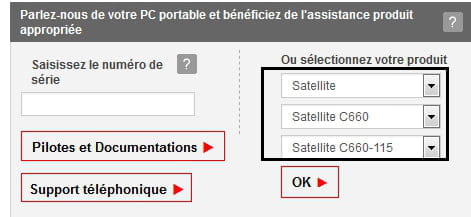
on this page >> https://fr.dynabook.com/support/businesslaptops/
fill in the fields as shown in the image and click OK

on the page that opens, do this

once done, right click on the zipped driver folder >> 7zip >> extract to "lan-20101130110923\"
open the unzipped driver folder, and run >> TC40134500B.exe as administrator (right click)
restart your PC and check the device manager for any remaining alerts
@+
-
re
I modified my previous message, check the manipulations
https://forums.commentcamarche.net/forum/affich-35773509-je-n-ai-plus-internet-apres-re-installation-de-windows-7#7
@+
--
the radiation level is higher at the employment office than at Chernobyl -
re
download it on this page and install it on the PC that needs it
https://www.microsoft.com/fr-fr/download/details.aspx?id=17718
let me know how it goes
@+
--
the radiation level is higher at the employment center than at Chernobyl -
Should I install mcAfee and WebAdvisor as they are asking me to?
Definitely not
Let me know how it goes once you've installed the LAN/Ethernet driver, and if you still have any alerts in the device manager
See you
--
The radiation level is higher at the employment agency than at Chernobyl -
McAfee and WebAdvisor are checked. What should I do?
Can't you uncheck them?
@+
--
The radiation level is higher at the job center than in Chernobyl. -
re
If, only once unchecked, I click on "installation" and an error message appears: "Thridpartyapp has stopped working"
Which installation do you get this message with?
Net Framework / the driver for Ethernet?
@+
--
the radiation level is higher at the employment office than at Chernobyl -
re
When installing the "Realtek LAN driver"
weird, because the driver comes from the Toshiba site
if it causes problems for the installation, install "mcAfee and WebAdvisor" and you can remove them later with Revo Uninstaller in advanced mode
download it to your desktop click here
the tutorial to help you >> https://www.logicielgratuit-tuto.com/nettoyage/revo-uninstaller/
PS: I’m working and won’t be able to answer your questions right away...
@+
--
the radiation level is higher at the employment agency than at Chernobyl -
re
I saw that Kaneagle replied to you and provided the Ethernet driver
please wait a moment for the Wifi driver
PS: hi Kaneagle
@+
--
the radiation level is higher at the unemployment office than at Chernobyl -
Go to Start
In the Search bar
Type --> devmgmt.msc and OK.
What do you have under network adapters?
If there is an alert regarding the network controller:
Give the hardware ID number of the device
Look at this --> Find a device's identification number
Post the number in your next message.
Best regards billmaxime.
--
Human beings are at their best when things are at their worst. -
Restart the PC after uninstalling the Realtek PCIe GBE Family Controller (with an exclamation mark)
Download this driver --> Wireless
Right-click on the driver --> realtek_wlan_win7_2000016L_20110523.zip
Select --> 7Zip
Choose --> extract to "realtek_wlan_win7_2000016L_20110523\"
Go to the folder of the unzipped driver --> realtek_wlan_win7_2000016L_20110523
Right-click on --> TC40162800B.exe
Select --> 7Zip
Choose --> extract to "TC40162800B\"
Go to Device Manager
Right-click on the device according to the given ID number (network controller)
Update driver
Browse my computer for driver software
Choose from a list of available drivers...
Have disk
Browse
Go to the folder of the unzipped driver --> realtek_wlan_win7_2000016L_20110523
Folder --> TC40162800B
Folder --> RTL_Driver
Folder --> Win7X64
Select the file --> net8192ce.inf and OK.
Restart.
-
-
If this is the following no. --> PCI\VEN_10EC&DEV_8176&SUBSYS_818410EC&REV_01
Look at the message 30 -
-
-
-
-
re
Kaneagle is asking you this in his previous message >> https://forums.commentcamarche.net/forum/affich-35773509-je-n-ai-plus-internet-apres-re-installation-de-windows-7#35
@+
--
the radiation level is higher at the unemployment office than in Chernobyl -
After a reboot, mission accomplished! Thank you for your very quick responses, I have internet access again!!
See you later -
You're welcome, it made us happy.
Good evening.
--
The human being is at his best when things are at their worst.