Favorite Icons Issue in Edge
Remy
-
pistouri Posted messages 19010 Registration date Status Contributor Last intervention -
pistouri Posted messages 19010 Registration date Status Contributor Last intervention -
Hello,
I imported my bookmarks from Chrome but instead of having their icons, I just have a simple star. How can I display the site icons? I tried browsing for a while but it doesn't work.
Here's what it looks like: http://image.noelshack.com/fichiers/2018/41/5/1539338422-capture.jpg
Can you tell me how to do this?
I imported my bookmarks from Chrome but instead of having their icons, I just have a simple star. How can I display the site icons? I tried browsing for a while but it doesn't work.
Here's what it looks like: http://image.noelshack.com/fichiers/2018/41/5/1539338422-capture.jpg
Can you tell me how to do this?
1 answer
-
pistouri Posted messages 19010 Registration date Status Contributor Last intervention Ambassador 8 732
Hello,
The only solution found so far:
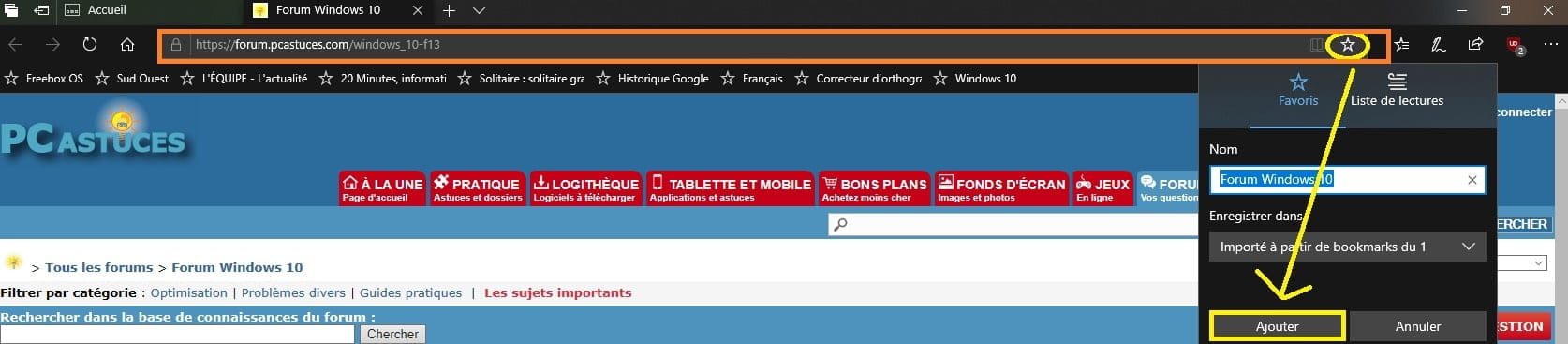
Open a site from your imported favorites in a new tab for example
Once the page is open, click on the star at the end of the URL bar then on → Add
Close the tab and check if you have the icon in Favorites
Example

Where it doesn't work is for example if you save posts on CCM, the icon is not there
but the icon is present on the main login page
In my case, it was the importation of Firefox Bookmarks, so the same issue was noted
You have to hope that your favorites list is not too long because you will have to do this for each favorite where
you're missing the icon while waiting for another solution, that's why I don't like Microsoft products
of which Edge is a part.