How to download a Calameo PDF file
Solved
Prof
-
LeBurjK19 -
LeBurjK19 -
Hello,
I would like to download the file https://es.calameo.com/read/0046557268d67960f9cc5 but I can't. Even by creating an account, I'm unable to do so.
Could you help me?
Thank you very much.
I would like to download the file https://es.calameo.com/read/0046557268d67960f9cc5 but I can't. Even by creating an account, I'm unable to do so.
Could you help me?
Thank you very much.
1 answer
-
pistouri Posted messages 19010 Registration date Status Contributor Last intervention Ambassador 8 732
Hello,
Try downloading your PDF with calameodownload.com
I did a test with the link you provided
The title of the PDF is → Didactic Unit "Travel, travel!"
Steps to follow:
1- Go to the site calameodownload.com
2- Copy/paste your link into the box → https://es.calameo.com/read/0046557268d67960f9cc5
Then click on → View pages and download PDF

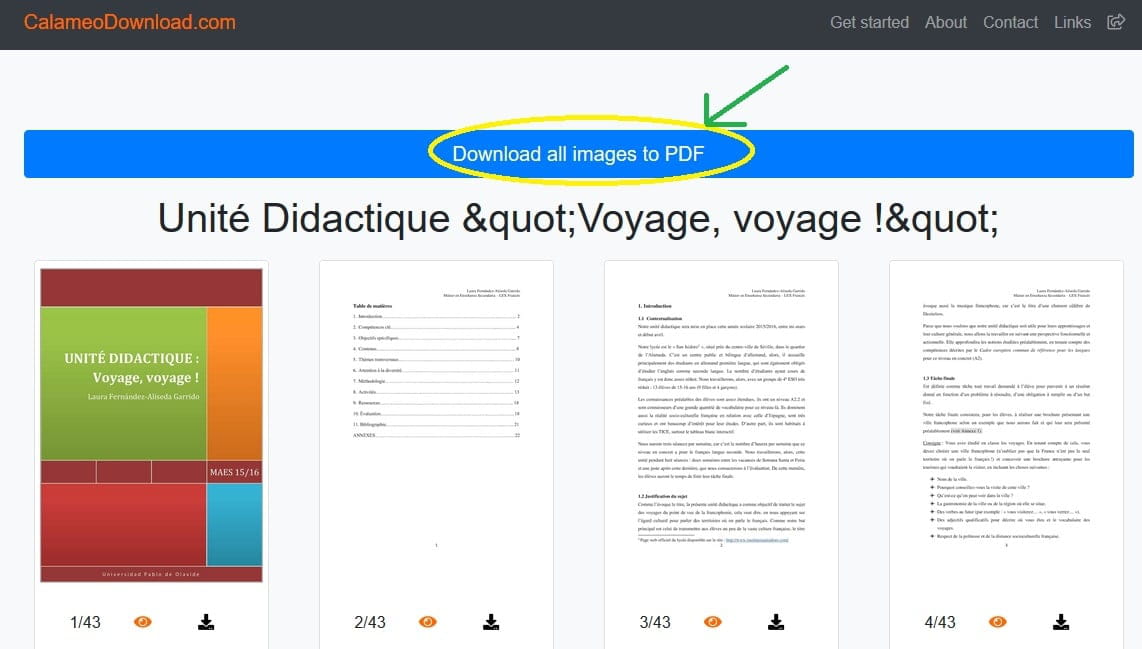
3- A new page opens, click on → Download all images to PDF

4- Be patient while the server is preparing (maximum 1 minute)

5- You can now download or save your PDF
To do this click on the line → Your PDF is ready, click here to download it
Translation: Your PDF is ready, click here to download it
Additionally, at the end of the line, you have a book-shaped icon to show you that it's a PDF

That's all.
Then go to your Downloads folder
Open it with your PDF reader
Acrobat Reader if you have it
You can then move it to a folder of your choice in File Explorer, "My Documents" for example
or you can copy/paste it onto a USB stick if you want to keep it or show it to other people
If you can't do it, here is the PDF → here
See you later
--
pistouri