Unable to delete the Avira folder
Solved
Ankomm
Posted messages
21
Status
Member
-
Jojolaguitare Posted messages 12012 Registration date Status Member Last intervention -
Jojolaguitare Posted messages 12012 Registration date Status Member Last intervention -
Hello,
Avira is really driving me crazy; I've been trying to remove it for three days because it's become worse than a virus. I've followed several tutorials without success.
This one seemed the most interesting: https://support.avira.com/hc/en-us
But even in safe mode, it's IMPOSSIBLE to delete the "avira" folder in ProgramData because it tells me I don't have the permissions. I'm on the administrator account of this PC; I've tried renaming the folder, but nothing... It's seriously starting to annoy me... I even tried with the command prompt...
Does anyone have a solution? Thanks!
Avira is really driving me crazy; I've been trying to remove it for three days because it's become worse than a virus. I've followed several tutorials without success.
This one seemed the most interesting: https://support.avira.com/hc/en-us
But even in safe mode, it's IMPOSSIBLE to delete the "avira" folder in ProgramData because it tells me I don't have the permissions. I'm on the administrator account of this PC; I've tried renaming the folder, but nothing... It's seriously starting to annoy me... I even tried with the command prompt...
Does anyone have a solution? Thanks!
4 answers
-
Hello.
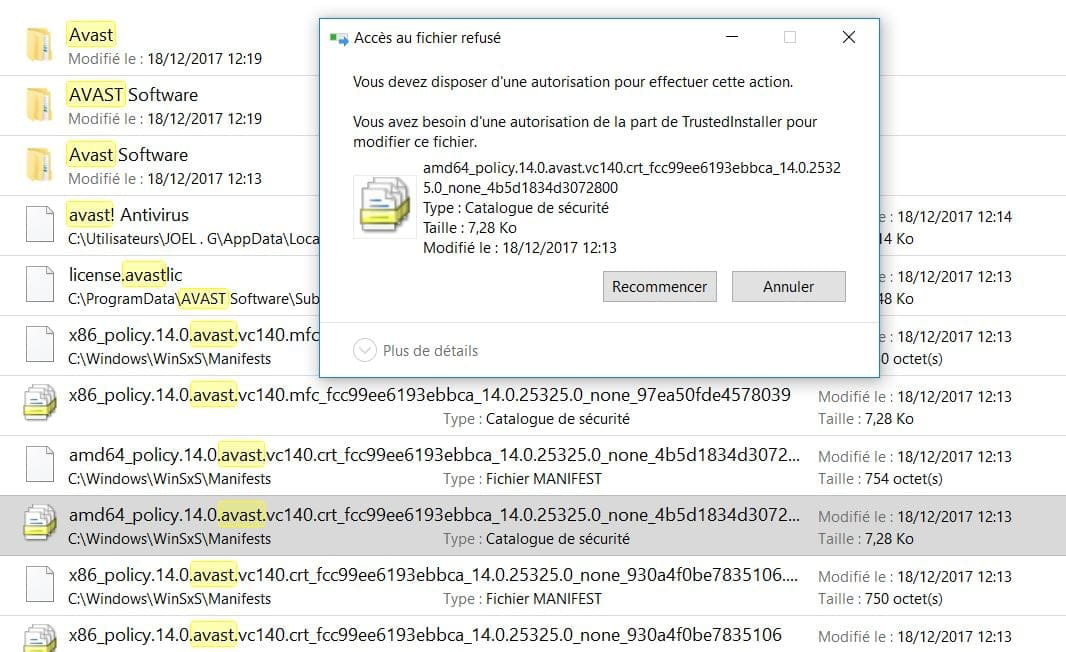
Avira is like Avast. And despite their additional uninstallation utility, there are remnants left in the system.
Open C: Click on the local disk and then in the search bar at the top right, type Avira. Let the search run until the end.
As an example for Avast, you'll find files like this >>>

Otherwise, you won’t be able to delete them. Even by changing the file's security permissions. Even "trustedinstaller" won't allow you.
The only remedy = download the small software Unlocker and accept its placement in the right-click menu. From there, perform the search as mentioned above, then for each folder or file found, right-click and select "Unlocker" then "No action" to set it to "Delete". Finally, "Confirm". These files/folders will end up in the recycle bin.
https://www.commentcamarche.net/telecharger/utilitaires/22737-unlocker/
This is just a suggestion . . . See you later
--
It is useless to run; one must leave on time . . . -
Hi
Look on this page, you need to delete the registry keys >> https://www.security-helpzone.com/2013/03/31/avira-registry-cleaner-supprimer-totalement-avira-antivir/
See you later
--
The radiation level is higher at the unemployment office than at Chernobyl. -
Hi,
I haven't been on Windows for some time now, but when I had Vista and wanted to uninstall a stubborn program, I would go to administration, then services, and disable all the services associated with the software. Then, I would delete it manually or restart the uninstaller. -
Hello
I tried too but it doesn't work, I still need to delete the folder in ProgramData
When you have deleted the registry keys, you delete the remaining files/folders
If you want to run a diagnostic scan with FRST (from Fabar), to remove the leftovers do this:
Download FRST from (Fabar) to your desktop
https://www.bleepingcomputer.com/download/farbar-recovery-scan-tool/
PS: take the one corresponding to your PC (32 or 64 bits)
https://www.commentcamarche.net/informatique/windows/169-32-bits-ou-64-bits-comment-savoir/
Run it as administrator (right-click)
At the end of the scan, the FRST and ADDITION reports will appear on your desktop and in C:\FRST\LOG
Post the reports via cjoint
https://www.commentcamarche.net/faq/29493-utiliser-cjoint-pour-heberger-des-fichiers
If you have any questions...
See you
--
The radiation level is higher at the employment office than at Chernobyl