Remove NEW TAB in Google Chrome.
Solved/Closed
Rasta_Pocchollas
Posted messages
59
Registration date
Status
Member
Last intervention
-
bazfile Posted messages 58537 Registration date Status Moderator Last intervention -
bazfile Posted messages 58537 Registration date Status Moderator Last intervention -
Hello,
A few hours ago, I accidentally installed an extension that changed the settings of the new tab in Chrome. The small thumbnails of my favorite pages have disappeared to make room for others that are impossible to remove (there's no little cross in the top right corner of the thumbnails to do so).
I deleted the extension in question, but it didn't help. I checked for any installed programs but found nothing. I reset Chrome to its default settings without success. I even went so far as to uninstall Chrome completely and reinstall it. Then I noticed that it was prompting me to add the said extension again (since Chrome must have synced it with the other extensions I have) except that it's nowhere to be found on the list of installed extensions!
In short, I have this modified new tab (which is called New Tab even though I use Chrome in French) that is driving me crazy. I seek your help to restore the default settings.
The changes are marked by circles in the screenshot below.

Thank you in advance for your help.
Configuration: Windows / Chrome 63.0.3239.132
--
Wondering...
A few hours ago, I accidentally installed an extension that changed the settings of the new tab in Chrome. The small thumbnails of my favorite pages have disappeared to make room for others that are impossible to remove (there's no little cross in the top right corner of the thumbnails to do so).
I deleted the extension in question, but it didn't help. I checked for any installed programs but found nothing. I reset Chrome to its default settings without success. I even went so far as to uninstall Chrome completely and reinstall it. Then I noticed that it was prompting me to add the said extension again (since Chrome must have synced it with the other extensions I have) except that it's nowhere to be found on the list of installed extensions!
In short, I have this modified new tab (which is called New Tab even though I use Chrome in French) that is driving me crazy. I seek your help to restore the default settings.
The changes are marked by circles in the screenshot below.

Thank you in advance for your help.
Configuration: Windows / Chrome 63.0.3239.132
--
Wondering...
1 answer
-
Hello,
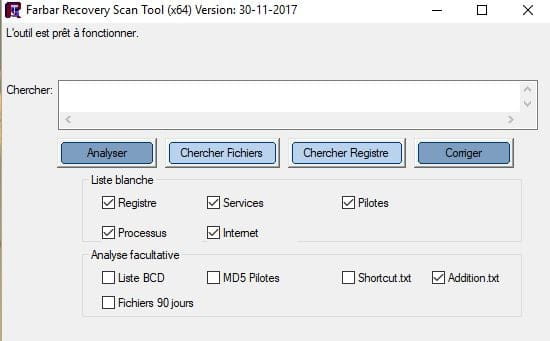
Download FRST and once downloaded, place it on your desktop and open it; you will see this:
Click on Analyze; at the end of the analysis, you will have two text files on the desktop: FRST and Addition. Send these reports to https://pjjoint.malekal.com/ and then provide the two links generated by Pjoint in your next message.
--
bazfile security contributor.-
It's done, here are the links:
FRST: https://pjjoint.malekal.com/files.php?id=FRST_20180108_f13p7p10n12c15
Additions: https://pjjoint.malekal.com/files.php?id=20180108_j10s8l5t13r12 -
Open FRST (do not close FRST during the procedure) and then simultaneously press the CTRL and Y keys, the notepad opens. Copy/paste the script that is in the following box:
CreateRestorePoint:
CloseProcesses:
GroupPolicy: Restriction - Chrome <==== ATTENTION
S3 cpuz132; \??\C:\Users\Haroun\AppData\Local\Temp\DTL132\DTL132_x64.sys [X] <==== ATTENTION
S3 cpuz137; \??\C:\Users\Haroun\Downloads\pc-wizard_2014.2.13\pcwiz_x64.sys [X]
S3 dbx; system32\DRIVERS\dbx.sys [X]
 2016-06-09 03:28 - 2016-06-09 03:51 - 006871040 _____ () C:\Program Files (x86)\GUT464.tmp
EmptyTemp:
Click on File then Save and close the notepad.
Go back to the open FRST and click on Fix.
Let the fix proceed, and once it is completed, restart your computer.
Once your computer has restarted, you will have a Fixlog file on your desktop. Send it via https://pjjoint.malekal.com/ and then put the link generated by Pjoint in your next message.
Then:
Reset your Google Chrome browser, see HERE.
Check and let me know if your problem is still present.
-