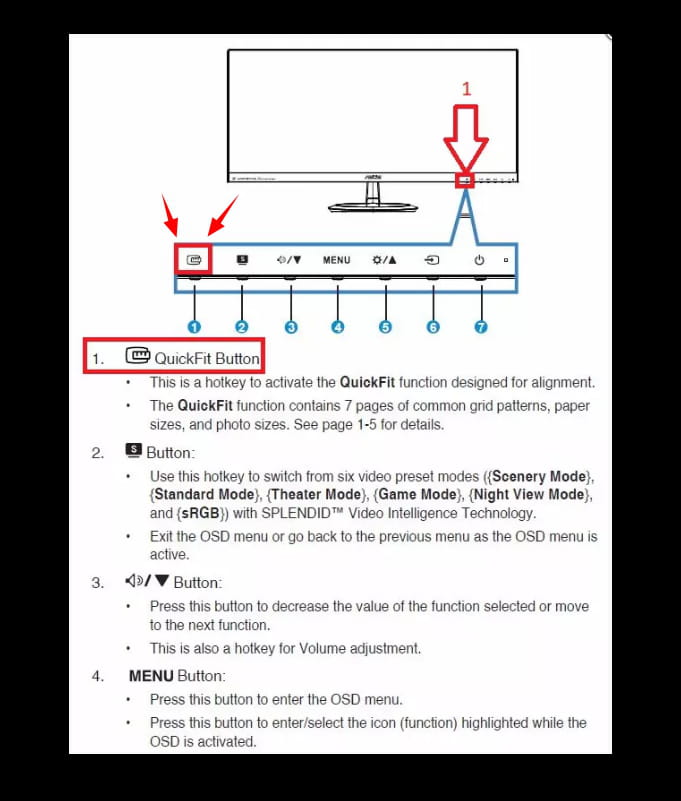
Disable ASUS QuickFit (screen grid).
Solved
Annabel-Lee
Posted messages
9
Registration date
Status
Member
Last intervention
-
pistouri Posted messages 19010 Registration date Status Contributor Last intervention -
pistouri Posted messages 19010 Registration date Status Contributor Last intervention -
Since yesterday, a large grid has appeared on my screen.
Very annoying because it is everywhere, on the desktop screen, in Word, Excel, etc.
I can't seem to remove it.
Thank you for your help.
7 answers
-
In fact, it’s the ASUS monitor that has this function called apparently quickfit
so it has nothing to do with the PC but only with the monitor
I had to slide my hand under the monitor to reposition it and pressed the wrong button
so I did the same again and at first, I got several squares then after insisting, nothing
I sincerely thank you for taking an interest in this really annoying problem