Connecting a Continental Edison television
Solved
Pimprenelle
-
baladur13 Posted messages 47330 Registration date Status Moderator Last intervention -
baladur13 Posted messages 47330 Registration date Status Moderator Last intervention -
Hello,
I bought this television, CONTINENTAL EDISON 40KA0816B7. What determined my choice was that I could connect via WiFi since I watch a lot of shows on replay. My Livebox is in my office and the television is in my bedroom.
How can I connect the TV? I think I’m missing something to finalize the connection, I don’t quite understand how it works.
Can someone explain it to me clearly?
Thank you in advance.
Have a nice weekend everyone.
I bought this television, CONTINENTAL EDISON 40KA0816B7. What determined my choice was that I could connect via WiFi since I watch a lot of shows on replay. My Livebox is in my office and the television is in my bedroom.
How can I connect the TV? I think I’m missing something to finalize the connection, I don’t quite understand how it works.
Can someone explain it to me clearly?
Thank you in advance.
Have a nice weekend everyone.
1 answer
-
Hello,
You have two options to connect this television to the internet:- via an Ethernet cable between the router and the television (probably not feasible given the position of the two elements).
- Via WIFI. To do this, you need to know the name of your router (SSID) and the security code or key (written on the router).
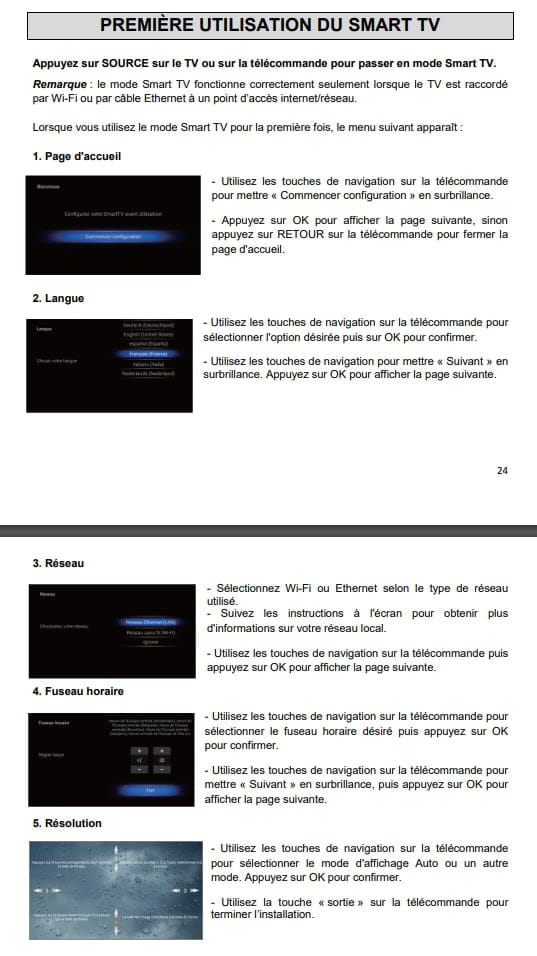
On the TV, you need to select:- "Network" and then choose Wireless Network (wifi) (see manual page 25) and follow the instructions displayed on the screen or Press HOME (SMART TV) on the remote to display the home page. (see manual page 25) with the navigation key highlight the "gear icon" and
- press OK to display the "Settings" window (see manual page 28)
- with the navigation key highlight "Network" and press
- OK to confirm the selection. (page 29)
- Select wifi (navigate and then OK) and then follow the on-screen instructions.
- You will need to select your router by choosing its name (SSID) and for "password" enter the code noted on the router.

The manual: https://i6.cdscdn.com/imagesOK/notice/continental-edison-40ka0816b7-tv-led-4k-uhd-102c-3612405959684.pdf