Is Windows 10 possible on HP dv7 4163-sf?
Solved
gugu01
Posted messages
15669
Registration date
Status
Contributor
Last intervention
-
Malekal_morte- Posted messages 178136 Registration date Status Moderator, Security Contributor Last intervention -
Malekal_morte- Posted messages 178136 Registration date Status Moderator, Security Contributor Last intervention -
Hello everyone!
I plan to upgrade a HP Pavilion DV7 model 4163-sf to Windows 10.
1 > Regarding the PC:
Since the HP website does not offer any drivers for Windows 10, I would like to know if this could cause issues for certain hardware.
Have you done this before, and are there any incompatibilities?
2 > Regarding Windows:
To upgrade to Windows 10 for free and legally, do you know of any so-called "assistance technologies" recognized by Windows that are free?
Just to be compliant with their terms.
Thank you for your future help.
After finding a solution, please remember to mark your topic as SOLVED.
Also, providing feedback is always nice for those who helped you... THANK YOU!!! :-)
I plan to upgrade a HP Pavilion DV7 model 4163-sf to Windows 10.
1 > Regarding the PC:
Since the HP website does not offer any drivers for Windows 10, I would like to know if this could cause issues for certain hardware.
Have you done this before, and are there any incompatibilities?
2 > Regarding Windows:
To upgrade to Windows 10 for free and legally, do you know of any so-called "assistance technologies" recognized by Windows that are free?
Just to be compliant with their terms.
Thank you for your future help.
After finding a solution, please remember to mark your topic as SOLVED.
Also, providing feedback is always nice for those who helped you... THANK YOU!!! :-)
14 answers
-
Conclusion for my case:
After upgrading to Windows 10.
Display:
Download https://www2.ati.com/drivers/beta/amd_catalyst_13.4_legacy_beta_vista_win7_win8.exe
The PC will crash upon rebooting after installation.
Gray screen, force shutdown.
Then Windows finds default drivers.
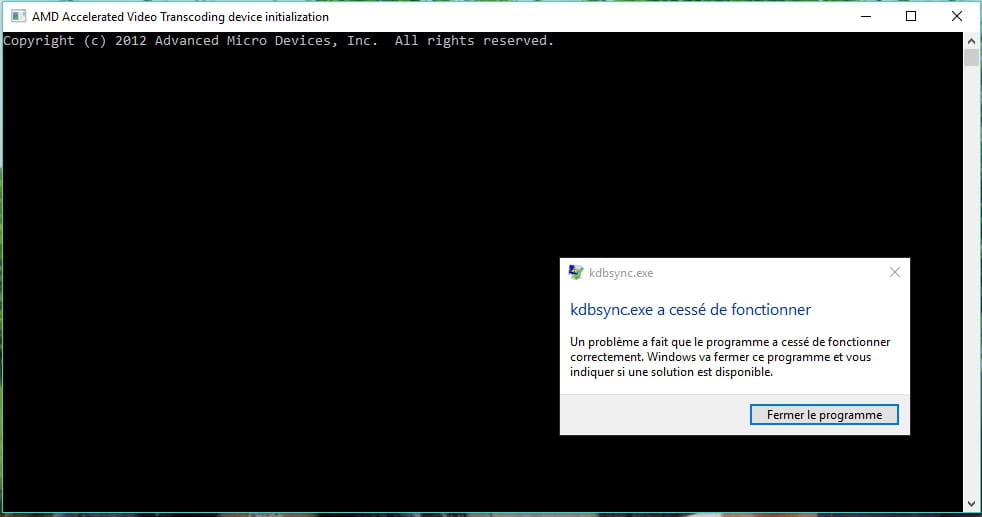
You will receive an error message at startup.
Go to Control Panel then Programs and click on Advenced micro device to uninstall it.
Multiple items will appear after launching the uninstallation.
Only delete the AMD Accelerated video transcoding item.
Audio:
The driver that Windows found gives a low sound and the F11 mute button remains permanently lit in orange but works.
Go to the HP site, download the audio driver for Windows 7 64 bit, and install it normally.
In my case: http://whp-hou9.cold.extweb.hp.com/pub/softpaq/sp50501-51000/sp50595.exe
The F11 button turns off and the sound is at a normal volume.
If you have an unknown device
identified ACPI\VEN_HPQ&DEV_0004ACPI\HPQ0004*HPQ0004
Install this driver
ftp://ftp.hp.com/pub/softpaq/sp64001-64500/sp64144.exe
Other:
I also disabled automatic hardware updates in Windows:
https://lecrabeinfo.net/desactiver-installation-automatique-pilotes-drivers-composants-peripheriques-windows-update-windows-10.html
Make sure to perform updates yourself afterwards (if needed)
Remaining issues due to upgrading to Windows 10:
> Notification area, random functionality of displaying desired icons, but no impact on functionality.
(Note I'm only talking about the notification area at the bottom right, not the rest of the taskbar, which works fine)
> And "project" in the notification area that does not work.
It works by going through screen settings, I can choose "hear," "Screen 1," "Screen 2," "duplicate."
There you go, it may not be very clear, but if it can help others in the same situation.
And thanks to all the participants in this discussion.
After finding a solution, remember to mark your topic as SOLVED.
Also, providing feedback is always appreciated towards those who helped you... THANK YOU!!! ???? -
Well, it's installed, but there's a driver issue with the graphics card.
As a result, when I click on any setting, the screen turns gray for a few seconds, then the mouse reappears, and then the normal page displays.
I just shut it down because it was getting hot; I'll restart it to see if Windows can find a driver.
In the meantime, if there's a solution, I’m open to suggestions.
--
After finding a solution, remember to mark your topic as RESOLVED. Also, giving feedback is always nice for those who helped you... THANK YOU!!! :-) -
Hello,
You can try the free update, it should still work: https://www.malekal.com/mise-a-jour-gratuite-windows-10/
As for the drivers, it's hard to say.
Make sure you have what you need to restore the HP to factory settings in Windows 7 in case of problems: https://www.commentcamarche.net/faq/20792-restaurer-un-ordinateur-hp-a-son-etat-d-usine
Please press any key to continue the disinfection...-
Hello Malekal_morte-,
You can try the free update, it should still work
Yes, but that's why I wanted to know if there are any free "assistive technologies" recognized by Windows, just to install it on the PC and be compliant.
I don't think they will check, but you never know... (since the installation won't be on one of my PCs but on someone else's)
Make sure you have what you need to restore the HP to Windows 7 in case of problems
I wasn't planning to create the recovery CD but to note the license key and take an ISO of Windows 7 in case I need to reinstall it.
(Fresh Windows without all the basic HP software)
Now you're making me doubt...
Is it preferable to make recovery CDs or is an ISO and key sufficient?
-
-
I just retrieved the PC.
Problem creating a factory reset recovery media, I no longer have a large enough medium.
No DVDs and no USB stick large enough.
I only have an external hard drive of 500 GB left.
Can we create a partition on this disk and put the recovery media on it, then later transfer it to a dedicated USB stick?
--
After finding a solution, remember to mark your topic as RESOLVED.
Also, giving feedback is always nice for those who helped you... THANK YOU!!! :-)-
-
-
Better to have a DVD
Do you mean that it is safer and more durable than a USB drive?
Because as I see it, a USB drive is still cheaper and can be reused.
Like this one: http://www.darty.com/nav/achat/accessoires/stockage/cle_usb/lexar_media_jumpdrive_s25_32gb.html
So what is it preferable to take? -
In general, factory reset procedures require creating a DVD and are not well-suited for USB drives.
=> https://www.commentcamarche.net/faq/20792-restaurer-un-ordinateur-hp-a-son-etat-d-usine -
-
-
For your information, backup completed and downloading Windows 10 in progress.
--
After finding a solution, please remember to mark your topic as RESOLVED.
Likewise, providing feedback from your side is always nice for those who helped you... THANK YOU!!! :-)-
-
4 hours have passed and it still hasn't finished downloading (97% for a long time, like other percentages that took a long time to move), yet I have fiber :-(
-
-
-
The hard drive is still running and it took several hours to go from 97% to 99% (98% took 15 minutes).
And it's been at 99% for about 1 hour and 30 minutes.
So it doesn't seem to have completely frozen, but it's struggling.
Being at 99%, I'm hesitant to cancel (actually there's no option to do that) or to let it continue :-(
-
-
While it downloads ...
Windows 10 is still free if you use "accessibility technologies."
Initially, "accessibility technologies" are third-party software recognized as such by Microsoft, and they provide links to purchase them, but they are very expensive!
You can find them at this link: https://www.microsoft.com/en-us/accessibility
To be in compliance with this offered update, one would thus need to use at least one.
But some sites mention these few words from the Microsoft firm, I quote:
<< We do not restrict the free upgrade offer to specific accessibility technologies. If you use assistive technology on Windows, you are eligible for the free upgrade offer >>.
This would contradict the basic conditions, and with a simple use of the accessibility tools in Windows 10, we would be compliant for this free update.
(no need for third-party software called "accessibility technologies")
Question >>>
Can we find the actual source of these statements that would come from Microsoft to confirm all of this?
All this to, of course, stay within the greatest legality.
After finding a solution, remember to mark your topic as SOLVED.
Likewise, giving feedback on your part is always nice towards those who helped you ... THANK YOU!!! :-) -
To illustrate the previous message:

--
After finding a solution, remember to mark your topic as RESOLVED.
Also, providing feedback from your side is always nice towards those who helped you ... THANK YOU!!! :-) -
After several driver tests (manufacturer and supplier) with no results.
Multiple restart requests from Windows to complete the installation of the GPU which resulted in worse and worse display, until this one which seems good:

But is this really good, or is there something better to install?
Actually, I was inspired by this discussion https://h30478.www3.hp.com/t5/Archives-Ordinateurs-Portables-Lecture-Seulement/HP-Pavilion-DV7-Pilote-Windows-10-AMD-ATI-mise-%C3%A0-jour/td-p/590247
And since I downloaded numerous drivers, attempted an installation that crashed, forced shutdown, and then rebooted, it worked.
So I can't say if it was Windows that found it with an update or from the drivers I downloaded, but well...
After finding a solution, remember to mark your topic as RESOLVED.
Also, giving feedback from your side is always nice towards those who helped you... THANK YOU!!! :-)-
Well, it didn't last.
Display issue, no more driver and I can't reinstall one.- Normally, you are supposed to put these: https://support.hp.com/en-us/drivers/selfservice/hp-pavilion-dv7-4100-entertainment-notebook-pc-series/4247665/model/4353749
- Gray screen with mouse for the drivers provided by HP and those from AMD.
I'm summarizing where I am in the upcoming message.
-
-
Problem and possible solution:
Video:
After multiple attempts to install drivers from the HP and AMD sites, none work, it gives a gray screen.
Only the drivers from the image in the previous message work.
And I don’t know if it’s Windows or my driver attempts that installed them.
But there’s an issue with fine black/white horizontal lines that flash (rarely and not all the time) on the PC screen when duplicating to a TV, for example.
If you have installed “AMD Catalyst Control Center or Advanced Micro Device”, you will see this upon startup:
To get rid of it:
> go to programs (and not applications)
> double click on AMD advanced micro device.
> uninstall
> a window opens with 6 pre-checked items to be uninstalled.
> leave only AMD Accelerated Video Transcoding checked
> and uninstall it.
Audio:
The driver that Windows finds gives low sound and the F11 mute button stays permanently lit orange but works.
Go to the HP site, download the audio driver for Windows 7 64 bits and install it normally.
In my case: http://whp-hou9.cold.extweb.hp.com/pub/softpaq/sp50501-51000/sp50595.exe
The F11 button turns off and the sound is at normal volume.
Other:
I also disabled the automatic hardware updates from Windows:
https://lecrabeinfo.net/desactiver-installation-automatique-pilotes-drivers-composants-peripheriques-windows-update-windows-10.html
Make sure to do the updates yourself afterward (if needed).
After finding a solution, make sure to mark your topic as SOLVED.
Also, providing feedback is always nice for those who helped you... THANK YOU!!! :-) -
Hello.
If there are too many problems with technology assistance, it might be better to install a REAL Windows 10 since there are usually rarely any installation issues when upgrading from Windows 7 to Windows 10.
I received this morning in my "mailbox" >>>
https://www.cdiscount.com/informatique/logiciels-informatique/windows-home-10-oem-edition-64-bit/f-10707-kw900145.html?refer=criteo_cpc&cid=media&cm_mmc=RET%21INF%21COR%21CD%21125436%21CD#rating
However, I don't know what it's worth even though many contributors have provided CDiscount links for various versions of Windows. So I think, but without certainty, that this site must be reliable.
This is just a suggestion of course . . . Cheers
--
It's no use running; you have to start on time . . .-
Hello Jojolaguitare and thank you for the info.
Do you think there's a difference in Windows with this upgrade via assistive technology?
Because apart from a page at the beginning, the rest seems identical to a classic Windows 10.
And the problems I'm encountering are in topics on the same model PC and the date of the regular free upgrade.
-
-
Problem where I'm stuck:
Avira:
Long initialization at startup.
Every other time or after a certain period, the icon in the taskbar (on the right) disappears.
The icons in the taskbar or the start menu are unresponsive, nothing shows up, and when this happens, I cannot access Avira.
Uninstalling and reinstalling yields the same result.
Projecting:
I can project the image (duplicate, extend...) on my TV for example.
But I can only do this from the control panel.
Impossible from the commands on the right side of the screen which are unresponsive.
Taskbar at the bottom right:
Does not validate the programs I want to display.
It does what it wants.
And another issue to discover undoubtedly, but if we could solve this already ;-)
--
After finding a solution, remember to mark your topic as SOLVED.
Also, giving feedback is always nice for those who helped you... THANK YOU!!! :-)-
Re.
Personally, I haven't found any support forums for Windows 10 T.A and very few questions about this special Windows. And there are none regarding the compatibility of the graphics card with this Windows.
As for Avira, if you are savvy on the internet and your email, the Windows Defender antivirus installed by default in Windows 10 will suffice on its own.
Projecting I don't know because my box is only connected to my desktop PC.
Taskbar on the right. By right-clicking on the Windows icon, you can access various programs without going through the control panel.
See you later . . . -
Uninstall Antivir, free programs will only cause problems on Windows 10.
If you want to secure Windows, take action on this:
1) How to protect against malicious scripts on Windows
2) Windows Firewall: the right settings
-
-
I reinstalled from a USB with Windows 10 ISO.
And did this by formatting the partition.
Same problem ...
I had to install the sound driver as mentioned before.
The graphics driver is a battle, insisting with different drivers, which resulted in a gray screen. I forced the shutdown and then a default driver is installed and it works fine.
But
>Same issue with the notification bar at the bottom right.
>For Avira, I don’t know because I haven’t reinstalled it.
>For projecting to another screen, it’s the same.
For Malekal, since I’ve been using Defender I no longer have access to your site.
I don’t know if it’s related or a problem with the site?
I really need help, because I am going to go crazy ... Thank you
After finding a solution remember to mark your topic as RESOLVED.
Similarly, giving feedback on your part is always nice for those who helped you ... THANK YOU!!! :-)-
-
Non-stop search then:
This site is inaccessible
www.malekal.com took too long to respond.
Try the suggestions below:
Check the connection
Check the proxy and firewall
Run Windows network diagnostics
ERR_CONNECTION_TIMED_OUT
And this with two PCs, so your site has an issue, right? -
Hello.
>>> so your site has a problem, right? <<<
As for me, the 3 links (1# - 35#) from Malekal opened in half a second.
Bandwidth issue?
See you later. -
No, but today I can log into his site ...
(that wasn't the case yesterday, but the speed is probably sufficient since the other sites were working) -
-
-
Without Avira, and after installing graphics and sound drivers, everything works.
Except the notification area (to the right of the taskbar)
When I want to customize it, I activate certain icons but they do not appear in the dropdown menu)
On another PC, it’s the same, while before I had no issues.
Maybe it’s due to a Windows update?
And "project" in the notification area doesn’t work.
It works by going through display settings, I can choose "hear," "screen 1," "screen 2," "duplicate."
Any ideas?
--
After finding a solution, remember to mark your topic as SOLVED.
Also, giving feedback is always nice for those who helped you... THANK YOU!!! :-) -
And for others who might try:
If you have an unknown device identified as ACPI\VEN_HPQ&DEV_0004ACPI\HPQ0004*HPQ0004
Install this driver
ftp://ftp.hp.com/pub/softpaq/sp64001-64500/sp64144.exe
Solution from a discussion:
HP Pavilion dv6 dv7 Unknown device with hardware ID ACPI \ HPQ0004 is HP 3D DriveGuard
ACPI \ VEN_HPQ & DEV_0004
ACPI \ HPQ0004 HPQ0004</li></ul>
This is the HP DriveGuard, which requires a driver to operate the built-in [G-force] sensor that protects the hard drive by parking its heads when the notebook experiences physical shock such as a bump or fall, etc.
For those with the same sensor and finding the same UD in Device Manager, here is the link to download HP 3D DriveGuard v4.2.9.1 REV: A from hp:
Ftp://ftp.hp.com/pub/softpaq/sp64001-64500/sp64144.exe
Here is the driver description:
Ftp://ftp.hp.com/pub/softpaq/sp64001-64500/sp64144.html
This driver is for Vista, Win 7-8-8.1 and although it is not stated in the description, it works on Win 10, 32-bit or 64-bit.
After finding a solution, please remember to mark your topic as RESOLVED.
Also, providing feedback is always appreciated for those who helped you... THANK YOU!!! :-)