
Table fixed at the top of the page.
Solved
Licorne rose
Posted messages
1047
Status
Member
-
Osny -
Osny -
Good evening,
I have an issue with a Word file that a friend gave me. I don't know how it was created.
It has a table that is glued to the beginning of one of the pages of the text. However, I want to write things between the beginning of this page and the start of the table, so I want to detach it from the top of the page.
I am using Word 2016 but I feel like this file may have been created in Word 2003.
How can I do that? Thank you,
LR
Configuration: Laptop W10
Firefox
Office 365 (2016)
I have an issue with a Word file that a friend gave me. I don't know how it was created.
It has a table that is glued to the beginning of one of the pages of the text. However, I want to write things between the beginning of this page and the start of the table, so I want to detach it from the top of the page.
I am using Word 2016 but I feel like this file may have been created in Word 2003.
How can I do that? Thank you,
LR
Configuration: Laptop W10
Firefox
Office 365 (2016)
10 answers
-
Hello
The positioning and difficulty come from the wrapping: the cursor in the table / right-click -> Table properties / text wrapping: check none.
The table will reposition itself and you just need to insert a page break that will include the desired paragraph above the table.
--
Argitxu -
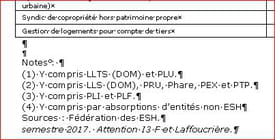 Oh really?
Initial situation -------------->
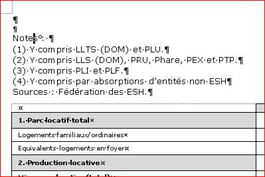
<--- After vertical position corrected
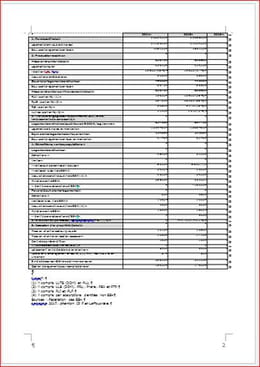
And finally, after sliding up ---------------------->
https://www.cjoint.com/c/GFzbEMculRv
--
Retirement is great!
Especially in the Caribbean... :-)
Raymond (INSA, AFPA, CF/R) -
Hello
Try this:
- select the first row
- insert a row above
- go to TABLE TOOLS/LAYOUT/Data/Convert to text
--
It's nice, retirement! Especially in the Caribbean... :-)
Raymond (INSA, AFPA, CF/R) -
Good evening Raymond and thank you.
I wasn't aware of this very useful maneuver.
I see that it works if I create the table but not with the old table that was given to me.
I will see what I can do with it.
Thanks a million in any case. -
So send your file; we'll see what can be done!
 1) Go to https://www.cjoint.com/
 2) Click on [Browse] to select your file (max 15 MB)
 3) Scroll down to click on the blue button [Create the Cjoint link]
 4) After a few seconds, the second page will display, with the link in bold; right-click on it and choose "Copy link"
 5) Return to your discussion on CCM, and paste it into your message.
=>See the guide https://www.commentcamarche.net/faq/29493-utiliser-cjoint-pour-heberger-des-fichiers
--
Retirement is great! Especially in the Caribbean... :-)
Raymond (INSA, AFPA, CF/R) -
OK,
Here is the link, thank you.
http://www.cjoint.com/c/GFykAGTYGss
The table that is bothering me is on the second page. No way to add text above it. -
I may have found the solution.
1
I copied my Word table into Excel.
2
I did ctrl-* ctrl-c of the useful part of the Excel file.
3
I created two lines of text in Word
4
I created an empty line between the two lines in Word.
5
I placed my cursor on it and pressed ctrl v, I got a table that seems to work well, I can write just above or below it. -
As you noticed, this table is poorly positioned, as it encroaches on the top margin.
You need to go to Table Properties / Table / Position / Vertical and replace-2.5 cm
with 2.5 cm.
Go back to the end of the previous paragraph, right after "equivalents-logements)" and insert a page break.
With the mouse, position yourself on the button at the top left of the table and drag it up since there are 8 lines that should be below the table.
https://www.cjoint.com/c/GFymX5HBm53
--
It's nice, retirement! Especially in the West Indies... :-)
Raymond (INSA, AFPA, CF/R) -
Hello again,
When I do this: "You need to go to Table Properties / Table / Position / Vertical and replace
-2.5 cm
with 2.5 cm."
It works great and thank you.
But if I do the rest:
"You go back to the end of the previous paragraph, right after "housing-equivalents)" and insert a page break.
Using the mouse, you position it on the button at the top left of the table and drag it up since there are 8 lines that should be located after the table."
It becomes a mess again! And what are these eight lines you’re talking about? -
Thank you Raymond,
I didn't have Internet today.
I'll do what you suggested tomorrow.
Have a great time in your dream place!

