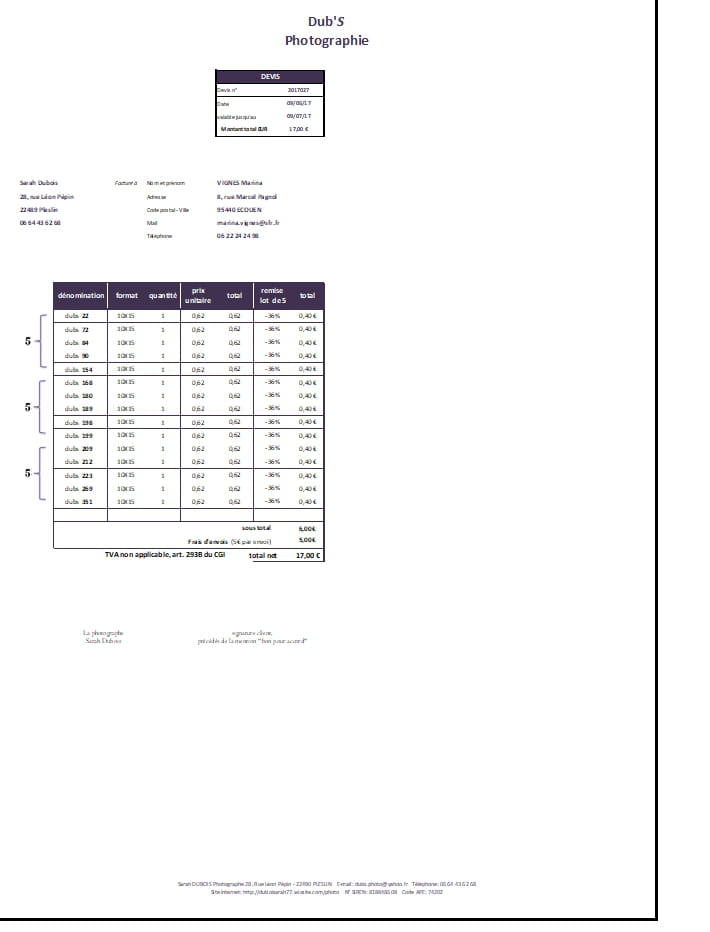
Print of the table always too small
Solved
sista77
Posted messages
41
Registration date
Status
Member
Last intervention
-
PHILOU10120 Posted messages 6463 Registration date Status Contributor Last intervention -
PHILOU10120 Posted messages 6463 Registration date Status Contributor Last intervention -
Hello,
when I create Excel tables and want to print them, they come out small.
I've tried widening the rows, columns, adding columns, increasing the font size to 20, but it’s still the same; you need good eyesight to read it...
yet, I've defined the borders for printing right at the edge of the table, but it doesn't change anything...
Can someone explain to me how to do it?
Thank you in advance.
--
thankfully, there are brains to help me out of my mess!
:) Thank you!!!
when I create Excel tables and want to print them, they come out small.
I've tried widening the rows, columns, adding columns, increasing the font size to 20, but it’s still the same; you need good eyesight to read it...
yet, I've defined the borders for printing right at the edge of the table, but it doesn't change anything...
Can someone explain to me how to do it?
Thank you in advance.

--
thankfully, there are brains to help me out of my mess!
:) Thank you!!!
7 answers
-
Hello Sista77
Check at the bottom of the sheet on the right side the zoom set to 100%
Select the area to print, for example A1 to H50
this gives you a page in portrait orientation
the columns are 80 pixels wide
the rows are 20 pixels high
Check by putting a number in cell H50
go to the print preview the number should be at the bottom right of the page
You can choose narrow margins
a smaller font
adjust the row heights
When you widen the columns if you are in fit to page mode the sheet will be adjusted to A4 format and thus reduced to fit this format
So you need to reduce your columns instead of widening them
--
It is by forging that one becomes a blacksmith. - It is at the foot of the wall that one sees the mason - one always learns from one's mistakes -
Hello Sista77
You need to remove the zoom and then fit to page
Then we use center across selection instead of merging cells
we reduce the font size
we redefine the headers and footers
everything must be in final format
Use narrow margins
In the file, you can brighten up the top with the address by increasing the height of row 6 to 50 pixels and row 12 to 35 pixels
--
Practice makes perfect. - It's at the foot of the wall that you see the mason - you always learn from your mistakes. -
Hello
Your recalibrated file without zoom or page adjustment
http://www.cjoint.com/c/GFjjT6Rr0Ax
I haven't looked at the calculations (see Vaucluse's remark, which I acknowledge)
It's by forging that one becomes a blacksmith. - It's at the foot of the wall that you see the mason - you always learn from your mistakes. -
Hello,
Check the printer properties, if it's not printing everything on one page
Best regards -
Hello Philou,
I have reduced everything, removed columns (that were useless), set the font size between 16 and 12 (depending) and it gives me a small table on an A4 page :-(
I can't attach the image... :-(
Fortunately there are brains to help me out of my troubles!
:) Thank you!!! -
http://www.cjoint.com/c/GFjiRsNE2Ad
--
Fortunately, there are brains to help me out of my troubles!
:) Thank you!!! -
Hello
the print preview provided by the file is fine. The problem is likely in your printer settings.
See what the print preview of the sheet looks like on your end
as a side note: your total at the bottom of the quote is quite curious, you are adding the sum of M21 to M36 twice including the subtotal (6+5=17???)
you have good clients!
best regards
The quality of the response mainly depends on the clarity of the question, thank you!