Page format issue in WordPad
Solved
vivianethyssen
Posted messages
21
Status
Membre
-
glg29 Posted messages 29751 Registration date Status Contributeur Last intervention -
Hello everyone, I have a real problem when I open WordPad. The page format automatically sets to 10 x 15, whereas I want it to default to A4. I can't find a place to set the desired format as default, even though I never had this problem before. Can anyone enlighten me? Thank you
--
Vivi
--
Vivi
8 réponses
I would like to take a screenshot of what appears upon opening, but I can't post it in the message
--
Vivi
--
Vivi
Please click on this link HERE, save it in jpeg format.
Use cjoint to upload the image, copy the link and paste it in your next response.
Hello,
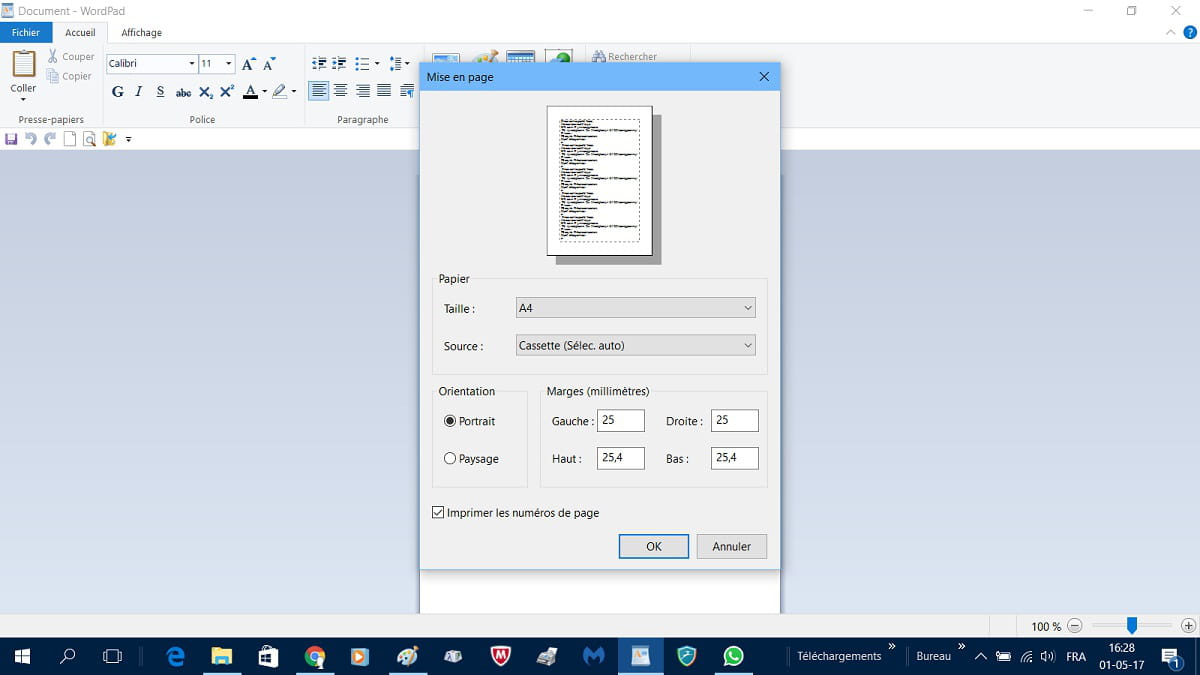
WordPad launched, click on File, Page Setup,
Select the A4 format and confirm by clicking OK.
Best regards.
--
The one who doesn’t bring joy upon arriving, always brings joy upon leaving!
Breizh a tao
WordPad launched, click on File, Page Setup,
Select the A4 format and confirm by clicking OK.
Best regards.
--
The one who doesn’t bring joy upon arriving, always brings joy upon leaving!
Breizh a tao
Indeed, it's disheartening and I can understand!
Maybe try a repair of Windows 10 while keeping your documents and other personal files, perhaps.
In the search box, type recovery, click on Recovery options,
In the next window, select the option that allows you to keep your files, then proceed.
If Wordpad still doesn't improve, I'm at my wit's end!!!
--
The one who does not please upon arrival, always pleases upon departure!
Breizh a tao
Maybe try a repair of Windows 10 while keeping your documents and other personal files, perhaps.
In the search box, type recovery, click on Recovery options,
In the next window, select the option that allows you to keep your files, then proceed.
If Wordpad still doesn't improve, I'm at my wit's end!!!
--
The one who does not please upon arrival, always pleases upon departure!
Breizh a tao
Indeed, very stubborn this Wordpad!
I don’t know what else to suggest, other than switching to a more manageable and efficient word processor, such as the Open Office suite that you can download from this LINK.
Have a good evening as well.
Best regards.
I don’t know what else to suggest, other than switching to a more manageable and efficient word processor, such as the Open Office suite that you can download from this LINK.
Have a good evening as well.
Best regards.
Hello,
I'm back at it!
It’s possible that the 10x15 format is configured at the print level; this format could take precedence in that case.
Open Wordpad, go to File, then Print, you will have access to the General tab, select your printer from the list and then click on Preferences.
With my Epson, here’s what I see on the display.
Once the A4 format is selected, click Apply then OK.
Still in Wordpad, under Page Layout, check if the A4 format is properly accounted for in Size.
I don't know if this will work, but sometimes a night of reflection brings advice, so I thought I could pass this on for a final attempt!
Best regards.
--
He who does not bring joy when arriving always brings joy when leaving!
Breizh a tao
I'm back at it!
It’s possible that the 10x15 format is configured at the print level; this format could take precedence in that case.
Open Wordpad, go to File, then Print, you will have access to the General tab, select your printer from the list and then click on Preferences.
With my Epson, here’s what I see on the display.

Once the A4 format is selected, click Apply then OK.
Still in Wordpad, under Page Layout, check if the A4 format is properly accounted for in Size.
I don't know if this will work, but sometimes a night of reflection brings advice, so I thought I could pass this on for a final attempt!
Best regards.
--
He who does not bring joy when arriving always brings joy when leaving!
Breizh a tao
Super !!!!!!! The solution was there !!!! Oh thank you glg29... I hope you didn't lose any sleep over this! I'm so happy! A huge thank you. I do, however, have to bang my head on the desk... I could have thought of that! Thanks again for your valuable help! Have a great day! My problem is solved! We can close this topic!
Here is something that makes me happy, I usually push failures as far away as possible, within my knowledge of course!
Very happy for you and you're welcome, I’ll let you mark your topic as resolved, check on this PAGE how to proceed.
Good luck, don’t pull your hair out anymore and avoid banging your head on the desk now...........it does hurt after all!
Maybe see you soon and have a good day as well.
Best regards.
Very happy for you and you're welcome, I’ll let you mark your topic as resolved, check on this PAGE how to proceed.
Good luck, don’t pull your hair out anymore and avoid banging your head on the desk now...........it does hurt after all!
Maybe see you soon and have a good day as well.
Best regards.


- Open WordPad
- Then click on "File"
- Page setup
- In "Format" set A4
- "OK" then save.