My keychain is no longer saving my passwords.
titoua
Posted messages
358
Registration date
Status
Member
Last intervention
-
Anonymous user -
Anonymous user -
Hello,
I looked for the answer to my problem in the existing topics, but I couldn't find anything... Help!
Last week, I did something that completely messed up my keychain... To be honest, I'm not really sure what I did, I think I reset it (because I didn’t know the keychain password...), and since then, I haven’t been able to save my passwords via Chrome.
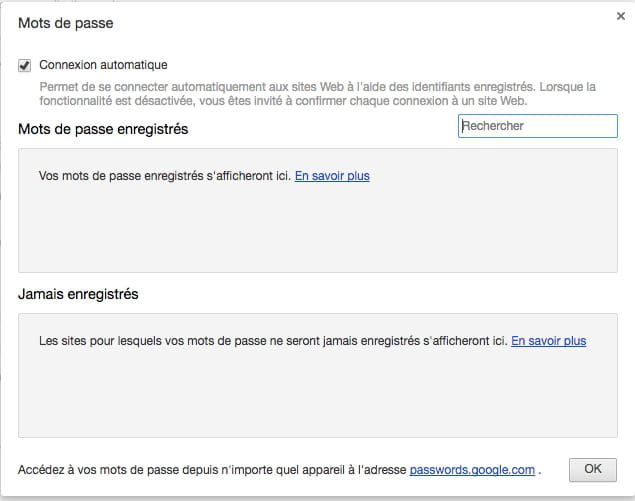
Yet, Chrome asks me every time if I want to save my passwords, and of course I say yes, but nothing happens, nothing gets saved.
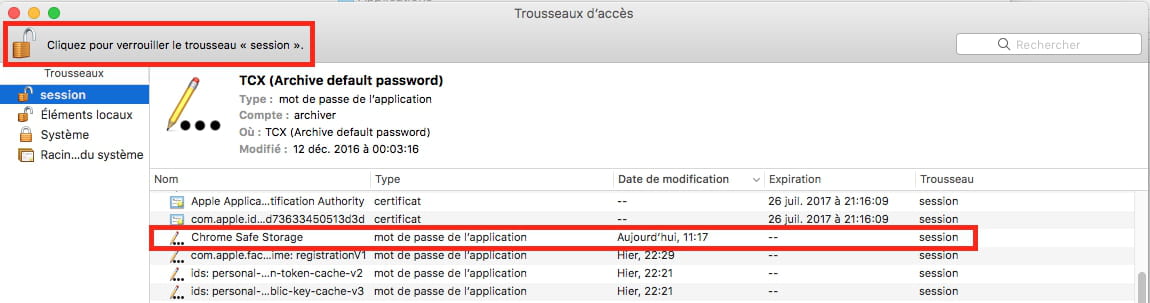
I checked my keychain: "session" and "local items" are unlocked, but "system" is locked.
What should I do to get everything back to the way it was?
Thanks in advance for your help... ;)
Configuration: Macintosh / Chrome 56.0.2924.87
I looked for the answer to my problem in the existing topics, but I couldn't find anything... Help!
Last week, I did something that completely messed up my keychain... To be honest, I'm not really sure what I did, I think I reset it (because I didn’t know the keychain password...), and since then, I haven’t been able to save my passwords via Chrome.
Yet, Chrome asks me every time if I want to save my passwords, and of course I say yes, but nothing happens, nothing gets saved.
I checked my keychain: "session" and "local items" are unlocked, but "system" is locked.
What should I do to get everything back to the way it was?
Thanks in advance for your help... ;)
Configuration: Macintosh / Chrome 56.0.2924.87
17 answers
-
Hi there ;)
No panic = every question has an answer BUT here what do you mean by
" My keyring " ... ????
--
The 'www' is also made for communicating, sharing, and exchanging, right? Thank you for being polite enough to respond to those who are trying to help you :) -
Hello,
so do something simple but radical...
Go to your personal library and delete the entire Keychains folder that you find there.
Then, still from your personal library, go to the Preferences subfolder, and from there delete the file "com.apple.keychainaccess.plist"
Then empty the trash.
Now you will have a brand new Keychain, but you will need to enter your passwords as needed, and they will be saved in your keychain if you allow it.
PS/ if you are on a version of Mac OS X later than 10.6, your personal library is hidden, you can access it by holding down the Option key while going from Finder to the Go menu
https://forums.commentcamarche.net/forum/affich-37636370-acceder-a-la-bibliotheque-utilisateur-sous-mac-os
have a good continuation! -
Hello,
try repairing the Keychain, or creating a new one...
https://support.apple.com/kb/PH7296?locale=en_US&viewlocale=en_US
https://support.apple.com/en-us/HT201609
Best regards.
--
Always provide your system configuration in full - exact model of the computer, exact OS version. -
Hello,
You can try a first step, which is simpler,
launch the Keychain Access application found in Applications / Utilities
and from there, go to the Keychain Access menu / Preferences and request to reset the keychain to its default settings...

that should suffice in principle
--
Always indicate your system configuration completely - exact computer model, exact OS version. -

Here is my keyring, to see what's locked or not... -
Hello,
try clicking on the lock to open it, located in the toolbar, to unlock the lock. Then exit Keychain Access without closing the lock. ...
--
Always indicate your system configuration completely - exact computer model, exact OS version.-
-
-
-
To access your personal Library, go to the Go menu and hold down the Alt key to see the Library line appear... see also this help:
https://forums.commentcamarche.net/forum/affich-37636370-acceder-a-la-bibliotheque-utilisateur-sous-mac-os -
-
-
Well, even that seems complicated... pfff I'm fed up!

-
When I close Chrome, it says something like "Chrome can't save your passwords in the keychain." I reset it (by restoring the default settings), but nothing happens.
-
Hello,
It tells me that "unable to perform the operation because the file Keychains-2.db is in use..."
You need to:
- throw the entire keychains folder in the trash,
(I’m talking about the Keychains folder found in the user library, not the keychains folders located in the main library or in the system folder)
- empty the trash
- restart the Mac before wanting to do anything else. Otherwise, the file loaded in memory is considered as in use...
--
Always provide your complete system configuration - exact model of the computer, exact OS version.-
-
It's done! But still nothing... No password in my saved passwords list...
:(
The passwords we keep in web browsers like Safari, Firefox, are actually stored in the Keychain.
Once the Keychain is new, it is empty, so it is normal that it doesn't contain any passwords.
The logic is, to have a clear and clean situation
- delete the stored passwords in Safari, Firefox, and... so that they are also empty,
- delete the Keychains folder,
- empty the trash
- restart the Mac
After that, everything is empty. No saved passwords, no bugs in the Keychain.
We progressively enter all our passwords again, and they are saved again in the Keychain. Just like on a new Mac.
-
-
That's exactly what I did!
They may be saving in my keychain, but I'm still having the same problem: they don't show up anywhere and Chrome asks me every time:
-
Edit: I just saw that the Keychains folder is still in the library, but is it a new one or the old one?
-
There are at least 3 keychain folders in total on a Mac
- located in
Hard Drive / Library / Keychains
Hard Drive / System / Library / Keychains
Hard Drive / Users / username / Library / Keychains
Only the folder located in the user's library is affected. The other two should not be touched.
If there are multiple users on the Mac, there will be as many additional Keychain folders.
In the user's Library folder, there should only be one Keychain folder. To determine if it is new or old, simply check its creation date.
As I mentioned earlier, by default, since Mac OS X 10.7, the user's library is hidden. To access it, see this page:
https://forums.commentcamarche.net/forum/affich-37636370-acceder-a-la-bibliotheque-utilisateur-sous-mac-os
EDIT: I do not use Chrome, maybe the issue lies only in Chrome??
EDIT 2: I will install Chrome, just to see how this password thing works for me...
Always provide your system configuration completely - exact model of the computer, exact OS version. -
I just installed and tested Chrome. It works normally for me.
Note that my keychain is unlocked by default when I open it.
You will probably need to delete your Keychain access preferences file if it is the one that's blocking the keychain in locked mode.


The preferences file of the keychain to possibly delete
com.apple.keychainaccess.plist
it is located in
Hard drive / Users / username / Library / Preferences
put it in the trash, in addition to the Keychains folder, empty the trash, and restart the Mac.
--
Always indicate your system configuration completely - exact model of the computer, exact OS version.-
Hello Francis, sorry, I haven't been on the computer much these days (on vacation).
I'm in trouble, I threw away the Keychains folder, the first one I found in bulk, before I knew I had to throw away the user's one. I didn't think twice!
So, that means I deleted the wrong one, is it serious doctor?
Well, as soon as I find a little bit of time, I'll take care of all that... thank you thank you a thousand times for everything! -
Hello
Seriously, I don't know, but that's not really good, that's why I set up the procedure to access his personal library from the beginning, and then repeated it....(see from message n°5)...
At this stage, we’ll have to see how it goes next, if it goes badly, we might need to reinstall the OS X system. Without needing to erase the data. Or at least apply a combined update. I need to know which version of OS this Mac is running in order to say more. Check in About This Mac... it will show the Mac model and especially the OS X version
https://www.commentcamarche.net/informatique/macos/1463-informations-systeme-mac/- But I had followed the right procedure! Well, the one indicated in your replies. So that means I did delete the right folder... Since I didn't do anything else.
As for the rest, as I mentioned at the very beginning of our exchanges here, this is a Mac OS X El Capitan.
There you go. I'll try to do all of that as soon as I have a little more than 5 minutes to spare. A thousand thanks!!!
-
-
Hello Francis! News of the day... I checked, my Session key is also unlocked (and the "system" is locked), exactly like yours...
I'm still looking, this thing is crazy! -
If nothing works,
boot from the recovery partition and perform a repair:
https://forums.commentcamarche.net/forum/affich-37641569-entretenir-et-reparer-macos-x-10-12-10-13-et-suivants
Then apply a combined update for El Capitan
https://support.apple.com/kb/dl1885?locale=fr_FR
--
Always indicate your system configuration in full - exact computer model, exact OS version.-
Hello Francis,
Sorry for the lack of news...
Here’s an update: I brought in a friend who's somewhat knowledgeable about this, and he’s never seen anything like it. He couldn't fix the thing (but then again, we didn’t have enough time...).
He checked everything in Chrome (so, apparently, it’s not a Chrome issue according to him), then we did the updates and installed the new Mac Sierra version.
In the meantime, he also installed a password manager for me, which is taking over from the keychain by saving my passwords.
I don’t know why, but I still believe it’s something really simple...
However, I’ve noticed some bugs with my computer for the past 2-3 days; I hope it’s not related to that Keychains folder I threw away! (the user one, that is).
I couldn’t install Chrome on a test user session; there’s not enough space, I don’t know why...
I can't spend all my days on this, unfortunately, so I don't have time to test everything.
I think I’ll take my computer to an "i Clinic" near me. I’ll keep you updated as soon as I know more!
Thank you so much for your help.
-
-
Hello,
We can delete the Keychains folder located in the user's library without any problem. A brand new and empty folder will then be recreated. However, the folders related to Keychain Access that are found in other libraries should not be deleted. We can assume that if that was the case, installing Sierra would have resolved the issue.
But in this kind of situation, it would have been more effective to start with a clean slate, that is to say, install Sierra fresh on a wiped and empty disk, rather than over the old version. It's longer, and obviously requires backing up all one's data and applications. But it runs so much better afterwards :)
In any case, I hope the specialist will be able to resolve this in the best, easiest and quickest way.
Good luck then ;-)
--
Always provide your complete system configuration - exact computer model, exact OS version. -
Hello Francis,
Sorry for the long silence.
I ultimately solved my problem super simply, by cleanly reinstalling Chrome, like this:
So, everything's been fine since then. So indeed, nothing to do with the keychain! A thousand thanks for your help. ;)