Screen resolution with a VirtualBox VM
Solved
CYRILR
Posted messages
22
Status
Member
-
CYRILR Posted messages 22 Status Member -
CYRILR Posted messages 22 Status Member -
Hello,
I'm struggling with an attempt to virtualize WIN7 on my new computer that has WIN10 installed.
I'm using Oracle VM VirtualBox for this. It's my first time, and it's quite a headache...
The virtual machine installed well
My WIN7 iso installed fine too.
The problem is that the desktop page of WIN7 that appears in the VM does not display with the desired screen resolution settings:
My screen under WIN10 supports 1920 X 1080.
Once the VM with WIN7 is installed, it supports a maximum of 1600 X 1200 BUT... if I set it to 1600 X 1200, the desktop page display is incomplete, and I have to scroll to be able to move from the top to the bottom of the desktop page. I can't see the entire desktop, and it's a bit tiring!
To avoid scrolling, I have to set the VM to a resolution of 1152 X 864, and in that case, I end up with a desktop page that fits on the screen, yes, but is about half the width of the screen, almost too small to be usable. Of course, I've tried everything I could find to configure in the VM, but nothing changes.
So! I'm wondering if this is a problem that has a solution or if it's always like this with a VM.
I'm interested in your opinion ;-)
Looking forward to hearing from you
Cyril
Configuration: Configuration: Configuration: Windows / Opera Next 43.0.2442.806
I'm struggling with an attempt to virtualize WIN7 on my new computer that has WIN10 installed.
I'm using Oracle VM VirtualBox for this. It's my first time, and it's quite a headache...
The virtual machine installed well
My WIN7 iso installed fine too.
The problem is that the desktop page of WIN7 that appears in the VM does not display with the desired screen resolution settings:
My screen under WIN10 supports 1920 X 1080.
Once the VM with WIN7 is installed, it supports a maximum of 1600 X 1200 BUT... if I set it to 1600 X 1200, the desktop page display is incomplete, and I have to scroll to be able to move from the top to the bottom of the desktop page. I can't see the entire desktop, and it's a bit tiring!
To avoid scrolling, I have to set the VM to a resolution of 1152 X 864, and in that case, I end up with a desktop page that fits on the screen, yes, but is about half the width of the screen, almost too small to be usable. Of course, I've tried everything I could find to configure in the VM, but nothing changes.
So! I'm wondering if this is a problem that has a solution or if it's always like this with a VM.
I'm interested in your opinion ;-)
Looking forward to hearing from you
Cyril
Configuration: Configuration: Configuration: Windows / Opera Next 43.0.2442.806
2 answers
-
Hi
Did you install the extension pack after installing VirtualBox?
How did you configure the Display section in the VM?
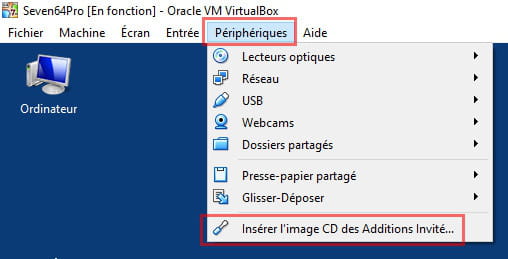
Did you install the Guest Additions while on W7?
Are you making sure to put the VM in full screen (Host + F)
-
Hello kaumune,
Thank you for your questions which are surely some beginnings of answers...
So:
Extension pack and Guest additions: no. I don't even know what that is. I will check.
Display of the VM is automatic
Host on my computer is Ctrl right and it doesn't work. It's like my numeric keyboard. It's one of the things I need to sort out.
Since yesterday, while poking around, I've still made some progress.
I managed to get things more or less normal by reworking from the VM configuration in the user interface + screen part, but the final result isn't great.
I'm able to display full screen but I still have work to do on the proportions. It's still very distorted. The text still appears quite blurry and it's hard on the eyes. I'm going to look into that
See you later.- It's normal that you don't have the same menus
you're talking about the VirtualBox software configuration and I'm talking about the virtual machine configuration (Machine === Configuration)
For the Guest Additions, as I told you, it needs to be done while the virtual machine is running
It's to be done for each virtual machine
-
Hello kaumune,
I cracked and gave up on VirtualBox. Too complicated for my little head.
I switched everything to VMware. The downside is that it's in English, but it's much simpler for my needs.
It installed easily and configured itself by default the way I needed without me having to mess with the configurations on several levels that I don't control.
I might regret it in use, but for now, the result isn't too bad. I'm left with a small not-too-bad display bug that can be managed quite well...so far ;-)
Thanks
-