Problem with 7zip
norafranchise
Posted messages
5
Status
Member
-
kaneagle Posted messages 86296 Registration date Status Moderator Last intervention -
kaneagle Posted messages 86296 Registration date Status Moderator Last intervention -
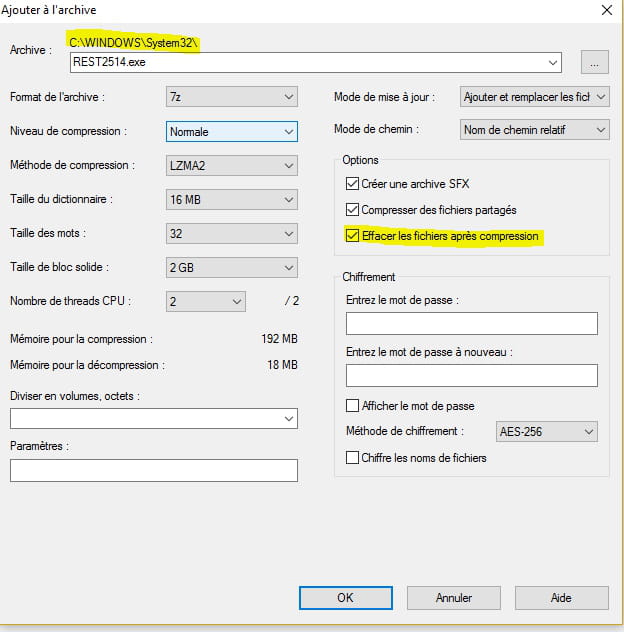
Hello, I had a little issue with the 7zip application (and I didn't know which forum to post my question so here it is...). So, I downloaded the 7zip application on Windows 10 and I tried to compress a folder, and by mistake I checked the option to delete the folders after compression and I didn't check the folder where the compressed file landed. I later saw that the file ended up in C:\WINDOWS\system32\ and I can't find it. I read on a forum that I should open it with administrator rights but I don't know how to do that. Can you help me please? Or if it’s impossible for me to find it, please let me know :(
5 answers
-
Hello,
I saw the compressed file later and it landed in C:\WINDOWS\system32
Are you sure it's in the system32 folder?
Have you checked in --> C:\Windows \SysWOW64?
--
Human beings are at their best when things are at their worst. -
You don't have folders with a Zip in system32 or SysWOW64 as shown in this image?

Right-click on Start
Control Panel
File Explorer Options
View tab
Check --> Show hidden files, folders, and drives
Uncheck --> Hide extensions for known file types
Apply and OK.
In System32 or SysWOW64, there should be folders with the .zip extension
See the example image:
The human being is at its best when things are at their worst. -
I checked to delete the folders after compression
Where is this option?
Context menu?
--
Human beings are at their best when things are at their worst. -
-
I checked "delete folders after compression"
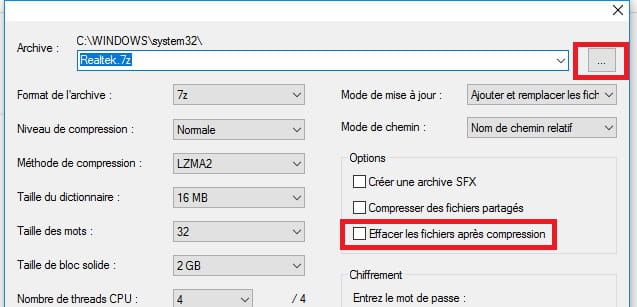
Uncheck the box --> Delete folders after compression
In the archive, click on the small square, browse, select the location of your choice, e.g. downloads
Otherwise, have you tried this option?
Right-click on the file
Choose 7Zip
Select --> Compress to ........zip and send by email
The human being is at his best when things are at their worst