Photoshop becomes a background process.

adridri99
Posted messages
8
Status
Member
-
Hydr0s Posted messages 1843 Registration date Status Member Last intervention -
Hydr0s Posted messages 1843 Registration date Status Member Last intervention -
Hello,
I recently installed Photoshop CS6 and when I open a panel, the Photoshop interface crashes and Photoshop becomes a background process like this: Additionally, upon startup, a pop-up appears saying that a certain font is missing
Thank you in advance for your help.
I recently installed Photoshop CS6 and when I open a panel, the Photoshop interface crashes and Photoshop becomes a background process like this:
Additionally, upon startup, a pop-up appears saying that a certain font is missing 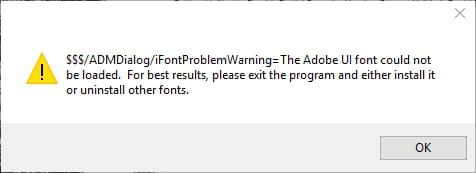
Thank you in advance for your help.
3 answers
-
Hello,
After closing all Photoshop processes, search in the folder C:\Program Files\Adobe\Adobe Photoshop CS6 (64/32 Bit)\Required\Plug-Ins\ADM for the plugin ADmPlugin.apl and rename it to ADmPlugin.apl.bak then check...
Did this solve the problem?
--
Trust me and keep calm, I'm an engineer! -
Hello,
In msconfig, startup tab, simply uncheck Photoshop, then validate and restart. -
By uninstalling and reinstalling the software, it will fix the font installation issues (including ADMUI3.fon).
PS: portable versions of Photoshop are not legal...
--
Trust me and keep calm, I'm an engineer!