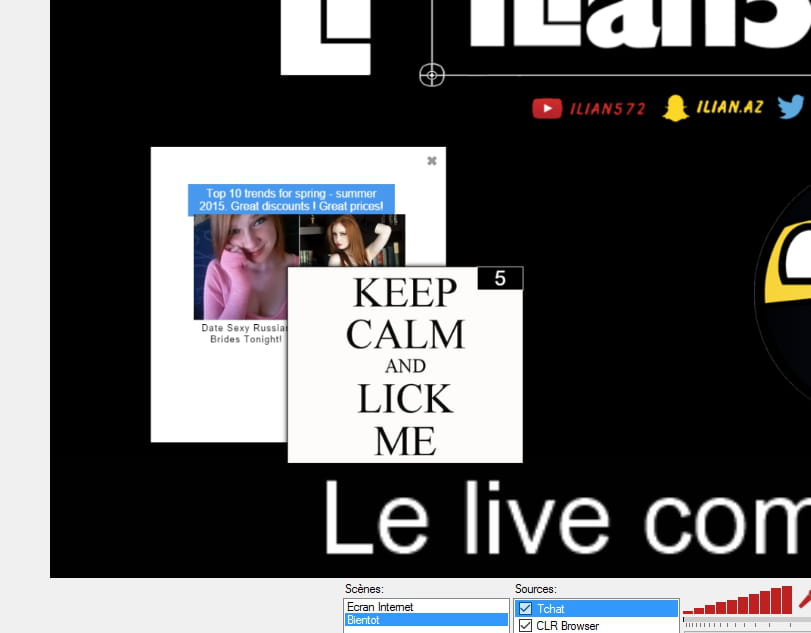
Probème de pub
Résolu
Bonjour, j'ai des pubs assez bizarre qui apparaissent n'importe ou (Jeu sur steam, application Steam, application Curse, a la place des notifications sur mes lives twitch...). J'ai cependant fait plusieurs analyses AdwCleaner mais il ne trouve rien :/. J'aimerais bien avoir de l'aide. Merci :D
6 réponses
-
ModérateurSalut,
Suis le tutoriel FRST. ( prends le temps de lire attentivement - tout y est bien expliqué ).
Télécharge et lance le scan FRST, 3 rapports FRST seront générés :- FRST.txt
- Shortcut.txt
- Additionnal.txt
Envoie ces 3 rapports sur le site http://pjjoint.malekal.com/ et en retour donne les 3 liens pjjoint qui mènent aux rapports ici dans une nouvelle réponse afin que l'on puisse les consulter.
-
Salut, voici :
FRST : https://pjjoint.malekal.com/files.php?id=FRST_20160718_s514s15m7b8
Shortcut : https://pjjoint.malekal.com/files.php?id=20160718_j6n5t10s10u7
Additionnal : https://pjjoint.malekal.com/files.php?id=20160718_d12l9u15z14b5
Merci d'avance :D
-
Voici un petit exemple :

-
ModérateurDésinstalle :
Yahoo! Powered
Web Companion
Voici la correction à effectuer avec FRST. Tu peux t'aider de cette note explicative avec des captures d'écran.
Ouvre le bloc-notes : Touche Windows + R,
Dans le champs "Exécuter", saisir notepad et OK.
Copie/Colle dedans ce qui suit :
CreateRestorePoint:
CloseProcesses:
Task: {E9C1ADA4-C7B2-46C3-97E5-27E4562FCCA3} - System32\Tasks\Yahoo! Powered cisid
HKU\S-1-5-21-4046268625-3432484266-2061772133-1001\...\Run: [Web Companion] => C:\Program Files (x86)\Lavasoft\Web Companion\Application\WebCompanion.exe [1732368 2016-07-18] (Lavasoft)
Winsock: Catalog9 01 C:\WINDOWS\system32\LavasoftTcpService.dll Pas de fichier
Winsock: Catalog9 02 C:\WINDOWS\system32\LavasoftTcpService.dll Pas de fichier
Winsock: Catalog9 03 C:\WINDOWS\system32\LavasoftTcpService.dll Pas de fichier
Winsock: Catalog9 04 C:\WINDOWS\system32\LavasoftTcpService.dll Pas de fichier
Winsock: Catalog9 17 C:\WINDOWS\system32\LavasoftTcpService.dll Pas de fichier
Winsock: Catalog9-x64 01 C:\WINDOWS\system32\LavasoftTcpService64.dll [425744 2016-07-18] (Lavasoft Limited)
Winsock: Catalog9-x64 02 C:\WINDOWS\system32\LavasoftTcpService64.dll [425744 2016-07-18] (Lavasoft Limited)
Winsock: Catalog9-x64 03 C:\WINDOWS\system32\LavasoftTcpService64.dll [425744 2016-07-18] (Lavasoft Limited)
Winsock: Catalog9-x64 04 C:\WINDOWS\system32\LavasoftTcpService64.dll [425744 2016-07-18] (Lavasoft Limited)
Winsock: Catalog9-x64 17 C:\WINDOWS\system32\LavasoftTcpService64.dll [425744 2016-07-18] (Lavasoft Limited)
R2 LavasoftAdAwareService11; C:\Program Files\Lavasoft\Ad-Aware Antivirus\Ad-Aware Antivirus\11.11.898.9090\AdAwareService.exe [730496 2016-06-10] ()
R2 LavasoftTcpService; C:\Program Files (x86)\Lavasoft\Web Companion\TcpService\2.3.4.7\LavasoftTcpService.exe [2751760 2016-07-18] (Lavasoft Limited)
2016-07-18 10:16 - 2016-07-18 10:16 - 00000000 ____D C:\Users\toshiba\AppData\Roaming\LavasoftStatistics
2016-07-18 10:15 - 2016-07-18 11:18 - 00003032 _____ C:\WINDOWS\SysWOW64\LavasoftTcpServiceOff.ini
2016-07-18 10:15 - 2016-07-18 11:18 - 00003032 _____ C:\WINDOWS\system32\LavasoftTcpServiceOff.ini
2016-07-18 10:15 - 2016-07-18 11:12 - 00000000 ____D C:\Users\toshiba\AppData\Roaming\Lavasoft
2016-07-18 10:15 - 2016-07-18 10:15 - 00000000 ____D C:\Users\toshiba\AppData\Local\Lavasoft
2016-07-18 10:14 - 2016-07-18 10:15 - 00000000 ____D C:\ProgramData\Microsoft\Windows\Start Menu\Programs\Lavasoft
2016-07-18 10:14 - 2016-07-18 10:14 - 00425744 _____ (Lavasoft Limited) C:\WINDOWS\system32\LavasoftTcpService64.dll
2016-07-18 10:14 - 2016-07-18 10:14 - 00345360 _____ (Lavasoft Limited) C:\WINDOWS\SysWOW64\LavasoftTcpService.dll
2016-07-18 10:14 - 2016-07-18 10:14 - 00000000 ____D C:\Program Files (x86)\Lavasoft
2016-07-18 10:12 - 2016-07-18 10:12 - 00000000 ____D C:\Program Files\Lavasoft
2016-07-18 10:11 - 2016-07-18 10:11 - 00000000 ____D C:\Program Files\Common Files\Lavasoft
2016-07-18 10:09 - 2016-07-18 10:14 - 00000000 ____D C:\ProgramData\Lavasoft
Hosts:
cmd: netsh winsock reset
EmptyTemp:
RemoveProxy:
Reboot:
Une fois, le texte collé dans le Bloc-notes,
Menu "Fichier" puis "Enregistrer sous",
A gauche, place toi sur le Bureau,
Dans le champs en bas, nom du fichier mets : fixlist.txt
Clique sur "Enregistrer", cela va créer fixlist.txt sur le Bureau.
Relance FRST et clique sur le bouton "Corriger / Fix"
Un redémarrage sera peut-être nécessaire ( pas obligatoire )
Un fichier texte apparait, copie/colle le contenu ici dans un nouveau message.
Redémarre l'ordinateur.
2/
Remets/Vérifie que tous les serveurs de noms (DNS) sont automatiques. Suis le paragraphe "manuellement" du tutoriel pour réintialiser les DNS PUIS vide ensuite le cache DNS et internet. Ces 3 étapes sont importantes et à faire sinon les publicités vont continuer.
-
Merci de ton aide !
Voici :
Résultats de correction de Farbar Recovery Scan Tool (x64) Version: 17-07-2016 03
Exécuté par toshiba (2016-07-18 20:12:16) Run:2
Exécuté depuis C:\Users\toshiba\Desktop\Ilian\Analyse
Profils chargés: toshiba (Profils disponibles: toshiba)
Mode d'amorçage: Normal
==============================================
fixlist contenu:
CreateRestorePoint:
CloseProcesses:
Task: {E9C1ADA4-C7B2-46C3-97E5-27E4562FCCA3} - System32\Tasks\Yahoo! Powered cisid
HKU\S-1-5-21-4046268625-3432484266-2061772133-1001\...\Run: [Web Companion] => C:\Program Files (x86)\Lavasoft\Web Companion\Application\WebCompanion.exe [1732368 2016-07-18] (Lavasoft)
Winsock: Catalog9 01 C:\WINDOWS\system32\LavasoftTcpService.dll Pas de fichier
Winsock: Catalog9 02 C:\WINDOWS\system32\LavasoftTcpService.dll Pas de fichier
Winsock: Catalog9 03 C:\WINDOWS\system32\LavasoftTcpService.dll Pas de fichier
Winsock: Catalog9 04 C:\WINDOWS\system32\LavasoftTcpService.dll Pas de fichier
Winsock: Catalog9 17 C:\WINDOWS\system32\LavasoftTcpService.dll Pas de fichier
Winsock: Catalog9-x64 01 C:\WINDOWS\system32\LavasoftTcpService64.dll [425744 2016-07-18] (Lavasoft Limited)
Winsock: Catalog9-x64 02 C:\WINDOWS\system32\LavasoftTcpService64.dll [425744 2016-07-18] (Lavasoft Limited)
Winsock: Catalog9-x64 03 C:\WINDOWS\system32\LavasoftTcpService64.dll [425744 2016-07-18] (Lavasoft Limited)
Winsock: Catalog9-x64 04 C:\WINDOWS\system32\LavasoftTcpService64.dll [425744 2016-07-18] (Lavasoft Limited)
Winsock: Catalog9-x64 17 C:\WINDOWS\system32\LavasoftTcpService64.dll [425744 2016-07-18] (Lavasoft Limited)
R2 LavasoftAdAwareService11; C:\Program Files\Lavasoft\Ad-Aware Antivirus\Ad-Aware Antivirus\11.11.898.9090\AdAwareService.exe [730496 2016-06-10] ()
R2 LavasoftTcpService; C:\Program Files (x86)\Lavasoft\Web Companion\TcpService\2.3.4.7\LavasoftTcpService.exe [2751760 2016-07-18] (Lavasoft Limited)
2016-07-18 10:16 - 2016-07-18 10:16 - 00000000 ____D C:\Users\toshiba\AppData\Roaming\LavasoftStatistics
2016-07-18 10:15 - 2016-07-18 11:18 - 00003032 _____ C:\WINDOWS\SysWOW64\LavasoftTcpServiceOff.ini
2016-07-18 10:15 - 2016-07-18 11:18 - 00003032 _____ C:\WINDOWS\system32\LavasoftTcpServiceOff.ini
2016-07-18 10:15 - 2016-07-18 11:12 - 00000000 ____D C:\Users\toshiba\AppData\Roaming\Lavasoft
2016-07-18 10:15 - 2016-07-18 10:15 - 00000000 ____D C:\Users\toshiba\AppData\Local\Lavasoft
2016-07-18 10:14 - 2016-07-18 10:15 - 00000000 ____D C:\ProgramData\Microsoft\Windows\Start Menu\Programs\Lavasoft
2016-07-18 10:14 - 2016-07-18 10:14 - 00425744 _____ (Lavasoft Limited) C:\WINDOWS\system32\LavasoftTcpService64.dll
2016-07-18 10:14 - 2016-07-18 10:14 - 00345360 _____ (Lavasoft Limited) C:\WINDOWS\SysWOW64\LavasoftTcpService.dll
2016-07-18 10:14 - 2016-07-18 10:14 - 00000000 ____D C:\Program Files (x86)\Lavasoft
2016-07-18 10:12 - 2016-07-18 10:12 - 00000000 ____D C:\Program Files\Lavasoft
2016-07-18 10:11 - 2016-07-18 10:11 - 00000000 ____D C:\Program Files\Common Files\Lavasoft
2016-07-18 10:09 - 2016-07-18 10:14 - 00000000 ____D C:\ProgramData\Lavasoft
Hosts:
cmd: netsh winsock reset
EmptyTemp:
RemoveProxy:
Reboot:
Le Point de restauration a été créé avec succès.
Processus fermé avec succès.
HKLM\SOFTWARE\Microsoft\Windows NT\CurrentVersion\Schedule\TaskCache\Tasks\{E9C1ADA4-C7B2-46C3-97E5-27E4562FCCA3} => clé non trouvé(e).
C:\WINDOWS\System32\Tasks\Yahoo! Powered cisid => non trouvé(e). -
ModérateurTu as bien remis les DNS en automatique ?
Télécharge et installe MBAM. La version gratuite permet de nettoyer ( décoche bien la proposition d'essai de la version Premium à la fin de l'installation ) :- Tutoriel Malwarebytes Anti-Malware (MBAM) version gratuite
- Tutoriel Malwarebytes Anti-Malware (MBAM) version payante
Mettre MBAM à jour puis lancer un examen.
A la fin du scan, clique sur "Supprimer Sélection" en bas à gauche.
Redémarrer l'ordinateur si nécessaire puis relancer Malwarebytes.
Vas chercher le rapport dans l'onglet "Historique".
A gauche "Journal d'analyse", double-clique sur l'examen dans la liste. Puis en bas "Copier dans le presse papier", va sur http://pjjoint.malekal.com/, clique droit "Coller" pour coller le contenu du rapport du scan. Clique sur "Envoyer". Dans un nouveau message ici en réponse, donne le lien pjjoint afin de pouvoir consulter le rapport.
Remets les DNS en automatique s'ils se sont remis n'importe comment.
Attends 1h ou 2h pour voir si ça tient.
Refaire un scan FRST et donner les rapports via pjjoint.
-
-
Bonsoir, après avoir refait toutes les étapes, a première vue, aucune pub. J'ai commis une faute, j'avais mis le DSN en automatique seulement pour ma carte Wi-Fi (J'était co' en Wi-Fi lors de ma première manipulation). J'ai donc mis en automatique le DSN de mon Ethernet =). Bon je sais pas si c'est clair mais merci en tout cas ^^'.
-
-
Modérateurde rien =)
Quelques conseils :
Pour tenter de prévenir les sites malicieux, tu peux installer Blockulicious.
Pour ne plus te faire avoir.
A lire - Programmes parasites / PUPs : Dossier Adwares/PUPs : programmes indésirables et parasites
(Surtout active les détections LPIs pour détecter les programmes parasites et publicitaires)