USB de stockage de masse
elind
-
Ange -
Ange -
Hello,
This morning, when I tried to plug in my hard drive, it wouldn't show up on my computer. When I tried to unplug it, it showed up as USB mass storage instead of SAMSUNG something. My hard drive is only 2 months old and hasn't been dropped or left plugged in at all. Is it dead or not? Thanks to anyone who can provide answers.
Configuration: Windows / Chrome 50.0.2661.75
This morning, when I tried to plug in my hard drive, it wouldn't show up on my computer. When I tried to unplug it, it showed up as USB mass storage instead of SAMSUNG something. My hard drive is only 2 months old and hasn't been dropped or left plugged in at all. Is it dead or not? Thanks to anyone who can provide answers.
Configuration: Windows / Chrome 50.0.2661.75
2 answers
-
Hi,
How do you disconnect it from the PC?
You need to do it through the icon in the notification area or by going to My Computer, right-clicking on it and then ejecting.
Check in Disk Management to see if it appears and in what format.-
-
-
- Put a screenshot here, it's more clear.
Press the Print Screen key on the PC to take your screenshot.
Or Ctrl Alt Print Screen to select the active window.
Then open Paint, click Paste and Save As.
You put the screenshot on the desktop and then upload it here by clicking on:
Reply to the topic at the bottom of the page, it's written in white on blue.

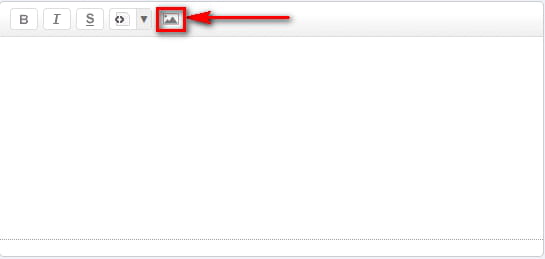
You'll see an icon shaped like two small mountains with a sun (black and white).
Click on it and import the image.
Wait for the process to finish.

Then you can confirm.
You can also use FastStone Capture to get comments on the screenshots.
Tutorial here: http://www.rakforgeron.fr/documents/Utilisation%20de%20FastStone%20Capture.pdf
Personally, I use this one much faster for screenshots because you can capture just a part of the screen or a single window instead of the entire screen.
-