
I'm stuck with CloudFlare.
Solved
Anonymous user
-
jmdepise Posted messages 1649 Registration date Status Security Contributor Last intervention -
jmdepise Posted messages 1649 Registration date Status Security Contributor Last intervention -
Hello,
everyone from Quebec everything was going wonderfully until I installed Spy bot; I don't know if it's the application that introduced this but I'm tied up, it's no joke because I formatted my PC (which isn't young I admit 3-4 years but now I can't download anything like ZHPfix and many other Firefox applications and a lot of other things how can I please remove this (mess) sorry for the bad words but it's really no joke There's surely someone who knows this well at my age I'm limited Thanks for your help
Configuration: Windows 7 / Chrome 48.0.2564.116
everyone from Quebec everything was going wonderfully until I installed Spy bot; I don't know if it's the application that introduced this but I'm tied up, it's no joke because I formatted my PC (which isn't young I admit 3-4 years but now I can't download anything like ZHPfix and many other Firefox applications and a lot of other things how can I please remove this (mess) sorry for the bad words but it's really no joke There's surely someone who knows this well at my age I'm limited Thanks for your help
Configuration: Windows 7 / Chrome 48.0.2564.116
5 answers
-
- Hello
Welcome to CCM.
→ Can you uninstall Spybot? ► help here
Then do this if you can
Recommendations before starting
"We will use tools that will allow us to initiate the cleaning process." therefore: The disinfection will take place in several stages. Be patient and respect the response times Even if the symptoms of the infection disappear, please continue to finalize the procedure until the end..
//\\
ZHPdiag:- Download >ZHPdiag to the desktop
- Or use this link if the previous link does not work
- Once downloaded to the desktop, launch it
/!\ Users of Windows Vista-7-8-10, Right-click on the ZHPdiag icon and "run as Administrator""
- Then click on "Scan"
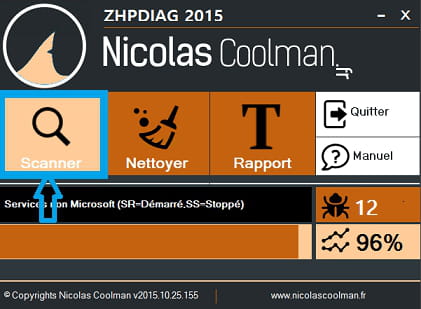
- Let the tool work without touching anything even if it seems stuck!
- At the end of the scan, the report will display and will be saved on the desktop.
- Thank you for posting this report in your next response.
- If you do not know how to post a report, here is an explanation >>HERE<<
►►► Internet Explorer is used to install Mozilla Firefox :)) ◄◄◄
Configuration [Linux]
