
Remove or modify the details of a video file
Solved
Zezinho71
Posted messages
15
Status
Member
-
ziggourat Posted messages 24624 Registration date Status Contributor Last intervention -
ziggourat Posted messages 24624 Registration date Status Contributor Last intervention -
Hello,
I have several video files (.avi) on an external hard drive that I renamed for example:
01-file x
02-file z
03-file y
The goal is that when I open the folder (from my PS3 console), the files are sorted in order (01, 02, etc.).
The problem is that one of these files has a title in the file details and that name appears on the screen. This messes up my sorting.
I cannot change or delete this detail so that only the file name appears.
I'm not sure if this is clear; it may seem like a silly problem, but it would calm my "neat-freak" side if I had a solution.
Thank you in advance
Configuration: Windows / Firefox 40.0
I have several video files (.avi) on an external hard drive that I renamed for example:
01-file x
02-file z
03-file y
The goal is that when I open the folder (from my PS3 console), the files are sorted in order (01, 02, etc.).
The problem is that one of these files has a title in the file details and that name appears on the screen. This messes up my sorting.
I cannot change or delete this detail so that only the file name appears.
I'm not sure if this is clear; it may seem like a silly problem, but it would calm my "neat-freak" side if I had a solution.
Thank you in advance
Configuration: Windows / Firefox 40.0
7 answers
-
Hello,
For your file name (the one you renamed) and the "true title" (the one that appears with your PS3) to match, you need to change its "Tag" or metadata as gej62 said.
Try using XMedia Recode in direct stream copy mode. If you want to set the software to French, go to Options --> Preferences __> Language --> French
Add your file, set Video and Audio to Copy, under Tag (Balises in French), set Title to the name of the file you want, then press the big green cross button. Finally, before starting the re-encoding process, check if the settings are exactly what you want under the Queue or Tasks tab in French. Now click on the Encode or Convert button.
Everything should be as you want it unless I’m mistaken ;)
But I don't understand why this poses a problem with one specific file while the others work fine...
Best regards
Vive Bobo! ~ Little fish will grow big ~ -
Hi ziggourat
It also works with xmedia, I tested it before using vlc.
I didn't mention it (some people don't like downloading
software)
I knew you would have had the idea.
Best regards -
Hi
You can try using vlc if you think the problem is due to a detail
in the file..
Open your file with vlc, if during playback the name does not match the one you renamed the file to, click on "tools", click on "general".
From there, you have the information about the title.
Delete the title and rename it to "01" or something else.
Then you will see "write metadata" appear
click on it.
You open your file again with vlc to see if the title matches your renaming.
If the title does not appear during playback under vlc.
click on "tools"
click on "preferences"
under "show a tooltip on media change" you select
"always"
Then click on "save", you open your file again to see
if the renaming is correct.
It's worth a try.
Cheers -
Hello, I just tried.
Every time I close and open, the original title comes back as if there is some kind of protection or I don't know what.
Or am I forgetting something? Is there something to do to save the file after the operation? -
I renamed a video to 01. Even so, the artist's name appears
on vlc. I change the title in vlc and save it.
After that, it’s not necessarily the problem you’re facing.
I have an old version of vlc.
Maybe the title is also embedded in the video (just a suggestion)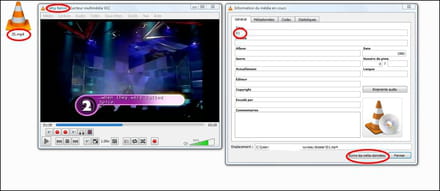
hi -
Hello, the ziggurat method (with media) worked.
Thank you.
To answer your question, I have no issues with the other files because they don't have tags, so it's the file name that is taken into account. -

