How to switch the keyboard to QWERTY on Windows 10?
Solved/Closed
RedJim
Posted messages
15
Status
Member
-
johntitor -
johntitor -
Hello,
I was wondering how to switch to QWERTY in Windows 10, as the Win+Space shortcut doesn't work.
Configuration: Windows / Chrome 44.0.2403.130
I was wondering how to switch to QWERTY in Windows 10, as the Win+Space shortcut doesn't work.
Configuration: Windows / Chrome 44.0.2403.130
Related links:
- how to switch from a qwerty keyboard to azerty
- How to type the hash symbol on the keyboard?
- Bluetooth wireless keyboard switch from QWERTY to AZERTY.
- How to type a lowercase c with a cedilla on a QWERTY keyboard.
- convert a wireless keyboard from qwerty to azerty
- iPad Apple: How to switch the keyboard back to AZERTY mode?
2 answers
-
Hello,
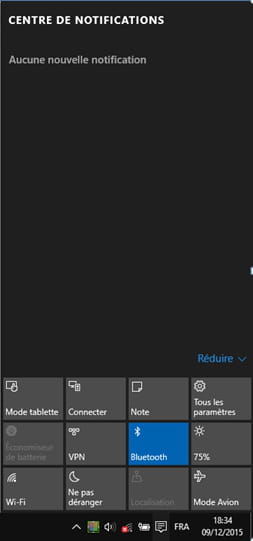
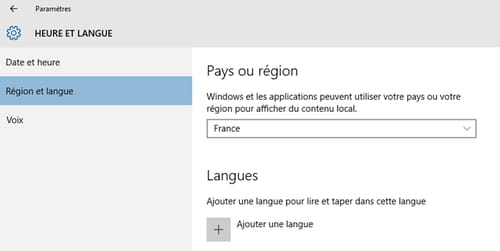
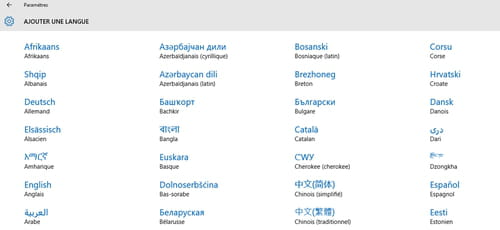
Attention! If you are on W10 and the small icon |FRA| is not displayed at the bottom right of the taskbar, it means no other language is configured, so you need to follow these steps: (see pictures)
NOTIFICATION CENTER (in the taskbar on the right) > All settings > Region and language > Add a language (to be able to switch the keyboard to QWERTY, you must choose English)
Then several choices are available to switch between languages:- Click the |FRA| button in the taskbar.
- Keyboard shortcut: Alt + Shift
- Keyboard shortcut: Win + Space