Acer Aspire V3 771G - Overheating and Slowdown
Solved
Klywen
Posted messages
26
Status
Member
-
glg29 Posted messages 29751 Registration date Status Contributor Last intervention -
glg29 Posted messages 29751 Registration date Status Contributor Last intervention -
Hello,
I have an Acer Aspire V3 771G, bought in December 2013. Very recently, it has shut down due to overheating twice when I was using Photoshop. So I installed Speedfan: normally, the temperature is 60 when I’m not doing anything, at 70/75 when I watch videos. And as soon as I launch Photoshop, it goes up and up and shuts down the computer. x)
I wanted to clean the fan, but my father and I noticed that it wasn't dirty, or at least not enough to cause that much overheating. I uninstalled a few programs that might have caused the problem by consuming a lot of power (like Bluestacks) or that I no longer used. I ran a scan with Avast, Malwarebytes, and AdwCleaner, and nothing was found.
It’s really starting to get on my nerves; even on an internet browser, videos lag to load, no matter the browser. My graphic tablet has become nearly impossible to use, it’s just horrible.
Do you have any ideas about what the problem could be? Would the only remaining solution be to install an external PC cooler?
Thanks in advance! ^_^
Configuration: Windows / Chrome 42.0.2311.152
I have an Acer Aspire V3 771G, bought in December 2013. Very recently, it has shut down due to overheating twice when I was using Photoshop. So I installed Speedfan: normally, the temperature is 60 when I’m not doing anything, at 70/75 when I watch videos. And as soon as I launch Photoshop, it goes up and up and shuts down the computer. x)
I wanted to clean the fan, but my father and I noticed that it wasn't dirty, or at least not enough to cause that much overheating. I uninstalled a few programs that might have caused the problem by consuming a lot of power (like Bluestacks) or that I no longer used. I ran a scan with Avast, Malwarebytes, and AdwCleaner, and nothing was found.
It’s really starting to get on my nerves; even on an internet browser, videos lag to load, no matter the browser. My graphic tablet has become nearly impossible to use, it’s just horrible.
Do you have any ideas about what the problem could be? Would the only remaining solution be to install an external PC cooler?
Thanks in advance! ^_^
Configuration: Windows / Chrome 42.0.2311.152
2 answers
-
Hello!
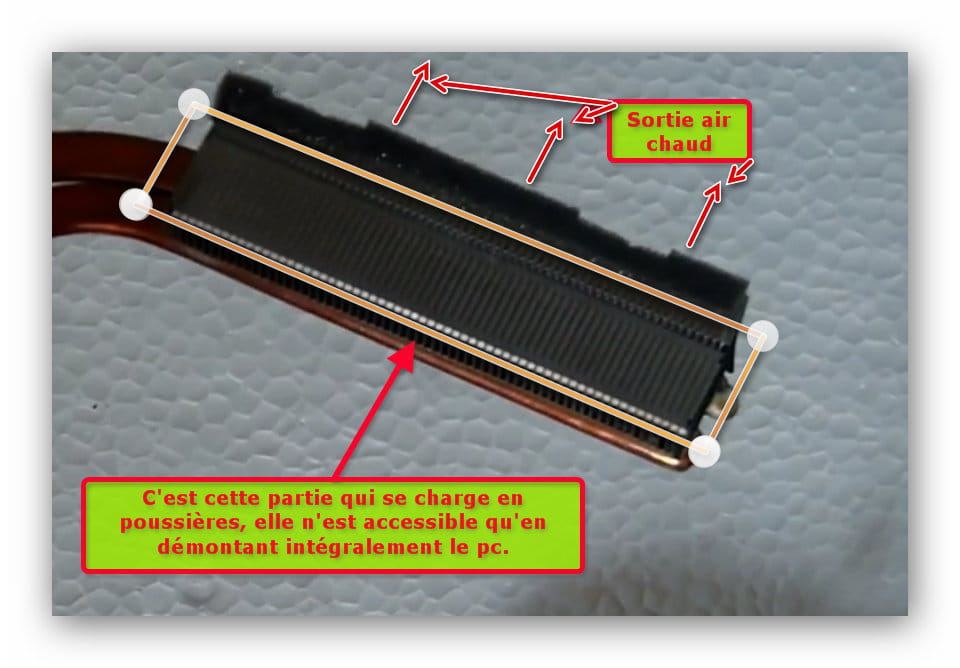
We just took apart and put back together my PC just now, and indeed, it was the air outlet from the fan that was completely blocked by a layer of condensed and compact dust 5 to 10mm thick, after a year and a half of use. We got rid of it, and while the canned air isn't the most useful for this part, it's good to have one for the dust that's settled everywhere. Don't forget to get thermal paste to replace the one on the processor.
Following some research, I found this video: https://www.youtube.com/watch?v=9ndqrPEi1Ps, which was very helpful to us. ^^
So there you go, thanks again for your answers glg29, and I hope this post can help others if needed! ^_^ Personally, I can already see a noticeable improvement in performance and heating of the beast. :p-
Hello Klywen,
After a long period of using the PC, completely disassembling it for cleaning is THE solution; you would never have removed the accumulated dust from the hot air outlet if you had just blown it with an compressed air can, that’s obvious.
The PC gets a little fresh look afterwards, the temperature stabilizes because it can expel hot air without straining.
Brand new thermal paste too (recommended), nothing like that for everything to work perfectly afterwards.
Good luck and you're welcome for the answers.
Best regards.
-
-
Hello,
"I wanted to clean the fan, but my father and I noticed that it wasn't dirty"
The fan may not be very dusty, but the hot air extraction grille can be completely saturated. Have you disassembled the PC for an assessment?
If we're talking about overheating, uninstalling software won't solve the issues!

A can of compressed air can be useful, but it only serves to blow dust inside the computer, which isn't great in my opinion, since the fins of the heatsink are very close to each other, and the vacuum cleaner isn't very helpful!
Regards.
The one who doesn't please upon arrival, ALWAYS pleases upon departure!
Breizh a tao-
Actually, this PC model is really hard to disassemble in the sense that you also have to take apart the keyboard and touchpad to access the fan... So, to reach the grille you'd have to go even further? I admit I'm a bit afraid of messing it up, you know.
If I tried uninstalling software, it’s because I hoped it was just some unwanted program running in the background and draining everything, causing the overheating. But apparently, that’s not it.
Still, for my next PC, I’ll make sure that the fan and other parts are easily accessible! x)- If you're handy, taking apart a laptop is not insurmountable; I simply advise you to take note of what you do, photograph your actions if you're not used to these interventions, and in principle, you should manage.
On a large number of laptops, the keyboard must be dismantled to access the motherboard; the touchpad, in my opinion, should just be disconnected; it should come off with the upper part of the laptop and doesn't need to be removed separately.
Now, if you have any doubts, it's better to entrust this work to a computer technician.
One thing is certain: only by fully disassembling the laptop will you completely eliminate the dirt it contains.
Be sure to have thermal paste for reassembly; it will need to be replaced.
See you later!
-
-
-