
Space between the text and the footer
Azurrr
Posted messages
1
Status
Member
-
C-Claire Posted messages 4562 Registration date Status Member Last intervention -
C-Claire Posted messages 4562 Registration date Status Member Last intervention -
Hello,
I can't remove the spaces between the text and the footer. This space is different on each of my pages, and I can't make them uniform.
Do you have a solution? :) Thank you
Configuration: Windows / Firefox 37.0
I can't remove the spaces between the text and the footer. This space is different on each of my pages, and I can't make them uniform.
Do you have a solution? :) Thank you
Configuration: Windows / Firefox 37.0
3 answers
-
Hello Azurrr.
You need to:
- select the entire document [ctrl+A]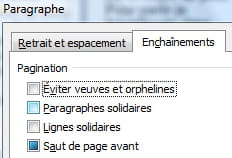
- right-click
- select "Paragraph" - in the Chains tab click twice on the buttons "Avoid widows and orphans", "Linked paragraphs" & "Linked lines" so that they contain neither a checkmark nor a color fill.
--
Retirement is great! Especially in the Antilles... :-)
Raymond (INSA, AFPA, CF/R) -
-
Hello,
By default, it is difficult to have pages that end exactly at the same point.
If you have larger titles than the text or if there are different line spacings depending on the paragraphs for example, you have a different space at the bottom of the page and that’s normal.
But you can achieve what you are asking for by going into the "Page Layout" dialog box (double-click in the vertical ruler on the left side of the screen), "Layout" tab, and selecting "Justified" from the "Vertical Alignment" list. Word will adjust the line spacing to stretch the text vertically.
--
C-Claire
