MSI H97 Gaming 3 issue
XqP
-
Hexalys -
Hexalys -
Hello,
I'm asking for help because I'm really lost!
I bought a small update kit for my PC including: a MSI H97 Gaming 3 motherboard + an Intel i5 4460 CPU + 12 GB Corsair Value Select...
The only problem is, when I start the PC, all the fans spin, the screen (or my TV) is detected but absolutely NOTHING is displayed on the screen. I tested without RAM, with my old sticks, without GPU, without a hard drive, but nothing works, it doesn't boot...
Do you think that could be related to my Corsair GS 600 power supply?
Sincerely,
LIXON Melvyn
I'm asking for help because I'm really lost!
I bought a small update kit for my PC including: a MSI H97 Gaming 3 motherboard + an Intel i5 4460 CPU + 12 GB Corsair Value Select...
The only problem is, when I start the PC, all the fans spin, the screen (or my TV) is detected but absolutely NOTHING is displayed on the screen. I tested without RAM, with my old sticks, without GPU, without a hard drive, but nothing works, it doesn't boot...
Do you think that could be related to my Corsair GS 600 power supply?
Sincerely,
LIXON Melvyn
3 answers
-
Hello
Do you think it has anything to do with my Corsair GS 600 power supply?
No, not really. Or at least not likely.
Otherwise you plugged everything in properly? on the side of the processor on the motherboard, the 4- or 8-pin connector? seated correctly?
The CPU cooler? with the Intel mounts, there are often problems, the pins are hard to press, if one of them isn’t pushed in, it tilts and the processor never starts.
Check carefully, it’s not always easily visible: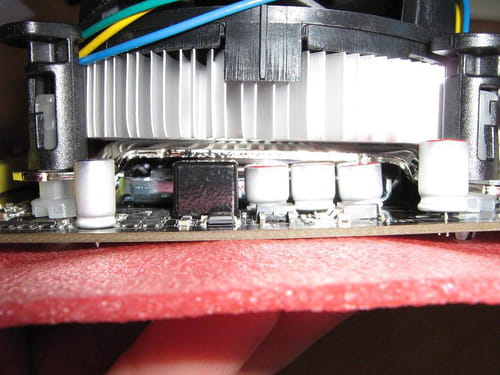
--
Hello at your place -
Hello,
Thank you for your reply.
Unfortunately, it still doesn’t work... My 8-pin CPU power connector is correctly plugged in, the 24-pin as well, and the CPU cooler is properly clipped, the four pins as well... -
Where are you with your problem?
It sounds like a CM whose BIOS isn’t up to date...
do you confirm?