
Previous
- 1
- 2
-
Image27.sparsebundle? Image27 is indeed the name of the iMac from which the backup originates?
--
Have a Nice Day :-) - Francis
“Working group: A group of people unable to do anything by themselves who collectively decide that nothing can be done!” WCh -
I sometimes received this message "no displayable file system", when the system considered that a disk image was corrupted. What needs to be done is to make a new backup with the iMac, then not try to open it locally, but from the Macbook and remotely at first.
Another attempt to be made is to put on this Time Machine disk, from the iMac, a new disk image of type sparsebundle, next to the backup image, created with Disk Utility, just for testing.
So, create this disk image from the iMac, put some innocuous files inside, unmount the disk image, and then try to open it from the Macbook remotely.
--
Have a nice day :-) - Francis
“Workgroup: A group of people unable to do anything on their own who collectively decide that nothing can be done!” WCh-
-
To create a disk image, you simply need to use Disk Utility, and from there, request to create a new blank or empty disk image from the menu bar. Then, in the dialog window, you can define the type, size, name, etc. I can't provide the detailed steps right now, as I am currently on Sierra, and the procedure on 10.6 is slightly different.
-
-
-
So, there must be a corruption of the file image when it passes through the network.
Tests to be done locally and then remotely:
you launch the Terminal, (Applications / Utilities ...)
in the Terminal window, you paste this command
md5
then you enter a space
next, you drag the sparsebundle disk image into the Terminal window, and you confirm.
The Terminal window should display a series of hexadecimal characters, like
5cf0bdeb82c2ae2f87acd4bd88d259d1
do the same thing locally and remotely, you should get the same string of characters if the image is not corrupted via the network...
-
-
That's surprising because the disk image, once transferred to the Mac, let's say directly on the desktop, should be accepted by the Terminal.
For example, if I take a disk image located in my Downloads folder:
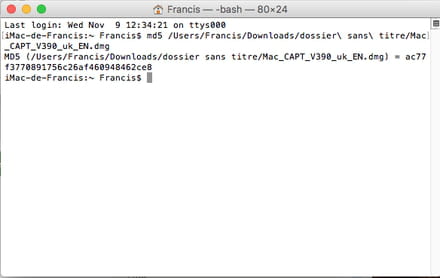
I will perform the operation with the sparsebundle image I created last night on my Time Capsule...
--
Have a nice day :-) - Francis
“Work group: A group of people unable to do anything by themselves who collectively decide that nothing can be done!” WCh -
Indeed, it won't work on a sparsebundle image. This image does indeed contain a directory.
I did another test, I renamed this sparsebundle image to .dmg instead of .sparsebundle... it mounts without any issue, it would be a test to perform from the remote Mac on the test sparsebundle image... (it works on the local network at my place)
Have a nice day :-) - Francis
“Workgroup: A group of people who are unable to do anything by themselves who collectively decide that nothing can be done!” WCh -
I'm trying it out, only MEGA problem, if it works by renaming the .dmg file, I would need to copy a 500GB image of data "remotely" to be able to fit it into the backup! lol
because of course, I can't rename the extension on the mounted backup drive.....
I'm fed up! -
-
And why? A problem with file permissions?
When you select the file, then request to read its information, you can see at the bottom of the window the read and write permissions.
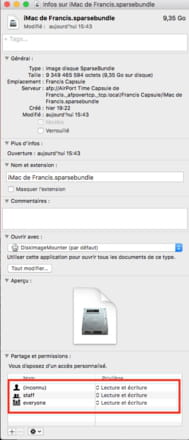
Have a nice day :-) - Francis
“Working group: A group of people unable to do anything by themselves who collectively decide that nothing can be done!” WCh -
so...
LOCALLY: I can rename it without any problem (even though it's unnecessary since the .sparsbundle opens correctly)
REMOTELY: I cannot rename it, when I check the properties, in Sharing and Permissions it says "you have custom access" -
I also have this line "you have personalized access", but below we see the write and read rights, as there are no restrictions, I can rename the file:

--
Have a nice day :-) - Francis
“Working group: A group of people unable to do anything by themselves who collectively decide that nothing can be done!” WCh-
-
-
-
It's easy to change the rights or add a user with write permissions; I wrote a response on this topic a while ago here:
https://forums.commentcamarche.net/forum/affich-10020248-aide-pour-mot-de-passe-svp#1
You can also add a user by clicking the + sign at the bottom of the window, then granting them read and/or write permissions. -
-
-
The parent folder is the folder that contains the sparsebundle disk image.
For me, although I am at the root of my Time Capsule, I have this structure,

where we can see that for me, with my test backup made yesterday, the parent folder is "Francis Capsule," which itself is contained in the Airport Time Capsule path of Francis...
--
Have a Good Day :-) - Francis
“Work group: A group of people unable to do anything by themselves who collectively decide that nothing can be done!” WCh-
-
-
Hello, so I tried on the root folder called "sauvegardeTM", it says "everyone access denied", when I open the menu I set "read and write", I apply it to the entire folder, I close the window. I reopen it, again "everyone access denied"!
Now when I try on the sparsebundle backup inside the root folder "sauvegardeTM", it already says "everyone read and write"
So that's the update...
I might need to try with the software you mentioned yesterday, I didn't have time ^^
Have a good day -
-
-
Here is a copy of my settings and the help screen here:
https://www.lagentesoft.com/bm_instructions/index.html
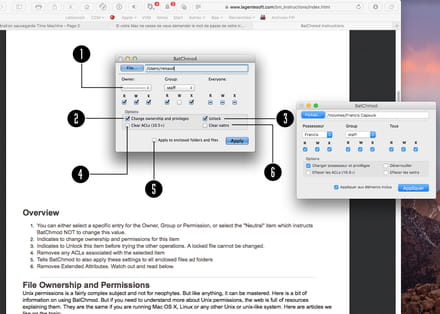
here, I have given everyone all the powers :)
--
Have a nice day :-) - Francis
“Task group: A group of people unable to do anything by themselves who collectively decide that nothing can be done!” WCh-
That's exactly what I did, once applied everything seems fine, a message from the software telling me it's done. I exit, I check the disk permissions, nothing has changed. I repeat the process, I open the software, all the permissions I checked have disappeared and we go back to square one.
I only have the first 3 boxes checked.
-
-
Yes, I did it, the permissions are still checked there, but I have the same problem as usual in remote mode, as soon as I click on the sparsebundle image: "no mountable file systems."
-
Well... I can only see one thing, the disk image is not being recognized correctly remotely via the Cloudbox...
and the DiskImageMounter application considers it invalid...,
when DiskImageMounter tries to mount a disk image, it first performs a file integrity check; if this check is not possible, or if the disk image is considered corrupted, it doesn’t mount it... Now, why, when viewed remotely, this disk image is seen as "not mountable"... I don't know... a corruption of the information via the Cloudbox?...
( just for your information, the message is more like "no mountable file system"...)
-
-
yes sorry "montable" ;)
as I told you, I will try formatting and starting from scratch... You never know, right!
I'll keep you updated Francis, thanks for everything.


Previous
- 1
- 2