Raccourci su clé USB
Résoluje souffre d'un virus qui crée des raccourci sur ma clé USB Malware antibytes le detecte et supprime mais il revient à chaque fois. J'arrive à réparer la clé avec USBfix mais le problème revient à chaque fois que faire ?
rapport malware
Malwarebytes Anti-Malware 1.75.0.1300
www.malwarebytes.org
Version de la base de données: v2013.11.02.03
Windows 7 Service Pack 1 x86 NTFS
Internet Explorer 9.0.8112.16421
aopen :: AOPEN-PC [administrateur]
04/11/2013 06:57:51
mbam-log-2013-11-04 (06-57-51).txt
Type d'examen: Examen rapide
Options d'examen activées: Mémoire | Démarrage | Registre | Système de fichiers | Heuristique/Extra | Heuristique/Shuriken | PUP | PUM
Options d'examen désactivées: P2P
Elément(s) analysé(s): 190856
Temps écoulé: 5 minute(s), 25 seconde(s)
Processus mémoire détecté(s): 0
(Aucun élément nuisible détecté)
Module(s) mémoire détecté(s): 0
(Aucun élément nuisible détecté)
Clé(s) du Registre détectée(s): 0
(Aucun élément nuisible détecté)
Valeur(s) du Registre détectée(s): 2
HKCU\SOFTWARE\Microsoft\Windows NT\CurrentVersion\Windows|Load (PUM.UserWLoad) -> Données: C:\Users\aopen\LOCALS~1\Temp\msogcf.exe -> Suppression au redémarrage.
HKCU\SOFTWARE\Microsoft\Windows NT\CurrentVersion\Windows|Load (Trojan.Agent) -> Données: C:\Users\aopen\LOCALS~1\Temp\msogcf.exe -> Suppression au redémarrage.
Elément(s) de données du Registre détecté(s): 0
(Aucun élément nuisible détecté)
Dossier(s) détecté(s): 0
(Aucun élément nuisible détecté)
Fichier(s) détecté(s): 0
(Aucun élément nuisible détecté)
merci
17 réponses
Problème central: une clé USB est infectée par un virus qui crée des raccourcis, détecté puis supprimé par Malwarebytes et USBFix, mais les symptômes réapparaissent après chaque redémarrage. Des échanges portent sur l'utilisation conjointe d USBFix, DelFix et OTMoveIt3, la génération de rapports et le nettoyage des éléments de démarrage et du registre, notamment les clés Load pointant vers msogcf.exe. Les participants recommandent de poster les rapports USBFix et d'effectuer les opérations en mode administrateur, tout en purgeant la restauration système et en surveillant les éléments persistants dans le dossier Local\Temp. Enfin, certains messages indiquent que la clé USB a été retirée pour prévenir une réinfection et que la patience reste indispensable face à ce type d'infection.
-
Contributeur sécuritéBonjour,
Est ce que tu peux poster le rapport de USBFIX ?
Il se trouve ici : C:\UsbFix.txt
@+
¤¤¤ Le meilleur remède pour tous les problèmes, c'est la patience.... ¤¤¤ -
bonjour merci de la rapidité ,
eh voici le rapport USBfix
############################## | UsbFix V 7.141 | [Recherche]
Utilisateur: aopen (Administrateur) # AOPEN-PC
Mis à jour le 30/09/2013 par El Desaparecido - Team SosVirus
Lancé à 07:17:27 | 04/11/2013
Site Web: https://www.usbfix.net/
Forum : https://www.sosvirus.net/
Upload Malware: http://www.sosvirus.net/upload_malware.php
Contact: https://www.usb-antivirus.com/fr/contact/
PC: BIOSTAR Group (G31M+)
CPU: Intel(R) Core(TM)2 Quad CPU Q8300 @ 2.50GHz
RAM -> [Total : 2038 | Free : 1050]
Bios: American Megatrends Inc.
Boot: Normal boot
OS: Microsoft Windows 7 Professionnel (6.1.7601 32-Bit) # Service Pack 1
WB: Windows Internet Explorer 9.0.8112.16421
SC: Security Center Service [Enabled]
WU: Windows Update Service [Enabled]
AS: Windows Defender [Enabled | (!) Outdated]
FW: Windows FireWall Service [Enabled]
C:\ (%systemdrive%) -> Disque fixe # 466 Go (415 Go libre(s) - 89%) [] # NTFS
F:\ -> Disque amovible # 4 Go (3 Go libre(s) - 81%) [] # FAT32
################## | Processus Actif |
C:\Windows\system32\csrss.exe (ID 372 |ParentID 360)
C:\Windows\system32\wininit.exe (ID 424 |ParentID 360)
C:\Windows\system32\csrss.exe (ID 432 |ParentID 416)
C:\Windows\system32\winlogon.exe (ID 480 |ParentID 416)
C:\Windows\system32\services.exe (ID 528 |ParentID 424)
C:\Windows\system32\lsass.exe (ID 536 |ParentID 424)
C:\Windows\system32\lsm.exe (ID 548 |ParentID 424)
C:\Windows\system32\svchost.exe (ID 644 |ParentID 528)
C:\Windows\system32\svchost.exe (ID 724 |ParentID 528)
C:\Windows\System32\svchost.exe (ID 812 |ParentID 528)
C:\Windows\System32\svchost.exe (ID 852 |ParentID 528)
C:\Windows\system32\svchost.exe (ID 892 |ParentID 528)
C:\Windows\system32\svchost.exe (ID 1008 |ParentID 528)
C:\Windows\system32\svchost.exe (ID 1132 |ParentID 528)
C:\Windows\system32\svchost.exe (ID 1320 |ParentID 528)
C:\Windows\system32\Dwm.exe (ID 1620 |ParentID 852)
C:\Windows\system32\svchost.exe (ID 1740 |ParentID 528)
C:\Windows\Explorer.EXE (ID 1840 |ParentID 1612)
C:\Windows\system32\svchost.exe (ID 1420 |ParentID 528)
C:\Windows\system32\svchost.exe (ID 3184 |ParentID 528)
C:\Windows\System32\svchost.exe (ID 3332 |ParentID 528)
C:\Windows\System32\svchost.exe (ID 752 |ParentID 528)
C:\Windows\system32\SearchIndexer.exe (ID 2480 |ParentID 528)
C:\Program Files\Windows Media Player\wmpnetwk.exe (ID 2908 |ParentID 528)
C:\Windows\System32\spoolsv.exe (ID 1352 |ParentID 528)
C:\Windows\system32\CNAB4RPK.EXE (ID 3148 |ParentID 1352)
C:\Program Files\Mozilla Firefox\firefox.exe (ID 2604 |ParentID 3980)
C:\Users\aopen\AppData\Local\Google\Chrome\Application\chrome.exe (ID 368 |ParentID 1840)
C:\Users\aopen\AppData\Local\Google\Chrome\Application\chrome.exe (ID 3888 |ParentID 368)
C:\Users\aopen\AppData\Local\Google\Chrome\Application\chrome.exe (ID 2332 |ParentID 368)
C:\Windows\System32\WUDFHost.exe (ID 1832 |ParentID 852)
C:\UsbFix\Go.exe (ID 3932 |ParentID 2488)
C:\Windows\system32\wbem\wmiprvse.exe (ID 3352 |ParentID 644)
################## | Regedit Run |
HKLM\SOFTWARE | Run : [IgfxTray] - C:\Windows\system32\igfxtray.exe
HKLM\SOFTWARE | Run : [HotKeysCmds] - C:\Windows\system32\hkcmd.exe
HKLM\SOFTWARE | Run : [Persistence] - C:\Windows\system32\igfxpers.exe
HKLM\SOFTWARE | RunOnce : [] -
HKU\S-1-5-19\SOFTWARE | Run : [Sidebar] - %ProgramFiles%\Windows Sidebar\Sidebar.exe /autoRun
HKU\S-1-5-20\SOFTWARE | Run : [Sidebar] - %ProgramFiles%\Windows Sidebar\Sidebar.exe /autoRun
HKU\S-1-5-21-1989051327-3976941916-1238747939-1000\SOFTWARE | Run : [Google Update] - "C:\Users\aopen\AppData\Local\Google\Update\GoogleUpdate.exe" /c
HKU\S-1-5-21-1989051327-3976941916-1238747939-1000\SOFTWARE | Run : [Facebook Update] - "C:\Users\aopen\AppData\Local\Facebook\Update\FacebookUpdate.exe" /c /nocrashserver
HKU\S-1-5-21-1989051327-3976941916-1238747939-1000\SOFTWARE | Run : [Uikskm] - C:\Users\aopen\AppData\Roaming\Microsoft\Uikskm.exe
HKU\S-1-5-21-1989051327-3976941916-1238747939-1000\SOFTWARE | Run : [RESTART_STICKY_NOTES] - C:\Windows\System32\StikyNot.exe
HKU\S-1-5-19\SOFTWARE | RunOnce : [mctadmin] - C:\Windows\System32\mctadmin.exe
HKU\S-1-5-20\SOFTWARE | RunOnce : [mctadmin] - C:\Windows\System32\mctadmin.exe
################## | Éléments infectieux |
Présent! F:\My Removable Device (4GB).lnk
Présent! F:\desktop.ini
################## | Registre |
################## | Vaccin |
C:\Autorun.inf -> Vaccin créé par UsbFix (El Desaparecido)
F:\Autorun.inf -> Vaccin créé par UsbFix (El Desaparecido)
################## | E.O.F | https://www.usbfix.net/ - https://www.sosvirus.net/ | -
Contributeur sécuritéD'accord!
On va lancer USBFix en mode suppression :
(!) Branche tes sources de données externes à ton PC, (clé USB, disque dur externe, etc...) susceptibles d'avoir été infectés sans les ouvrir
* Double clique sur le raccourci UsbFix sur ton Bureau (clique droit avec la souris
:exécuter en tant qu'administrateur pour vista/seven), l'installation se fera
automatiquement
* Clique sur "Suppression"
* Laisse travailler l'outil
* A la fin, le rapport va s'afficher : poste le dans ta prochaine réponse (il est aussi sauvegardé a la racine du disque dur : C:\UsbFix.txt )
¤¤¤ Le meilleur remède pour tous les problèmes, c'est la patience.... ¤¤¤ -
Eh voilà, en sachant que j'ai déjà fait l operation , ça corrige ma clé et quand je la remets le problème revient
############################## | UsbFix V 7.141 | [Suppression]
Utilisateur: aopen (Administrateur) # AOPEN-PC
Mis à jour le 30/09/2013 par El Desaparecido - Team SosVirus
Lancé à 08:01:24 | 04/11/2013
Site Web: https://www.usbfix.net/
Forum : https://www.sosvirus.net/
Upload Malware: http://www.sosvirus.net/upload_malware.php
Contact: https://www.usb-antivirus.com/fr/contact/
PC: BIOSTAR Group (G31M+)
CPU: Intel(R) Core(TM)2 Quad CPU Q8300 @ 2.50GHz
RAM -> [Total : 2038 | Free : 932]
Bios: American Megatrends Inc.
Boot: Normal boot
OS: Microsoft Windows 7 Professionnel (6.1.7601 32-Bit) # Service Pack 1
WB: Windows Internet Explorer 9.0.8112.16421
SC: Security Center Service [Enabled]
WU: Windows Update Service [Enabled]
AS: Windows Defender [Enabled | (!) Outdated]
FW: Windows FireWall Service [Enabled]
C:\ (%systemdrive%) -> Disque fixe # 466 Go (415 Go libre(s) - 89%) [] # NTFS
F:\ -> Disque amovible # 4 Go (3 Go libre(s) - 81%) [] # FAT32
################## | Regedit Run |
HKLM\SOFTWARE | Run : [IgfxTray] - C:\Windows\system32\igfxtray.exe
HKLM\SOFTWARE | Run : [HotKeysCmds] - C:\Windows\system32\hkcmd.exe
HKLM\SOFTWARE | Run : [Persistence] - C:\Windows\system32\igfxpers.exe
HKLM\SOFTWARE | RunOnce : [] -
HKU\S-1-5-19\SOFTWARE | Run : [Sidebar] - %ProgramFiles%\Windows Sidebar\Sidebar.exe /autoRun
HKU\S-1-5-20\SOFTWARE | Run : [Sidebar] - %ProgramFiles%\Windows Sidebar\Sidebar.exe /autoRun
HKU\S-1-5-21-1989051327-3976941916-1238747939-1000\SOFTWARE | Run : [Google Update] - "C:\Users\aopen\AppData\Local\Google\Update\GoogleUpdate.exe" /c
HKU\S-1-5-21-1989051327-3976941916-1238747939-1000\SOFTWARE | Run : [Facebook Update] - "C:\Users\aopen\AppData\Local\Facebook\Update\FacebookUpdate.exe" /c /nocrashserver
HKU\S-1-5-21-1989051327-3976941916-1238747939-1000\SOFTWARE | Run : [Uikskm] - C:\Users\aopen\AppData\Roaming\Microsoft\Uikskm.exe
HKU\S-1-5-21-1989051327-3976941916-1238747939-1000\SOFTWARE | Run : [RESTART_STICKY_NOTES] - C:\Windows\System32\StikyNot.exe
HKU\S-1-5-19\SOFTWARE | RunOnce : [mctadmin] - C:\Windows\System32\mctadmin.exe
HKU\S-1-5-20\SOFTWARE | RunOnce : [mctadmin] - C:\Windows\System32\mctadmin.exe
################## | Processus Stoppés |
Stoppé! C:\Windows\system32\SearchIndexer.exe (ID 2480 |ParentID 528)
Stoppé! C:\Program Files\Windows Media Player\wmpnetwk.exe (ID 2908 |ParentID 528)
Stoppé! C:\Windows\System32\spoolsv.exe (ID 1352 |ParentID 528)
Stoppé! C:\Windows\system32\CNAB4RPK.EXE (ID 3148 |ParentID 1352)
Stoppé! C:\Program Files\Mozilla Firefox\firefox.exe (ID 2604 |ParentID 3980)
Stoppé! C:\Users\aopen\AppData\Local\Google\Chrome\Application\chrome.exe (ID 368 |ParentID 1840)
Stoppé! C:\Users\aopen\AppData\Local\Google\Chrome\Application\chrome.exe (ID 3888 |ParentID 368)
Stoppé! C:\Users\aopen\AppData\Local\Google\Chrome\Application\chrome.exe (ID 2332 |ParentID 368)
Stoppé! C:\Windows\System32\WUDFHost.exe (ID 1832 |ParentID 852)
################## | Éléments infectieux |
Supprimé! F:\My Removable Device (4GB).lnk
Supprimé! F:\desktop.ini
(!) Fichiers temporaires supprimés.
################## | Registre |
################## | Listing |
[15/04/2011 - 21:46:55 | SHD ] C:\$Recycle.Bin
[10/06/2009 - 22:42:20 | N | 24] C:\autoexec.bat
[04/11/2013 - 06:55:36 | RASHD ] C:\Autorun.inf
[10/06/2009 - 22:42:20 | N | 10] C:\config.sys
[14/07/2009 - 05:53:55 | SHD ] C:\Documents and Settings
[07/11/2007 - 07:00:40 | N | 17734] C:\eula.1028.txt
[07/11/2007 - 07:00:40 | N | 17734] C:\eula.1031.txt
[07/11/2007 - 07:00:40 | N | 10134] C:\eula.1033.txt
[07/11/2007 - 07:00:40 | N | 17734] C:\eula.1036.txt
[07/11/2007 - 07:00:40 | N | 17734] C:\eula.1040.txt
[07/11/2007 - 07:00:40 | N | 118] C:\eula.1041.txt
[07/11/2007 - 07:00:40 | N | 17734] C:\eula.1042.txt
[07/11/2007 - 07:00:40 | N | 17734] C:\eula.2052.txt
[07/11/2007 - 07:00:40 | N | 17734] C:\eula.3082.txt
[07/11/2007 - 07:00:40 | N | 1110] C:\globdata.ini
[04/11/2013 - 06:50:03 | ASH | 1602985984] C:\hiberfil.sys
[07/11/2007 - 07:03:18 | N | 562688] C:\install.exe
[07/11/2007 - 07:00:40 | N | 843] C:\install.ini
[07/11/2007 - 07:03:18 | N | 76304] C:\install.res.1028.dll
[07/11/2007 - 07:03:18 | N | 96272] C:\install.res.1031.dll
[07/11/2007 - 07:03:18 | N | 91152] C:\install.res.1033.dll
[07/11/2007 - 07:03:18 | N | 97296] C:\install.res.1036.dll
[07/11/2007 - 07:03:18 | N | 95248] C:\install.res.1040.dll
[07/11/2007 - 07:03:18 | N | 81424] C:\install.res.1041.dll
[07/11/2007 - 07:03:18 | N | 79888] C:\install.res.1042.dll
[07/11/2007 - 07:03:18 | N | 75792] C:\install.res.2052.dll
[07/11/2007 - 07:03:18 | N | 96272] C:\install.res.3082.dll
[15/04/2011 - 21:53:49 | RHD ] C:\MSOCache
[04/11/2013 - 06:50:04 | ASH | 2137317376] C:\pagefile.sys
[14/07/2009 - 03:37:05 | D ] C:\PerfLogs
[30/06/2012 - 12:00:40 | D ] C:\PFiles
[24/10/2013 - 16:17:51 | D ] C:\Program Files
[08/02/2013 - 08:15:30 | HD ] C:\ProgramData
[15/04/2011 - 21:46:42 | SHD ] C:\Recovery
[28/10/2013 - 07:49:37 | SHD ] C:\System Volume Information
[02/11/2013 - 12:19:15 | D ] C:\TEMP
[04/11/2013 - 08:02:03 | D ] C:\UsbFix
[02/11/2013 - 12:43:48 | N | 6628] C:\UsbFix [Clean 10] AOPEN-PC.txt
[04/11/2013 - 06:53:35 | N | 6629] C:\UsbFix [Clean 11] AOPEN-PC.txt
[04/11/2013 - 06:55:37 | N | 6406] C:\UsbFix [Clean 12] AOPEN-PC.txt
[04/11/2013 - 08:02:22 | A | 5420] C:\UsbFix [Clean 13] AOPEN-PC.txt
[01/10/2013 - 12:34:56 | N | 4698] C:\UsbFix [Clean 2] AOPEN-PC.txt
[01/10/2013 - 13:36:24 | N | 3548] C:\UsbFix [Clean 3] AOPEN-PC.txt
[01/10/2013 - 13:47:01 | N | 7135] C:\UsbFix [Clean 4] AOPEN-PC.txt
[05/10/2013 - 10:21:30 | N | 10332] C:\UsbFix [Clean 6] AOPEN-PC.txt
[31/10/2013 - 16:53:05 | N | 7102] C:\UsbFix [Clean 7] AOPEN-PC.txt
[31/10/2013 - 16:55:51 | N | 6881] C:\UsbFix [Clean 8] AOPEN-PC.txt
[01/11/2013 - 11:59:29 | N | 6333] C:\UsbFix [Clean 9] AOPEN-PC.txt
[01/10/2013 - 12:29:14 | N | 6109] C:\UsbFix [Scan 1] AOPEN-PC.txt
[31/10/2013 - 16:58:59 | N | 4235] C:\UsbFix [Scan 3] AOPEN-PC.txt
[04/11/2013 - 07:15:07 | N | 4099] C:\UsbFix [Scan 5] AOPEN-PC.txt
[04/11/2013 - 07:18:12 | N | 4622] C:\UsbFix [Scan 6] AOPEN-PC.txt
[15/04/2011 - 21:46:48 | RD ] C:\Users
[07/11/2007 - 07:00:40 | N | 5686] C:\vcredist.bmp
[07/11/2007 - 07:09:22 | N | 1442522] C:\VC_RED.cab
[07/11/2007 - 07:12:28 | N | 232960] C:\VC_RED.MSI
[01/10/2013 - 12:45:55 | D ] C:\Windows
[04/11/2013 - 06:55:38 | D ] F:\Autorun.inf
[04/11/2013 - 07:57:00 | N | 16896] F:\~$WYZGU.FAT32
[04/11/2013 - 07:57:00 | RASH | 258152] F:\Thumbs.db
[02/11/2013 - 10:13:38 | D ] F:\
################## | Vaccin |
C:\Autorun.inf -> Vaccin créé par UsbFix (El Desaparecido)
F:\Autorun.inf -> Vaccin créé par UsbFix (El Desaparecido)
################## | E.O.F | https://www.usbfix.net/ - https://www.sosvirus.net/ | -
Contributeur sécuritéConcernant le retour de l'infection dans la clé USB, je vais envoyer un MP au concepteur de USBFix.
---------------------------
Mes remerciements à ¡El Desaparecido
---------------------------
Tout d'abord, retire ton clé USB puis fais ceci :
(!) Branche tes sources de données externes à ton PC, (clé USB, disque dur externe, etc...) susceptibles d'avoir été infectés sans les ouvrir
1/
* Double clic "OTMoveIt3.exe"
* Utilisateurs Windows Vista / 7 Clic droit sur "OTMoveIt3.exe" choisis "exécuter en tant qu'administrateur" afin de le lancer.
* Copie (Ctrl+C) le texte suivant en gras ci-dessous :
:files
F:\~$WYZGU.FAT32
C:\Users\aopen\AppData\Roaming\Microsoft\Uikskm.exe
- Colle (Ctrl+V) le texte précédemment copié dans le cadre: Paste Instructions for Items to be Moved.
- Clique maintenant sur le bouton MoveIt!
Si un fichier ou dossier ne peut pas être supprimé immédiatement, le logiciel te demandera de redémarrer.
Accepte en cliquant sur YES.
- Poste le rapport situé dans ce dossier : C:\_OTMoveIt\MovedFiles\
Le nom du rapport correspond au moment de sa création : date_heure.log
2/
Relance USBFIx en mode Recherche puis poste le rapport et tiens nous au courant!
3/
Toujours avec clé USB connecté, clique sur démarrer/ exécuter
tape Ctrl+Shift+Entrée pour exécuter la commande en mode administrateur puis tape:
dir /b/a/s F:\ >>%homedrive%\Dir_Rapport.txt
et poste le rapport C:\Dir_Rapport.txt
@+
¤¤¤ Le meilleur remède pour tous les problèmes, c'est la patience.... ¤¤¤ -
bonjour à tous et merci encore une fois
1/voici le rapport de old timer
All processes killed
========== FILES ==========
File/Folder F:\~$WYZGU.FAT32 not found.
========== COMMANDS ==========
[EMPTYTEMP]
User: All Users
User: aopen
->Temp folder emptied: 452345516 bytes
->Temporary Internet Files folder emptied: 103955726 bytes
->FireFox cache emptied: 19755358 bytes
->Google Chrome cache emptied: 455846511 bytes
->Flash cache emptied: 26466 bytes
User: Default
->Temp folder emptied: 0 bytes
->Temporary Internet Files folder emptied: 0 bytes
User: Default User
->Temp folder emptied: 0 bytes
->Temporary Internet Files folder emptied: 0 bytes
User: Public
%systemdrive% .tmp files removed: 0 bytes
%systemroot% .tmp files removed: 0 bytes
%systemroot%\System32 .tmp files removed: 0 bytes
%systemroot%\System32\drivers .tmp files removed: 0 bytes
Windows Temp folder emptied: 1468344 bytes
%systemroot%\system32\config\systemprofile\AppData\Local\Microsoft\Windows\Temporary Internet Files folder emptied: 17915153 bytes
RecycleBin emptied: 0 bytes
Total Files Cleaned = 1 003,00 mb
OTM by OldTimer - Version 3.1.21.0 log created on 11042013_145249
2/ voici le rapport de USBfix après passage de oldtimer
############################## | UsbFix V 7.141 | [Suppression]
Utilisateur: aopen (Administrateur) # AOPEN-PC
Mis à jour le 30/09/2013 par El Desaparecido - Team SosVirus
Lancé à 14:58:45 | 04/11/2013
Site Web: https://www.usbfix.net/
Forum : https://www.sosvirus.net/
Upload Malware: http://www.sosvirus.net/upload_malware.php
Contact: https://www.usb-antivirus.com/fr/contact/
PC: BIOSTAR Group (G31M+)
CPU: Intel(R) Core(TM)2 Quad CPU Q8300 @ 2.50GHz
RAM -> [Total : 2038 | Free : 928]
Bios: American Megatrends Inc.
Boot: Normal boot
OS: Microsoft Windows 7 Professionnel (6.1.7601 32-Bit) # Service Pack 1
WB: Windows Internet Explorer 9.0.8112.16421
SC: Security Center Service [Enabled]
WU: Windows Update Service [Enabled]
AS: Windows Defender [Enabled | (!) Outdated]
FW: Windows FireWall Service [Enabled]
C:\ (%systemdrive%) -> Disque fixe # 466 Go (416 Go libre(s) - 89%) [] # NTFS
F:\ -> Disque amovible # 4 Go (3 Go libre(s) - 81%) [] # FAT32
################## | Regedit Run |
HKLM\SOFTWARE | Run : [IgfxTray] - C:\Windows\system32\igfxtray.exe
HKLM\SOFTWARE | Run : [HotKeysCmds] - C:\Windows\system32\hkcmd.exe
HKLM\SOFTWARE | Run : [Persistence] - C:\Windows\system32\igfxpers.exe
HKLM\SOFTWARE | RunOnce : [] -
HKU\S-1-5-19\SOFTWARE | Run : [Sidebar] - %ProgramFiles%\Windows Sidebar\Sidebar.exe /autoRun
HKU\S-1-5-20\SOFTWARE | Run : [Sidebar] - %ProgramFiles%\Windows Sidebar\Sidebar.exe /autoRun
HKU\S-1-5-21-1989051327-3976941916-1238747939-1000\SOFTWARE | Run : [Google Update] - "C:\Users\aopen\AppData\Local\Google\Update\GoogleUpdate.exe" /c
HKU\S-1-5-21-1989051327-3976941916-1238747939-1000\SOFTWARE | Run : [Facebook Update] - "C:\Users\aopen\AppData\Local\Facebook\Update\FacebookUpdate.exe" /c /nocrashserver
HKU\S-1-5-21-1989051327-3976941916-1238747939-1000\SOFTWARE | Run : [Uikskm] - C:\Users\aopen\AppData\Roaming\Microsoft\Uikskm.exe
HKU\S-1-5-21-1989051327-3976941916-1238747939-1000\SOFTWARE | Run : [RESTART_STICKY_NOTES] - C:\Windows\System32\StikyNot.exe
HKU\S-1-5-19\SOFTWARE | RunOnce : [mctadmin] - C:\Windows\System32\mctadmin.exe
HKU\S-1-5-20\SOFTWARE | RunOnce : [mctadmin] - C:\Windows\System32\mctadmin.exe
################## | Processus Stoppés |
Stoppé! C:\Windows\System32\spoolsv.exe (ID 1300 |ParentID 524)
Stoppé! C:\Windows\system32\taskhost.exe (ID 1548 |ParentID 524)
Stoppé! C:\Windows\system32\CNAB4RPK.EXE (ID 1804 |ParentID 1300)
Stoppé! C:\Windows\System32\WUDFHost.exe (ID 2064 |ParentID 852)
Stoppé! C:\Windows\System32\igfxtray.exe (ID 2124 |ParentID 1784)
Stoppé! C:\Windows\System32\hkcmd.exe (ID 2132 |ParentID 1784)
Stoppé! C:\Windows\System32\igfxpers.exe (ID 2176 |ParentID 1784)
Stoppé! C:\Windows\system32\igfxsrvc.exe (ID 2192 |ParentID 636)
Stoppé! C:\Windows\System32\StikyNot.exe (ID 2292 |ParentID 1784)
Stoppé! C:\Users\aopen\AppData\Local\Facebook\Messenger\2.1.4814.0\FacebookMessenger.exe (ID 2372 |ParentID 1784)
Stoppé! C:\Windows\system32\SearchIndexer.exe (ID 2524 |ParentID 524)
Stoppé! C:\Windows\system32\SearchProtocolHost.exe (ID 2792 |ParentID 2524)
Stoppé! C:\Windows\system32\SearchFilterHost.exe (ID 2812 |ParentID 2524)
Stoppé! C:\Program Files\Windows Media Player\wmpnetwk.exe (ID 3088 |ParentID 524)
Stoppé! C:\Users\aopen\AppData\Local\Google\Chrome\Application\chrome.exe (ID 3656 |ParentID 1784)
Stoppé! C:\Users\aopen\AppData\Local\Google\Chrome\Application\chrome.exe (ID 3784 |ParentID 3656)
Stoppé! C:\Users\aopen\AppData\Local\Google\Chrome\Application\chrome.exe (ID 4020 |ParentID 3656)
Stoppé! C:\Users\aopen\AppData\Local\Google\Chrome\Application\chrome.exe (ID 2140 |ParentID 3656)
Stoppé! C:\Users\aopen\AppData\Local\Google\Chrome\Application\chrome.exe (ID 2640 |ParentID 3656)
Stoppé! C:\Users\aopen\AppData\Local\Google\Chrome\Application\chrome.exe (ID 4008 |ParentID 3656)
Stoppé! C:\Users\aopen\AppData\Local\Google\Chrome\Application\chrome.exe (ID 3916 |ParentID 3656)
Stoppé! C:\Users\aopen\AppData\Local\Google\Chrome\Application\chrome.exe (ID 1504 |ParentID 3656)
Stoppé! C:\Users\aopen\AppData\Local\Google\Chrome\Application\chrome.exe (ID 3456 |ParentID 3656)
################## | Éléments infectieux |
(!) Fichiers temporaires supprimés.
################## | Registre |
################## | Listing |
[15/04/2011 - 21:46:55 | SHD ] C:\$Recycle.Bin
[10/06/2009 - 22:42:20 | N | 24] C:\autoexec.bat
[04/11/2013 - 08:02:22 | RASHD ] C:\Autorun.inf
[10/06/2009 - 22:42:20 | N | 10] C:\config.sys
[14/07/2009 - 05:53:55 | SHD ] C:\Documents and Settings
[07/11/2007 - 07:00:40 | N | 17734] C:\eula.1028.txt
[07/11/2007 - 07:00:40 | N | 17734] C:\eula.1031.txt
[07/11/2007 - 07:00:40 | N | 10134] C:\eula.1033.txt
[07/11/2007 - 07:00:40 | N | 17734] C:\eula.1036.txt
[07/11/2007 - 07:00:40 | N | 17734] C:\eula.1040.txt
[07/11/2007 - 07:00:40 | N | 118] C:\eula.1041.txt
[07/11/2007 - 07:00:40 | N | 17734] C:\eula.1042.txt
[07/11/2007 - 07:00:40 | N | 17734] C:\eula.2052.txt
[07/11/2007 - 07:00:40 | N | 17734] C:\eula.3082.txt
[07/11/2007 - 07:00:40 | N | 1110] C:\globdata.ini
[04/11/2013 - 14:56:57 | ASH | 1602985984] C:\hiberfil.sys
[07/11/2007 - 07:03:18 | N | 562688] C:\install.exe
[07/11/2007 - 07:00:40 | N | 843] C:\install.ini
[07/11/2007 - 07:03:18 | N | 76304] C:\install.res.1028.dll
[07/11/2007 - 07:03:18 | N | 96272] C:\install.res.1031.dll
[07/11/2007 - 07:03:18 | N | 91152] C:\install.res.1033.dll
[07/11/2007 - 07:03:18 | N | 97296] C:\install.res.1036.dll
[07/11/2007 - 07:03:18 | N | 95248] C:\install.res.1040.dll
[07/11/2007 - 07:03:18 | N | 81424] C:\install.res.1041.dll
[07/11/2007 - 07:03:18 | N | 79888] C:\install.res.1042.dll
[07/11/2007 - 07:03:18 | N | 75792] C:\install.res.2052.dll
[07/11/2007 - 07:03:18 | N | 96272] C:\install.res.3082.dll
[15/04/2011 - 21:53:49 | RHD ] C:\MSOCache
[04/11/2013 - 14:56:58 | ASH | 2137317376] C:\pagefile.sys
[14/07/2009 - 03:37:05 | D ] C:\PerfLogs
[30/06/2012 - 12:00:40 | D ] C:\PFiles
[24/10/2013 - 16:17:51 | D ] C:\Program Files
[08/02/2013 - 08:15:30 | HD ] C:\ProgramData
[15/04/2011 - 21:46:42 | SHD ] C:\Recovery
[04/11/2013 - 08:54:26 | SHD ] C:\System Volume Information
[02/11/2013 - 12:19:15 | D ] C:\TEMP
[04/11/2013 - 14:59:47 | D ] C:\UsbFix
[02/11/2013 - 12:43:48 | N | 6628] C:\UsbFix [Clean 10] AOPEN-PC.txt
[04/11/2013 - 06:53:35 | N | 6629] C:\UsbFix [Clean 11] AOPEN-PC.txt
[04/11/2013 - 06:55:37 | N | 6406] C:\UsbFix [Clean 12] AOPEN-PC.txt
[04/11/2013 - 08:02:26 | N | 6930] C:\UsbFix [Clean 13] AOPEN-PC.txt
[04/11/2013 - 15:00:06 | A | 6609] C:\UsbFix [Clean 14] AOPEN-PC.txt
[01/10/2013 - 12:34:56 | N | 4698] C:\UsbFix [Clean 2] AOPEN-PC.txt
[01/10/2013 - 13:36:24 | N | 3548] C:\UsbFix [Clean 3] AOPEN-PC.txt
[01/10/2013 - 13:47:01 | N | 7135] C:\UsbFix [Clean 4] AOPEN-PC.txt
[05/10/2013 - 10:21:30 | N | 10332] C:\UsbFix [Clean 6] AOPEN-PC.txt
[31/10/2013 - 16:53:05 | N | 7102] C:\UsbFix [Clean 7] AOPEN-PC.txt
[31/10/2013 - 16:55:51 | N | 6881] C:\UsbFix [Clean 8] AOPEN-PC.txt
[01/11/2013 - 11:59:29 | N | 6333] C:\UsbFix [Clean 9] AOPEN-PC.txt
[01/10/2013 - 12:29:14 | N | 6109] C:\UsbFix [Scan 1] AOPEN-PC.txt
[31/10/2013 - 16:58:59 | N | 4235] C:\UsbFix [Scan 3] AOPEN-PC.txt
[04/11/2013 - 07:15:07 | N | 4099] C:\UsbFix [Scan 5] AOPEN-PC.txt
[04/11/2013 - 07:18:12 | N | 4622] C:\UsbFix [Scan 6] AOPEN-PC.txt
[15/04/2011 - 21:46:48 | RD ] C:\Users
[07/11/2007 - 07:00:40 | N | 5686] C:\vcredist.bmp
[07/11/2007 - 07:09:22 | N | 1442522] C:\VC_RED.cab
[07/11/2007 - 07:12:28 | N | 232960] C:\VC_RED.MSI
[01/10/2013 - 12:45:55 | D ] C:\Windows
[04/11/2013 - 14:52:49 | D ] C:\_OTM
[04/11/2013 - 08:02:24 | RASHD ] F:\Autorun.inf
[04/11/2013 - 07:57:00 | RASH | 258152] F:\Thumbs.db
[02/11/2013 - 10:13:38 | D ] F:\
################## | Vaccin |
C:\Autorun.inf -> Vaccin créé par UsbFix (El Desaparecido)
F:\Autorun.inf -> Vaccin créé par UsbFix (El Desaparecido)
################## | E.O.F | https://www.usbfix.net/ - https://www.sosvirus.net/ | -
Contributeur sécuritéParfait!
Retiré la clé USB
J'ai édité mon message, refais stp ce qui est indiqué ici :1/, 2/ et 3/
¤¤¤ Le meilleur remède pour tous les problèmes, c'est la patience.... ¤¤¤ -
bonjour
la clé est retirée
1/voici le rapport oldtimer
========== FILES ==========
File/Folder F:\~$WYZGU.FAT32 not found.
File/Folder C:\Users\aopen\AppData\Roaming\Microsoft\Uikskm.exe not found.
OTM by OldTimer - Version 3.1.21.0 log created on 11062013_071203
2/voici le rapport USBfix
############################## | UsbFix V 7.141 | [Recherche]
Utilisateur: aopen (Administrateur) # AOPEN-PC
Mis à jour le 30/09/2013 par El Desaparecido - Team SosVirus
Lancé à 07:12:46 | 06/11/2013
Site Web: http://www.usbfix.net/
Forum : http://www.sosvirus.net/
Upload Malware: http://www.sosvirus.net/upload_malware.php
Contact: http://www.usbfix.net/contact/
PC: BIOSTAR Group (G31M+)
CPU: Intel(R) Core(TM)2 Quad CPU Q8300 @ 2.50GHz
RAM -> [Total : 2038 | Free : 1349]
Bios: American Megatrends Inc.
Boot: Normal boot
OS: Microsoft Windows 7 Professionnel (6.1.7601 32-Bit) # Service Pack 1
WB: Windows Internet Explorer 9.0.8112.16421
SC: Security Center Service [Enabled]
WU: Windows Update Service [Enabled]
AS: Windows Defender [Enabled | (!) Outdated]
FW: Windows FireWall Service [Enabled]
C:\ (%systemdrive%) -> Disque fixe # 466 Go (416 Go libre(s) - 89%) [] # NTFS
################## | Processus Actif |
C:\Windows\system32\csrss.exe (ID 368 |ParentID 360)
C:\Windows\system32\wininit.exe (ID 420 |ParentID 360)
C:\Windows\system32\csrss.exe (ID 428 |ParentID 412)
C:\Windows\system32\winlogon.exe (ID 476 |ParentID 412)
C:\Windows\system32\services.exe (ID 528 |ParentID 420)
C:\Windows\system32\lsass.exe (ID 536 |ParentID 420)
C:\Windows\system32\lsm.exe (ID 548 |ParentID 420)
C:\Windows\system32\svchost.exe (ID 636 |ParentID 528)
C:\Windows\system32\svchost.exe (ID 716 |ParentID 528)
C:\Windows\System32\svchost.exe (ID 800 |ParentID 528)
C:\Windows\System32\svchost.exe (ID 844 |ParentID 528)
C:\Windows\system32\svchost.exe (ID 872 |ParentID 528)
C:\Windows\system32\svchost.exe (ID 1020 |ParentID 528)
C:\Windows\system32\svchost.exe (ID 1128 |ParentID 528)
C:\Windows\System32\spoolsv.exe (ID 1292 |ParentID 528)
C:\Windows\system32\svchost.exe (ID 1336 |ParentID 528)
C:\Windows\system32\taskhost.exe (ID 1636 |ParentID 528)
C:\Windows\system32\Dwm.exe (ID 1680 |ParentID 844)
C:\Windows\system32\svchost.exe (ID 1736 |ParentID 528)
C:\Windows\Explorer.EXE (ID 1804 |ParentID 1672)
C:\Windows\system32\CNAB4RPK.EXE (ID 1812 |ParentID 1292)
C:\Windows\system32\svchost.exe (ID 348 |ParentID 528)
C:\Windows\System32\igfxtray.exe (ID 2068 |ParentID 1804)
C:\Windows\System32\hkcmd.exe (ID 2076 |ParentID 1804)
C:\Windows\System32\igfxpers.exe (ID 2084 |ParentID 1804)
C:\Windows\System32\StikyNot.exe (ID 2120 |ParentID 1804)
C:\Windows\system32\igfxsrvc.exe (ID 2140 |ParentID 636)
C:\Users\aopen\AppData\Local\Facebook\Messenger\2.1.4814.0\FacebookMessenger.exe (ID 2340 |ParentID 1804)
C:\Windows\system32\SearchIndexer.exe (ID 2444 |ParentID 528)
C:\Program Files\Windows Media Player\wmpnetwk.exe (ID 2992 |ParentID 528)
C:\Windows\system32\svchost.exe (ID 3108 |ParentID 528)
C:\Windows\System32\svchost.exe (ID 3276 |ParentID 528)
C:\Windows\system32\wbem\wmiprvse.exe (ID 3408 |ParentID 636)
C:\Windows\system32\sppsvc.exe (ID 1604 |ParentID 528)
C:\Windows\System32\svchost.exe (ID 3720 |ParentID 528)
C:\Windows\system32\wbem\wmiprvse.exe (ID 2760 |ParentID 636)
C:\Windows\system32\SearchFilterHost.exe (ID 2220 |ParentID 2444)
C:\Windows\system32\SearchProtocolHost.exe (ID 3668 |ParentID 2444)
\\?\C:\Windows\system32\wbem\WMIADAP.EXE (ID 2272 |ParentID 872)
C:\UsbFix\Go.exe (ID 3308 |ParentID 2492)
################## | Regedit Run |
HKLM\SOFTWARE | Run : [IgfxTray] - C:\Windows\system32\igfxtray.exe
HKLM\SOFTWARE | Run : [HotKeysCmds] - C:\Windows\system32\hkcmd.exe
HKLM\SOFTWARE | Run : [Persistence] - C:\Windows\system32\igfxpers.exe
HKLM\SOFTWARE | RunOnce : [] -
HKU\S-1-5-19\SOFTWARE | Run : [Sidebar] - %ProgramFiles%\Windows Sidebar\Sidebar.exe /autoRun
HKU\S-1-5-20\SOFTWARE | Run : [Sidebar] - %ProgramFiles%\Windows Sidebar\Sidebar.exe /autoRun
HKU\S-1-5-21-1989051327-3976941916-1238747939-1000\SOFTWARE | Run : [Google Update] - "C:\Users\aopen\AppData\Local\Google\Update\GoogleUpdate.exe" /c
HKU\S-1-5-21-1989051327-3976941916-1238747939-1000\SOFTWARE | Run : [Facebook Update] - "C:\Users\aopen\AppData\Local\Facebook\Update\FacebookUpdate.exe" /c /nocrashserver
HKU\S-1-5-21-1989051327-3976941916-1238747939-1000\SOFTWARE | Run : [Uikskm] - C:\Users\aopen\AppData\Roaming\Microsoft\Uikskm.exe
HKU\S-1-5-21-1989051327-3976941916-1238747939-1000\SOFTWARE | Run : [RESTART_STICKY_NOTES] - C:\Windows\System32\StikyNot.exe
HKU\S-1-5-19\SOFTWARE | RunOnce : [mctadmin] - C:\Windows\System32\mctadmin.exe
HKU\S-1-5-20\SOFTWARE | RunOnce : [mctadmin] - C:\Windows\System32\mctadmin.exe
################## | Éléments infectieux |
################## | Registre |
################## | Vaccin |
C:\Autorun.inf -> Vaccin créé par UsbFix (El Desaparecido)
par contre je n'arrive pas à exécuter 3 car dans exécuter ilne reconnait pas le chemin
et autre chose en faisant repasser malware sans la clés j ai toujours ces deux élements infectieux qui ne disparaissent. J ai beau les supprimer en refaisant le scan apres avoir redemarré ils sont toujours la
Malwarebytes Anti-Malware 1.75.0.1300
www.malwarebytes.org
Version de la base de données: v2013.11.02.03
Windows 7 Service Pack 1 x86 NTFS
Internet Explorer 9.0.8112.16421
aopen :: AOPEN-PC [administrateur]
06/11/2013 07:19:07
MBAM-log-2013-11-06 (07-24-55).txt
Type d'examen: Examen rapide
Options d'examen activées: Mémoire | Démarrage | Registre | Système de fichiers | Heuristique/Extra | Heuristique/Shuriken | PUP | PUM
Options d'examen désactivées: P2P
Elément(s) analysé(s): 189757
Temps écoulé: 4 minute(s), 52 seconde(s)
Processus mémoire détecté(s): 0
(Aucun élément nuisible détecté)
Module(s) mémoire détecté(s): 0
(Aucun élément nuisible détecté)
Clé(s) du Registre détectée(s): 0
(Aucun élément nuisible détecté)
Valeur(s) du Registre détectée(s): 2
HKCU\SOFTWARE\Microsoft\Windows NT\CurrentVersion\Windows|Load (PUM.UserWLoad) -> Données: C:\Users\aopen\LOCALS~1\Temp\msogcf.exe -> Aucune action effectuée.
HKCU\SOFTWARE\Microsoft\Windows NT\CurrentVersion\Windows|Load (Trojan.Agent) -> Données: C:\Users\aopen\LOCALS~1\Temp\msogcf.exe -> Aucune action effectuée.
Elément(s) de données du Registre détecté(s): 0
(Aucun élément nuisible détecté)
Dossier(s) détecté(s): 0
(Aucun élément nuisible détecté)
Fichier(s) détecté(s): 0
(Aucun élément nuisible détecté)
(fin)
merci de votre aide-
Contributeur sécuritéBonjour,
Je t'ai demandé de retirer puis brancher tes disques amovibles (y compris notre clé!)
Refais ce qui est demandé ici :https://forums.commentcamarche.net/forum/affich-29038108-raccourci-su-cle-usb#6 en mettant la clé dans le port USB, merci
@+
-
-
désolé
je suis un gros amateur
1/========== FILES ==========
File/Folder F:\~$WYZGU.FAT32 not found.
File/Folder C:\Users\aopen\AppData\Roaming\Microsoft\Uikskm.exe not found.
OTM by OldTimer - Version 3.1.21.0 log created on 11062013_083901
2/############################## | UsbFix V 7.141 | [Suppression]
Utilisateur: aopen (Administrateur) # AOPEN-PC
Mis à jour le 30/09/2013 par El Desaparecido - Team SosVirus
Lancé à 08:39:35 | 06/11/2013
Site Web: http://www.usbfix.net/
Forum : http://www.sosvirus.net/
Upload Malware: http://www.sosvirus.net/upload_malware.php
Contact: http://www.usbfix.net/contact/
PC: BIOSTAR Group (G31M+)
CPU: Intel(R) Core(TM)2 Quad CPU Q8300 @ 2.50GHz
RAM -> [Total : 2038 | Free : 702]
Bios: American Megatrends Inc.
Boot: Normal boot
OS: Microsoft Windows 7 Professionnel (6.1.7601 32-Bit) # Service Pack 1
WB: Windows Internet Explorer 9.0.8112.16421
SC: Security Center Service [Enabled]
WU: Windows Update Service [Enabled]
AS: Windows Defender [Enabled | (!) Outdated]
FW: Windows FireWall Service [Enabled]
C:\ (%systemdrive%) -> Disque fixe # 466 Go (415 Go libre(s) - 89%) [] # NTFS
F:\ -> Disque amovible # 4 Go (3 Go libre(s) - 81%) [] # FAT32
################## | Regedit Run |
HKLM\SOFTWARE | Run : [IgfxTray] - C:\Windows\system32\igfxtray.exe
HKLM\SOFTWARE | Run : [HotKeysCmds] - C:\Windows\system32\hkcmd.exe
HKLM\SOFTWARE | Run : [Persistence] - C:\Windows\system32\igfxpers.exe
HKLM\SOFTWARE | RunOnce : [] -
HKU\S-1-5-19\SOFTWARE | Run : [Sidebar] - %ProgramFiles%\Windows Sidebar\Sidebar.exe /autoRun
HKU\S-1-5-20\SOFTWARE | Run : [Sidebar] - %ProgramFiles%\Windows Sidebar\Sidebar.exe /autoRun
HKU\S-1-5-21-1989051327-3976941916-1238747939-1000\SOFTWARE | Run : [Google Update] - "C:\Users\aopen\AppData\Local\Google\Update\GoogleUpdate.exe" /c
HKU\S-1-5-21-1989051327-3976941916-1238747939-1000\SOFTWARE | Run : [Facebook Update] - "C:\Users\aopen\AppData\Local\Facebook\Update\FacebookUpdate.exe" /c /nocrashserver
HKU\S-1-5-21-1989051327-3976941916-1238747939-1000\SOFTWARE | Run : [Uikskm] - C:\Users\aopen\AppData\Roaming\Microsoft\Uikskm.exe
HKU\S-1-5-21-1989051327-3976941916-1238747939-1000\SOFTWARE | Run : [RESTART_STICKY_NOTES] - C:\Windows\System32\StikyNot.exe
HKU\S-1-5-19\SOFTWARE | RunOnce : [mctadmin] - C:\Windows\System32\mctadmin.exe
HKU\S-1-5-20\SOFTWARE | RunOnce : [mctadmin] - C:\Windows\System32\mctadmin.exe
################## | Processus Stoppés |
Stoppé! C:\Windows\System32\spoolsv.exe (ID 1292 |ParentID 528)
Stoppé! C:\Windows\system32\taskhost.exe (ID 1636 |ParentID 528)
Stoppé! C:\Windows\system32\CNAB4RPK.EXE (ID 1812 |ParentID 1292)
Stoppé! C:\Windows\System32\igfxtray.exe (ID 2068 |ParentID 1804)
Stoppé! C:\Windows\System32\hkcmd.exe (ID 2076 |ParentID 1804)
Stoppé! C:\Windows\System32\igfxpers.exe (ID 2084 |ParentID 1804)
Stoppé! C:\Windows\System32\StikyNot.exe (ID 2120 |ParentID 1804)
Stoppé! C:\Windows\system32\igfxsrvc.exe (ID 2140 |ParentID 636)
Stoppé! C:\Users\aopen\AppData\Local\Facebook\Messenger\2.1.4814.0\FacebookMessenger.exe (ID 2340 |ParentID 1804)
Stoppé! C:\Windows\system32\SearchIndexer.exe (ID 2444 |ParentID 528)
Stoppé! C:\Program Files\Windows Media Player\wmpnetwk.exe (ID 2992 |ParentID 528)
Stoppé! C:\Users\aopen\AppData\Local\Google\Chrome\Application\chrome.exe (ID 1584 |ParentID 1804)
Stoppé! C:\Users\aopen\AppData\Local\Google\Chrome\Application\chrome.exe (ID 3972 |ParentID 1584)
Stoppé! C:\Users\aopen\AppData\Local\Google\Chrome\Application\chrome.exe (ID 1044 |ParentID 1584)
Stoppé! C:\Users\aopen\AppData\Local\Google\Chrome\Application\chrome.exe (ID 2676 |ParentID 1584)
Stoppé! C:\Users\aopen\AppData\Local\Google\Chrome\Application\chrome.exe (ID 1608 |ParentID 1584)
Stoppé! C:\Users\aopen\AppData\Local\Google\Chrome\Application\chrome.exe (ID 2096 |ParentID 1584)
Stoppé! C:\Users\aopen\AppData\Local\Google\Chrome\Application\chrome.exe (ID 1716 |ParentID 1584)
Stoppé! C:\Users\aopen\AppData\Local\Google\Chrome\Application\chrome.exe (ID 1304 |ParentID 1584)
Stoppé! C:\Users\aopen\AppData\Local\Google\Chrome\Application\chrome.exe (ID 2040 |ParentID 1584)
Stoppé! C:\Program Files\Common Files\Microsoft Shared\Source Engine\OSE.EXE (ID 3120 |ParentID 528)
Stoppé! C:\Users\aopen\AppData\Local\Google\Chrome\Application\chrome.exe (ID 2692 |ParentID 1584)
Stoppé! C:\Windows\system32\SearchProtocolHost.exe (ID 1360 |ParentID 2444)
Stoppé! C:\Windows\system32\SearchFilterHost.exe (ID 3512 |ParentID 2444)
Stoppé! C:\Windows\System32\WUDFHost.exe (ID 964 |ParentID 844)
Stoppé! C:\Windows\notepad.exe (ID 3988 |ParentID 416)
Stoppé! \\?\C:\Windows\system32\wbem\WMIADAP.EXE (ID 3492 |ParentID 872)
################## | Éléments infectieux |
(!) Fichiers temporaires supprimés.
################## | Registre |
################## | Listing |
[15/04/2011 - 21:46:55 | SHD ] C:\$Recycle.Bin
[10/06/2009 - 22:42:20 | N | 24] C:\autoexec.bat
[04/11/2013 - 15:22:00 | RASHD ] C:\Autorun.inf
[10/06/2009 - 22:42:20 | N | 10] C:\config.sys
[14/07/2009 - 05:53:55 | SHD ] C:\Documents and Settings
[07/11/2007 - 07:00:40 | N | 17734] C:\eula.1028.txt
[07/11/2007 - 07:00:40 | N | 17734] C:\eula.1031.txt
[07/11/2007 - 07:00:40 | N | 10134] C:\eula.1033.txt
[07/11/2007 - 07:00:40 | N | 17734] C:\eula.1036.txt
[07/11/2007 - 07:00:40 | N | 17734] C:\eula.1040.txt
[07/11/2007 - 07:00:40 | N | 118] C:\eula.1041.txt
[07/11/2007 - 07:00:40 | N | 17734] C:\eula.1042.txt
[07/11/2007 - 07:00:40 | N | 17734] C:\eula.2052.txt
[07/11/2007 - 07:00:40 | N | 17734] C:\eula.3082.txt
[07/11/2007 - 07:00:40 | N | 1110] C:\globdata.ini
[06/11/2013 - 07:08:16 | ASH | 1602985984] C:\hiberfil.sys
[07/11/2007 - 07:03:18 | N | 562688] C:\install.exe
[07/11/2007 - 07:00:40 | N | 843] C:\install.ini
[07/11/2007 - 07:03:18 | N | 76304] C:\install.res.1028.dll
[07/11/2007 - 07:03:18 | N | 96272] C:\install.res.1031.dll
[07/11/2007 - 07:03:18 | N | 91152] C:\install.res.1033.dll
[07/11/2007 - 07:03:18 | N | 97296] C:\install.res.1036.dll
[07/11/2007 - 07:03:18 | N | 95248] C:\install.res.1040.dll
[07/11/2007 - 07:03:18 | N | 81424] C:\install.res.1041.dll
[07/11/2007 - 07:03:18 | N | 79888] C:\install.res.1042.dll
[07/11/2007 - 07:03:18 | N | 75792] C:\install.res.2052.dll
[07/11/2007 - 07:03:18 | N | 96272] C:\install.res.3082.dll
[15/04/2011 - 21:53:49 | RHD ] C:\MSOCache
[06/11/2013 - 07:08:18 | ASH | 2137317376] C:\pagefile.sys
[14/07/2009 - 03:37:05 | D ] C:\PerfLogs
[30/06/2012 - 12:00:40 | D ] C:\PFiles
[06/11/2013 - 08:17:54 | D ] C:\Program Files
[08/02/2013 - 08:15:30 | HD ] C:\ProgramData
[15/04/2011 - 21:46:42 | SHD ] C:\Recovery
[04/11/2013 - 08:54:26 | SHD ] C:\System Volume Information
[02/11/2013 - 12:19:15 | D ] C:\TEMP
[06/11/2013 - 08:40:23 | D ] C:\UsbFix
[02/11/2013 - 12:43:48 | N | 6628] C:\UsbFix [Clean 10] AOPEN-PC.txt
[04/11/2013 - 06:53:35 | N | 6629] C:\UsbFix [Clean 11] AOPEN-PC.txt
[04/11/2013 - 06:55:37 | N | 6406] C:\UsbFix [Clean 12] AOPEN-PC.txt
[04/11/2013 - 08:02:26 | N | 6930] C:\UsbFix [Clean 13] AOPEN-PC.txt
[04/11/2013 - 15:00:09 | N | 8107] C:\UsbFix [Clean 14] AOPEN-PC.txt
[04/11/2013 - 15:22:03 | N | 7677] C:\UsbFix [Clean 15] AOPEN-PC.txt
[06/11/2013 - 08:40:42 | A | 7082] C:\UsbFix [Clean 16] AOPEN-PC.txt
[01/10/2013 - 12:34:56 | N | 4698] C:\UsbFix [Clean 2] AOPEN-PC.txt
[01/10/2013 - 13:36:24 | N | 3548] C:\UsbFix [Clean 3] AOPEN-PC.txt
[01/10/2013 - 13:47:01 | N | 7135] C:\UsbFix [Clean 4] AOPEN-PC.txt
[05/10/2013 - 10:21:30 | N | 10332] C:\UsbFix [Clean 6] AOPEN-PC.txt
[31/10/2013 - 16:53:05 | N | 7102] C:\UsbFix [Clean 7] AOPEN-PC.txt
[31/10/2013 - 16:55:51 | N | 6881] C:\UsbFix [Clean 8] AOPEN-PC.txt
[01/11/2013 - 11:59:29 | N | 6333] C:\UsbFix [Clean 9] AOPEN-PC.txt
[01/10/2013 - 12:29:14 | N | 6109] C:\UsbFix [Scan 1] AOPEN-PC.txt
[31/10/2013 - 16:58:59 | N | 4235] C:\UsbFix [Scan 3] AOPEN-PC.txt
[04/11/2013 - 07:15:07 | N | 4099] C:\UsbFix [Scan 5] AOPEN-PC.txt
[04/11/2013 - 07:18:12 | N | 4622] C:\UsbFix [Scan 6] AOPEN-PC.txt
[06/11/2013 - 07:14:01 | N | 4805] C:\UsbFix [Scan 7] AOPEN-PC.txt
[15/04/2011 - 21:46:48 | RD ] C:\Users
[07/11/2007 - 07:00:40 | N | 5686] C:\vcredist.bmp
[07/11/2007 - 07:09:22 | N | 1442522] C:\VC_RED.cab
[07/11/2007 - 07:12:28 | N | 232960] C:\VC_RED.MSI
[01/10/2013 - 12:45:55 | D ] C:\Windows
[04/11/2013 - 14:52:49 | D ] C:\_OTM
[04/11/2013 - 15:22:02 | RASHD ] F:\Autorun.inf
[02/11/2013 - 10:13:38 | D ] F:\
################## | Vaccin |
C:\Autorun.inf -> Vaccin créé par UsbFix (El Desaparecido)
F:\Autorun.inf -> Vaccin créé par UsbFix (El Desaparecido)-
Contributeur sécuritéBien! :-)
Il reste l'étape 3/ : https://forums.commentcamarche.net/forum/affich-29038108-raccourci-su-cle-usb#6 -
-
-
-
-
Contributeur sécuritéD'accord,
Concernant mbam
Aucune action effectuée ==> Est ce que tu n'as pas supprimé détectées ?
------------------------------------------
Pour faire un diagnostique de ton PC :
* Télécharge ZHPDiag de Nicolas Coolman à partir ce lien :
https://www.zebulon.fr/telechargements/securite/systeme/zhpdiag.html
ou
http://www.premiumorange.com/zeb-help-process/zhpdiag.html
* Une fois le téléchargement achevé,
* Double-clique sur l'icône pour lancer le programme. Sous Vista , Seven ou Windows 8 clic droit « exécuter en tant qu'administrateur »
* Dans la fenêtre ZHPDiag qui vient de s'ouvrir , clique sur "Configurer"
* Clique sur la loupe en bas à gauche sans signe pour lancer l'analyse.
* Clique sur OUI à la question "Voulez-vous un rapport full options"
* Laisse l'outil travailler, il peut être assez long.
* Un rapport s'ouvre. Ce rapport se trouve également sur ton bureau
* Héberge le rapport ZHPDiag.txt de ton bureau sur : FEC Upload ou malekal.com
* Fais copier/coller le lien fourni dans ta prochaine réponse
Aide ZHPDiag :http://nicolascoolman.webs.com/tutorials.htm
@+
-
-
Contributeur sécuritéBonsoir à tous,
@medkhrouf , avant tout et pour supprimer les infections restantes tu termines et tu fais ce que demande ¡El Desaparecido! que je le salue...
https://forums.commentcamarche.net/forum/affich-29038108-raccourci-su-cle-usb#18
Bonne continuation !
-
-
j ai fait win+R pour faire appraitre exécuter mais un message d erreur apparait quand je te tape ce que tu m as demandé de taper ( dir /b/a/s F:\ >>%homedrive%\Dir_Rapport.txt )
Dans exécuter , tu tapes cmd, une fenêtre noire va s'ouvrir , connecte la clé F, ensuite copie colle ceci dans la fenêtre noire :
dir /b/a/s F:\ >>%homedrive%\Dir_Rapport.txt
Post ensuite le rapport C:\Dir_Rapport.txt stp
-
Quand je me relis , j'ai l'impression de t'avoir donné un ordre :( Faut que j'arrête le café ^^
Et puis il faudrait peut être que je t'explique pourquoi je te demande cette manipulation :)
En fait dans ton rapport UsbFix, il y a ceci dans la partie Listing :
[04/11/2013 - 15:22:02 | RASHD ] F:\Autorun.inf
[02/11/2013 - 10:13:38 | D ] F:\
Il y a la présence d'un dossier "invisible" , il n'a pas de nom , alors je pense qu'il appartient à l'infection , la manipulation demandé affichera le contenu de ce dossier, si bien sur il contient quelque chose ;)
-
-
Hello Al,
Oui mais ça c'est pas grave puisque de toute façon, cette infection n'est pas prise en charge pour le moment, alors même si il aurait utilisé la dernière maj , le résultat aurait été le même.
J'ai le dropper de l'infection dans les antres des mes ftp, l'infection sera prise en charge demain ;) -
-
-
-
bonjour j ai affiché mon rapport que je ne retrouve plus l'avez vous lu ?
nON, héberge le sur cjoint et transmet le lien stp : https://www.cjoint.com/
-
T'es un chef :)
Toi tu y a pas accès à ce dossier sur ta clé : F:\ÿ ? vrais ?
Les fichiers qui y sont à l'intérieur sont important, il faut les récupérer si tu y a pas accès ?
-
en fait je vois pas de dossier Y mais des que j ouvre la clé j ai un autorun.inf et un dossier sans nom qui lui contient tous mes fichiers
mais ce qui m embete c est les infections restantes sur mon ordi dont j arrive pas a me debarsser avec Malware
j arrive pas à télécharger ZHdiag sur les liens fournis
-
-
en fait je vois pas de dossier Y mais des que j ouvre la clé j ai un autorun.inf et un dossier sans nom qui lui contient tous mes fichiers
Merci pour ces infos :) en fait le dossier ÿ est le dossier sans nom, ÿ correspond à un caractère invisible , une sorte d'espace si tu préfères.
mais ce qui m embete c est les infections restantes sur mon ordi dont j arrive pas a me debarsser avec Malware
j arrive pas à télécharger ZHdiag sur les liens fournis
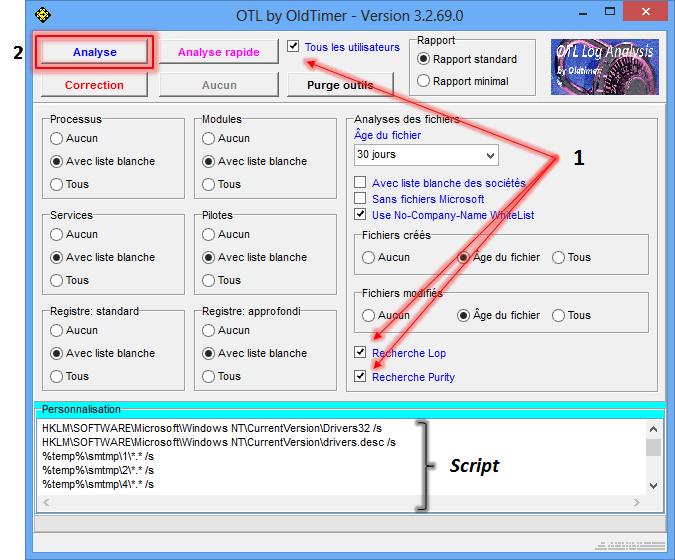
Télécharge OTL de Old_Timer et enregistre le sur le Bureau
Ferme toutes les autres fenêtres et double-clique sur OTL.exe
Sous Vista et Windows 7, il faut lancer le fichier par clic-droit-> Exécuter en tant qu'adminsitrateur.
Vérifie que les cases Tous les utilisateurs, Recherche Lop et Recherche Purity] soient cochées.
Dans le cadre Personnalisation, copie-colle l'intégralité de ce qui suit :
netsvcs
msconfig
safebootminimal
safebootnetwork
activex
drivers32
%ALLUSERSPROFILE%\Application Data\*.
%ALLUSERSPROFILE%\Application Data\*.exe /s
%APPDATA%\*.
%APPDATA%\*.exe /s
%temp%\*.exe /s
%SYSTEMDRIVE%\*.exe
%systemroot%\*. /mp /s
%systemroot%\system32\consrv.dll
%systemroot%\system32\*.dll /lockedfiles
%windir%\Tasks\*.job /lockedfiles
%systemroot%\system32\drivers\*.sys /lockedfiles
%systemroot%\System32\config\*.sav
/md5start
explorer.exe
winlogon.exe
services.exe
wininit.exe
/md5stop
HKEY_CLASSES_ROOT\CLSID\{F3130CDB-AA52-4C3A-AB32-85FFC23AF9C1}\InprocServer32 /s
HKEY_LOCAL_MACHINE\SYSTEM\SYSTEM\CurrentControlSet\Services\lanmanserver\parameters /s
HKEY_LOCAL_MACHINE\SYSTEM\CurrentControlSet\Control\Session Manager\SubSystems /s
HKEY_LOCAL_MACHINE\SYSTEM\CurrentControlSet\Control\Session Manager\AppCertDlls /s
HKEY_LOCAL_MACHINE\SOFTWARE\Microsoft\Windows NT\CurrentVersion\ProfileList /s
HKEY_LOCAL_MACHINE\Software\Microsoft\Command Processor /s
HKEY_CURRENT_USER\Software\Microsoft\Command Processor /s
CREATERESTOREPOINT
nslookup https://www.google.fr/?gws_rd=ssl /c
hklm\software\clients\startmenuinternet|command /rs
hklm\software\clients\startmenuinternet|command /64 /rs
CREATERESTOREPOINT
SAVEMBR:0
Clique ensuite sur Analyse et patiente le temps du scan.

A la fin de l'analyse, les rapports OTL.txtet Extras.txt s'affichent.
Les rapports étant trop longs pour le forum, héberge-les sur SosUpload et indique les liens fournis dans ta réponse.
Les rapports sont sauvegardés sur le Bureau.
Développeur : UsbFix ## Webmaster : SosVirus
Comme dis Birdy -> People help the peop -
Relance OTL.
Sous Persfonnalisation (Custom Scan), copie-colle le contenu du cadre ci dessous (bien prendre :OTL en début).
Clic Correction (Fix), un rapport apparraitra, copie/colle le contenu ici:
:OTL
F3 - HKU\S-1-5-21-1989051327-3976941916-1238747939-1000 WinNT: Load - (C:\Users\aopen\LOCALS~1\Temp\msogcf.exe) -  File not found
O4 - HKU\S-1-5-21-1989051327-3976941916-1238747939-1000..\Run: [Uikskm] C:\Users\aopen\AppData\Roaming\Microsoft\Uikskm.exe File not found

:Commands
[emptytemp]
[emptyflash]
[reboot]
Redemarre le pc sous windows et poste le rapport dans ta prochaine réponse.
Le rapport est sauvegardé sous C:\_OTL\MovedFiles\date_heure.log
#########
Relance ensuite Malwarebyte's, effectue sa mises à jours et lance un scan rapide, dis moi si il détecte encore des choses. Si c'est le cas, post son rapport.
-
All processes killed
========== OTL ==========
Registry value HKEY_USERS\S-1-5-21-1989051327-3976941916-1238747939-1000\SOFTWARE\Microsoft\Windows NT\CurrentVersion\Windows\\Load:C:\Users\aopen\LOCALS~1\Temp\msogcf.exe deleted successfully.
Registry value HKEY_USERS\S-1-5-21-1989051327-3976941916-1238747939-1000\Software\Microsoft\Windows\CurrentVersion\Run\\Uikskm deleted successfully.
========== COMMANDS ==========
[EMPTYTEMP]
User: All Users
User: aopen
->Temp folder emptied: 60794686 bytes
->Temporary Internet Files folder emptied: 703474 bytes
->FireFox cache emptied: 23517727 bytes
->Google Chrome cache emptied: 257882350 bytes
->Flash cache emptied: 0 bytes
User: Default
->Temp folder emptied: 0 bytes
->Temporary Internet Files folder emptied: 0 bytes
User: Default User
->Temp folder emptied: 0 bytes
->Temporary Internet Files folder emptied: 0 bytes
User: Public
%systemdrive% .tmp files removed: 0 bytes
%systemroot% .tmp files removed: 0 bytes
%systemroot%\System32 .tmp files removed: 0 bytes
%systemroot%\System32\drivers .tmp files removed: 0 bytes
Windows Temp folder emptied: 9292 bytes
RecycleBin emptied: 1377 bytes
Total Files Cleaned = 327,00 mb
[EMPTYFLASH]
User: All Users
User: aopen
->Flash cache emptied: 0 bytes
User: Default
User: Default User
User: Public
Total Flash Files Cleaned = 0,00 mb
OTL by OldTimer - Version 3.2.69.0 log created on 11082013_134440
Files\Folders moved on Reboot...
PendingFileRenameOperations files...
Registry entries deleted on Reboot... -
-
-
Pour supprimer les outils de désinfections utilisés :
Télécharges DelFix par Xplode sur ton Bureau.
Lance DelFix, exécuter en tant qu'administrateur sous Windows : 7/8 et Vista
Coche les cases suivantes :
Supprimer les outils de désinfection
Purger la restauration système

Bon week end de 3 jours :) :) :)