MacBook Pro locked, password issue
Solved/Closed
daniel-fr06
-
Oracle666 Posted messages 15 Status Member -
Oracle666 Posted messages 15 Status Member -
Hello,
Following a change in the keyboard option on the MacBook Pro, we can no longer enter the correct password.
Initially, the keyboard setting was French and not French Numeric, the password that worked was with the Caps Lock key activated:
capital E with acute accent (key é,2)
capital apostrophe (key ' , 4)
capital section sign (key §, 6)
capital E with acute accent (key é, 2)
Then my wife, to whom this MacBook Pro belongs, asked me if it was possible to change the keyboard configuration because when she typed text with Caps Lock on and the key 2 for example, she got a capital E with acute accent instead of the number 2. To type 2, she had to turn off Caps Lock, press Shift and then 2.
So I changed the keyboard setting from French to French Numeric.
And now we can no longer enter the correct password.
Can someone tell me how to enter the characters described above with the Caps Lock keyboard option set to French?
Thank you very much.
Following a change in the keyboard option on the MacBook Pro, we can no longer enter the correct password.
Initially, the keyboard setting was French and not French Numeric, the password that worked was with the Caps Lock key activated:
capital E with acute accent (key é,2)
capital apostrophe (key ' , 4)
capital section sign (key §, 6)
capital E with acute accent (key é, 2)
Then my wife, to whom this MacBook Pro belongs, asked me if it was possible to change the keyboard configuration because when she typed text with Caps Lock on and the key 2 for example, she got a capital E with acute accent instead of the number 2. To type 2, she had to turn off Caps Lock, press Shift and then 2.
So I changed the keyboard setting from French to French Numeric.
And now we can no longer enter the correct password.
Can someone tell me how to enter the characters described above with the Caps Lock keyboard option set to French?
Thank you very much.
5 answers
-
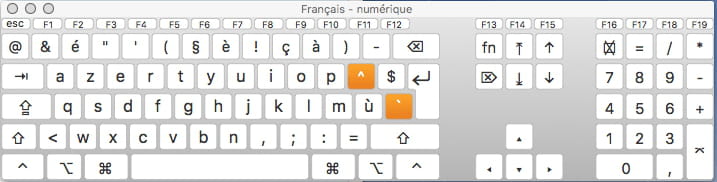
See the screenshots above to respond to your request made elsewhere.
To reset the password on a Mac, the simplest way for a novice:
- you need to insert the installation DVD
- power off the Mac
- press the C key
- hold down the C key and start the Mac
- keep the C key pressed until the screen displays
- release the C key
- choose the language in the window that appears
- ignore the installation window that comes up
- go to the menu bar and find in the menus Disk Utility or, depending on the OS version, reset a password or reset the administrator password. The exact terms and paths in the menus depend on the OS version.
Example for Mac OS 10.6
Go to the menu bar on "Utilities / Password Reset..."
Be careful not to create a password of the type Open Firmware, or internal program. You should only act on the administrator password. Not on the user foot either.
Note that you are at this moment in Qwerty keyboard mode, so choose a password that works in both keyboard modes. For example, tyty, you will change it later, once you are in your session.
When it's done, quit Disk Utility and exit the installation, to restart the Mac.
Always indicate your EXACT CONFIGURATION: Mac model and Mac OS version!
Francis Sanspseudo - Intel iMac running OS 10.7 + iMac-G5 running Mac OS 10.5-
daniel-fr06 - Jan 30, 2012 at 00:11
A big thank you to Sanspseudo who sent me the screenshots of the keys for the French and French numeric options with all the possibilities for uppercase with or without caps lock. Indeed, my wife had entered the sequence:
É'§É
as the password while the keyboard was set to the French option. She of course wanted the code 2462
Since switching to the French numeric option, it is clearly no longer possible to enter the first and fourth digit, so the only option left is to reset the password using the installation CD.
I consider this thread resolved. Thank you again. I will go to Fnac tomorrow morning.
Kudos to this forum!
Daniel
-