
Smart Tech TV without remote control
Hello,
I would desperately like to know if it is possible to press 'ok' on my TV from the brand Smart Tech, i.e., with the buttons located beneath the TV.
I can scroll the home screen normally but I can't select anything if I don't know how to enter 'ok'.
And if it's possible, how?
Thank you for your help
3 answers
-
Moderator
Hello,
As we have no divination power, to attempt an answer, it would be helpful to provide the model of this Smart Tech television. (see label on the back)
Very difficult to catch a black cat in a dark room.
Especially when it’s not there... -
43" LED TV
MODEL : SMT43N3OUC2M1B1
Power Rating : AC 100-240V~ 50/60Hz
Power Consumption : 80W
USB output : 5V ---0,5A
Country of origin : China
Express Luck Europe Electric Kft.
HUNGARY 2310 Szigetszentmiklós, Leshegy út 2
Manufactured under license from Dolby Laboratories,
Dolby, Dolby Audio, and the double-D symbol are trademarks of Dolby Laboratories Licensing Corporation
serial number
SMT432101198001249
I wrote the entire label, unable to attach an image
Thank you for your response
-
Moderator
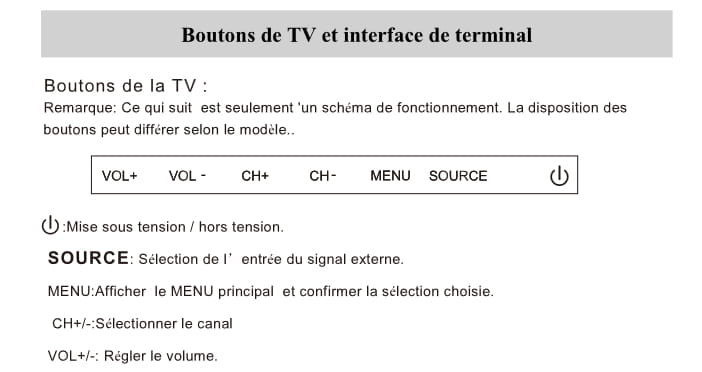
Confirmation, pressing the menu button after selecting a valid action confirms the choice, so it is indeed the equivalent of an OK..
Excerpt from the manual (page 235)
For all practical purposes, one can find a compatible remote:
https://www.amazon.fr/T%C3%A9l%C3%A9commande-Remplac%C3%A9e-Convient-SMT32N30HC1l1b1-SMT43N30UC2M1B1/dp/B0DST5NHB3
It's extremely hard to catch a black cat in a dark room.
Especially when it's not there...
