Unusual PC behavior – Crashes, slowdowns
SolvedHello everyone,
For some time now, I’ve noticed quite strange behavior on my computer, including repeated Windows Explorer crashes, slowdowns and overall system instability.
I’m wondering if these malfunctions could be related to an infection or another software issue.
As indicated in the forum guidelines, I ran FRST (Farbar Recovery Scan Tool) and I’m sending you below the two links to the generated reports:
-
FRST.txt :
-
Addition.txt :
Do you think a disinfection or other manipulations are necessary.
Thanks in advance for your help and for the time you’ll dedicate to my issue.
Have a great day everyone!
4 answers
-
Moderator
Hello,
To check your RAM because what can cause similar symptoms I think, RAM with errors, otherwise a SSD with errors.
Boot from a USB drive you prepare with Memtest86 Free
(Top right)
Start it using the PC's Boot Menu key
We can search on Google "[Brand Model] Boot Menu Key"
Let the automatic test run without touching anything until the end, PASS or FAIL.
-
Then to test your SSD and your HDD which could also cause these symptoms, even if not the system disk at fault.
-
Otherwise there would be little cleaning to do I think, I will let a Security Contributor handle it.
@+ -
Moderator
Hello ,
NO INFECTION ON THE PC.
Windows is not up to date; it should be at version 26H2, you’re three versions behind.
There are a few orphan/obsolete processes; if you want to remove them do the following.
Procedure to follow in the indicated order:
1- Open FRST as administrator by right-clicking FRST and selecting run as administrator
2 - Copy the entire script that is in the box that follows:Start:: CreateRestorePoint: CloseProcesses: HKLM\...\Run: [AdobeGCInvoker-1.0] => "C:\Program Files (x86)\Common Files\Adobe\AdobeGCClient\AGCInvokerUtility.exe" (No file) HKU\S-1-5-21-2041161678-726789958-1328963640-1000\...\Run: [Teams] => "C:\Users\User\AppData\Local\Microsoft\WindowsApps\MSTeams_8wekyb3d8bbwe\ms-teams.exe" msteams:system-initiated (No file) Task: {1BC3C165-6B2D-4287-8CB7-3E7B655D8A23} - System32\Tasks\AdobeGCInvoker-1.0-MicrosoftAccount-guillaumetib@yahoo.fr => C:\Program Files (x86)\Common Files\Adobe\AdobeGCClient\AGCInvokerUtility.exe (No file) Task: {C48D11D1-07F2-4C43-949C-96BE9DDC7548} - System32\Tasks\GoogleUpdateTaskUserS-1-5-21-2041161678-726789958-1328963640-1000Core{3018C511-B1FD-4004-975C-271848F1DE9F} => C:\Users\User\AppData\Local\Google\Update\GoogleUpdate.exe /c (No file) Task: {F1BAEF0F-552F-4DE8-8B19-5D6B7057D162} - System32\Tasks\GoogleUpdateTaskUserS-1-5-21-2041161678-726789958-1328963640-1000UA{55AFF046-9C4F-40B5-B9DF-D2D273AEBA5E} => C:\Users\User\AppData\Local\Google\Update\GoogleUpdate.exe /ua /installsource scheduler (No file) Task: {E0F10DCF-44AD-40E8-9370-FB5DA59F93FB} - System32\Tasks\Microsoft\Windows\UpdateOrchestrator\USO_UxBroker => %systemroot%\system32\MusNotification.exe (No file) S4 AmdTools64; \SystemRoot\System32\drivers\AmdTools64.sys (No file) End::3- Once the script is copied, click Fix, FRST will automatically take the script that's in the clipboard.
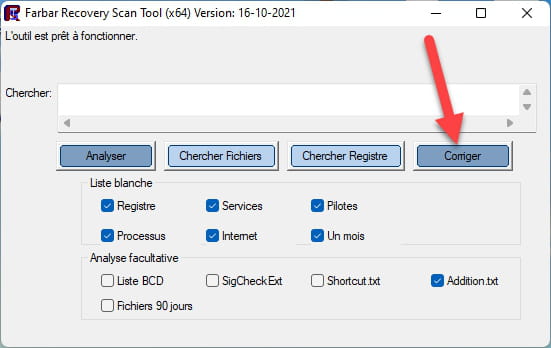

Let the fix run; once it finishes you will be prompted to restart your PC, do it as soon as prompted, see below.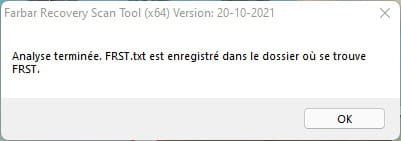
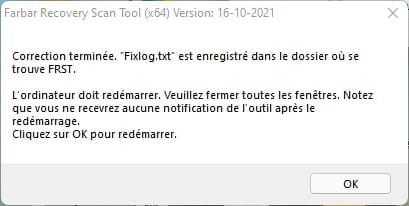

Then once your computer restarts:
4- You will have a Fixlog file on your desktop; then send this report fixlog to or .Then give the generated link from or in your reply.
Since your PC is not infected, regarding the security forum this is all.
bazfile
Security Moderator/Contributor.
a hello, a reply, a thanks always pleases. -
okay I’m going to clean up, thanks for the script
I'll give you feedback
NO PC INFECTION.
"Windows 11 is not up to date, it’s at version 23H2 while it should be at 26H2, you’re three versions behind" thanks yes Windows refuses updates because it says my SSD on which Windows 11 is installed is not compatible (Windows Update. Microsoft is currently applying a compatibility block to a Western Digital NVMe SSD in my tower)
in short I’m going to migrate this to the Windows 11 forum
-
here is the link:
thanks again