HDMI Switch Connection Issue
Hello everyone,
I'm reaching out to you to help me solve my problem; I've been pulling my hair out since Monday, at this rate I'll be bald by the end of the weekend...
So, I recently bought a new TV (LG 75UN71006LC) which has 3 HDMI ports (my old TV had 4).
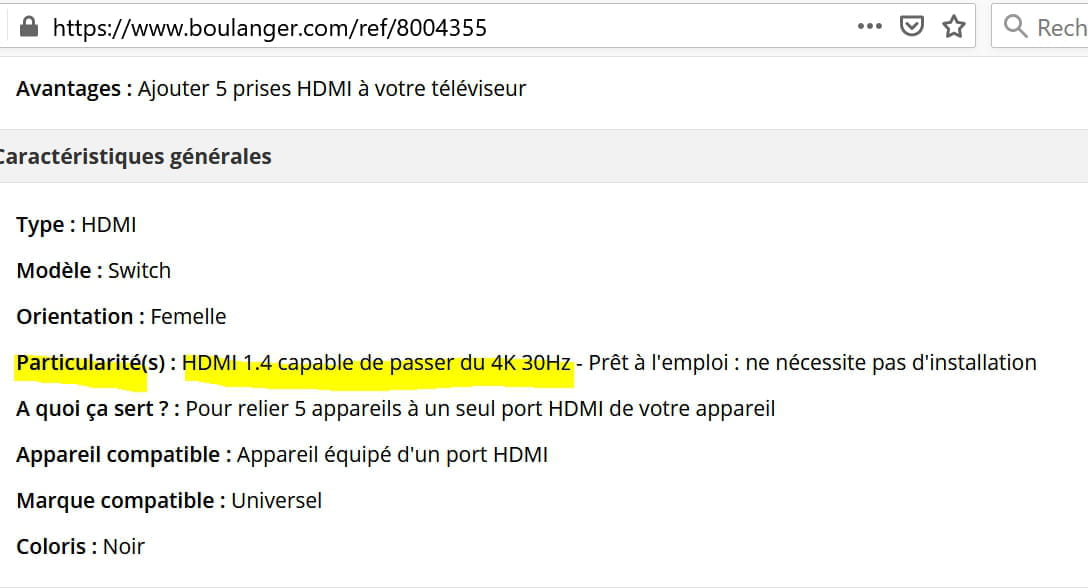
I decided to buy an HDMI switch at Boulanger, Switch HDMI Essentielb HDMI 4K 5 inputs / 1 output (Ref: 0008004355)
My goal is to connect my consoles (PS4 slim, XBOX ONE S, Nintendo Switch) to this switch since the other 2 HDMI ports on my TV are occupied by a Fire TV stick and my PC
When I wanted to install the device, I encountered a problem: NO SIGNAL...
Logically, this type of device should be plug & play, so I tried connecting the consoles one by one and the PS4 works, the Nintendo Switch too, but the XBOX doesn't give a signal. I tried connecting the latter (without a hard drive or any other additional device to see if the problem came from that, but nothing works), the issue being that when I connect my Xbox, I end up with no signal again for the other consoles.
I looked into the power settings of my console, both in energy-saving mode and instant-on mode; the result is the same...
If anyone has a solution to propose to solve this problem, I’m all ears.
Thanks in advance and have a great end of the year.
I'm reaching out to you to help me solve my problem; I've been pulling my hair out since Monday, at this rate I'll be bald by the end of the weekend...
So, I recently bought a new TV (LG 75UN71006LC) which has 3 HDMI ports (my old TV had 4).
I decided to buy an HDMI switch at Boulanger, Switch HDMI Essentielb HDMI 4K 5 inputs / 1 output (Ref: 0008004355)
My goal is to connect my consoles (PS4 slim, XBOX ONE S, Nintendo Switch) to this switch since the other 2 HDMI ports on my TV are occupied by a Fire TV stick and my PC
When I wanted to install the device, I encountered a problem: NO SIGNAL...
Logically, this type of device should be plug & play, so I tried connecting the consoles one by one and the PS4 works, the Nintendo Switch too, but the XBOX doesn't give a signal. I tried connecting the latter (without a hard drive or any other additional device to see if the problem came from that, but nothing works), the issue being that when I connect my Xbox, I end up with no signal again for the other consoles.
I looked into the power settings of my console, both in energy-saving mode and instant-on mode; the result is the same...
If anyone has a solution to propose to solve this problem, I’m all ears.
Thanks in advance and have a great end of the year.
7 answers
-
I just found something, I managed to start my Xbox by setting its resolution to 1080p; via the HDMI cable from the switch, it only runs in 1080p. Once set to 4k, the image skips or doesn't display at all...
The cable is a high-speed HDMI 2.0 cable (supposed to support 4k among other things..)
Obviously, the problem seems to be with the HDMI cable if I follow this logic and not the switch. I will look into buying another cable, and if this last one doesn't work, I think it will then be the switch that doesn’t support 4k despite what was stated on it...-
ContributorHi,
It all depends on the quality of the HDMI cable and the price you paid for it...
You can have an HDMI cable with the latest standard (2.1) but if you bought it on Amazon for €5.00, you should expect to run into issues...
In principle, 4K is already supported by HDMI 1.4, with compatibility up to 30 frames per second; beyond that, it's not guaranteed.
Best regards and have a good evening ;-) -
@STARGATE43I'm responding late because I've just gotten off work, but indeed I was wondering yesterday about the quality of the HDMI cable. To that end, I tested my Xbox One with a direct connection using:
- its original cable (4k 60fps ok)
- the original cable from my decoder (4k 60fps ok)
Logically, I thought to use these two cables to connect the console to the switch (one for Xbox, the other for switch-to-TV), and that should work, but in the end, it's the same story—no signal...
From this, I draw two conclusions:
- either the HDMI switch does not support 4K at all, even though it is described as supporting this format,
- or the HDMI switch supports 4K but only up to 30Hz, and at that point, the seller misled me, as I had specifically asked him if it could be compatible with my consoles for 4K support, and he replied, "Oh yes, no problem..."
Anyway, I've found the source of the problem; in any case, I know a bit more about this beast now... I'm going to go back to Boulanger and have a word or two with them.
Thanks for the responses anyway, and if anyone stumbles upon this topic, don't be fooled by the mere mention of "4K"; make sure it supports 60 or 120Hz formats to avoid any trouble... -
Moderator
-
@baladur13...Something I realized while reading on the site, yes, except that when I was in the store, the seller had duly addressed this detail when he recommended the item to me, even though I had asked him if it worked for 4K with the consoles...
-
Contributor
-