
Very small left scrollbar
Solved
brucine Posted messages 25275 Registration date Status Member Last intervention -
Friends of the day..........Hello!
W11-Pro -25H2 up to date...!
For some time now the scroll bar has become very narrow and not practical to use....
I have tried everything (even in the registry by increasing this size......) but no result ......I restored an relatively old System image where everything was OK and still the same ......
Having run out of cartridges, I even reinstalled Windows 11 completely (PC not compatible with Rufus ...already done several times without any problem...) and still this cursed scroll bar too narrow (For info I own 2 identical desktop PCs except a different graphics card ....on one everything is fine and why not on the second?)
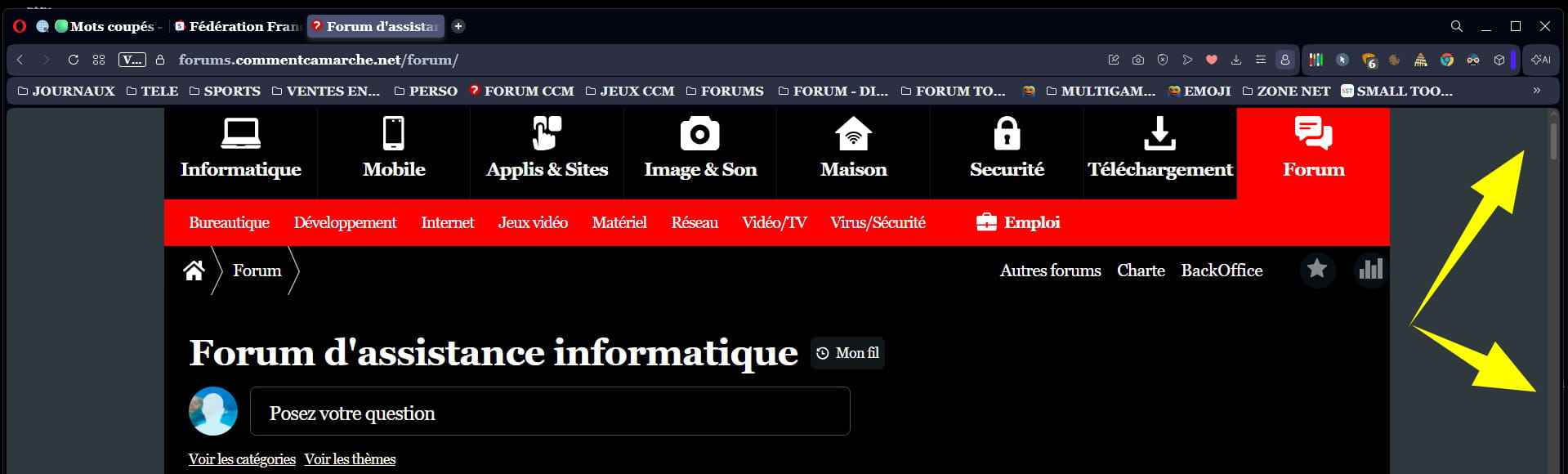
If someone knows the remedy, I thank them in advance .....
With my thanks
Best regards
1 answer
-
Hello,
We don't see any parameters other than those in the registry (aside from the fact that some argue it would only apply after disabling Fast Startup and a full restart) otherwise it can be browser-dependent.
For example here for Firefox, I don't know which browser is being used.
https://www.justgeek.fr/firefox-modifier-largeur-barre-defilement-136436/-
Hello brucine......
Thanks for the help, much appreciated.....
You hit the nail on the head because with Firefox the scrollbar is significantly wider....... I’ve been using Opera One for ages without problems except for a few days on this PC and not on the other ???
I'm not a big fan of Firefox, but until better days come I’ll stay with it on this PC
I hadn't thought of Firefox, Chrome yes but the result was the same (not surprising since Opera uses Chrome)
Thank you again ...... I reinstalled W11 for not much actually but the important thing is that everything works!
Have a nice day and A+
Slts
Opera is not known for being very prolific in documentation.
The engine being that of Chrome, one can try to take inspiration from it.
A number of extensions claim to do the job (but in Opera?) and I fear that these are only “cosmetic” changes (color, shape...); one can still try one of the Opera extensions.
I had an inspiration, you just need to modify a userChrome.css: lost, I peeked into the developer threads, the choice parameters are limited to “thin” or “normal” (not “large”) unlike Firefox which has settings adapted.
So overall, probably not too many solutions except maybe an extension that would work, but they seem to rely in our interest only on the previous settings.
Have a good end of day as well.
-
