Troubleshooting Windows 10 Pro installation on Lenovo
brucine Posted messages 25320 Registration date Status Member Last intervention -
hello
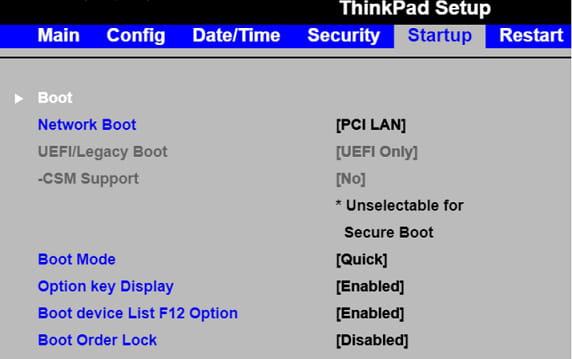
during the installation of the system on the Lenovo computer it does not finish. it asks for the adjustment on uefs the problem is that I am looking for the function to enter the settings section to make this adjustment, it seems that the manufacturer did not program the help of the appropriate functions to do this / thank you
thank you
1 answer
-
Hello,
There are many Lenovo models, but access to the BIOS is generally at startup with F1, or if GPT installation is chosen UEFI must be checked, regardless of whether CSM is available as an alternative and temporarily disabling Secure Boot if it conflicts with the installation.
The boot order, by moving up or down the boot devices with the arrows, must be USB at the top, all this while navigating the BIOS menu with the arrows.
Depending on how the USB drive was created (for example with Rufus) it must have been created in GPT.
Conversely, if the PC is so old that the BIOS does not support UEFI but then installing Windows 10 will probably be a challenge due to drivers, the BIOS is of course CSM and the drive is MBR.