Windows 10 Installation Issue
Solved
trocme95
Posted messages
1520
Status
Member
-
Malekal_morte- Posted messages 178136 Registration date Status Moderator, Security Contributor Last intervention -
Malekal_morte- Posted messages 178136 Registration date Status Moderator, Security Contributor Last intervention -
Best wishes to everyone. I replaced a faulty keyboard on a laptop. One of the issues is the installation of W10. After entering a key, I get the following error message:
"The upgrade option is not available if you are starting your computer using Windows installation media.
If a copy of Windows is already installed on this computer and you want to proceed with an upgrade, remove the installation media and restart your computer. Once Windows has started normally, insert the installation media and run the Windows installation program."
PS: I'm using a Windows 10 boot key
Thank you for your help.
"The upgrade option is not available if you are starting your computer using Windows installation media.
If a copy of Windows is already installed on this computer and you want to proceed with an upgrade, remove the installation media and restart your computer. Once Windows has started normally, insert the installation media and run the Windows installation program."
PS: I'm using a Windows 10 boot key
Thank you for your help.
3 answers
-
Hello,
you need to select custom and not upgrade.
~~
You need a minimum of an 8 GB USB drive.- Create a USB drive with Media Creation Tool: Download and create a Windows 10 USB drive with Media Creation Tool
- Boot from it by modifying the boot sequence and indicate the USB drive or DVD: How to boot the computer from USB drive
If the USB drive doesn't work, try making another one with Rufus: how to download Rufus.
Download the ISO file, for example, with Adguard: Download Windows ISO
Launch Rufus and then specify the path to the ISO file
In partition scheme, choose GPT.
For more details, refer to this tutorial for details: how to create a Windows installation USB drive
The Windows 10 installer should then start:
Follow this tutorial that explains how to install Windows 10: how to install Windows 10.
All steps are provided from A to Z with tips at the end to secure Windows 10.- Let yourself be guided to install Windows 10.
- Choose custom (not upgrade)
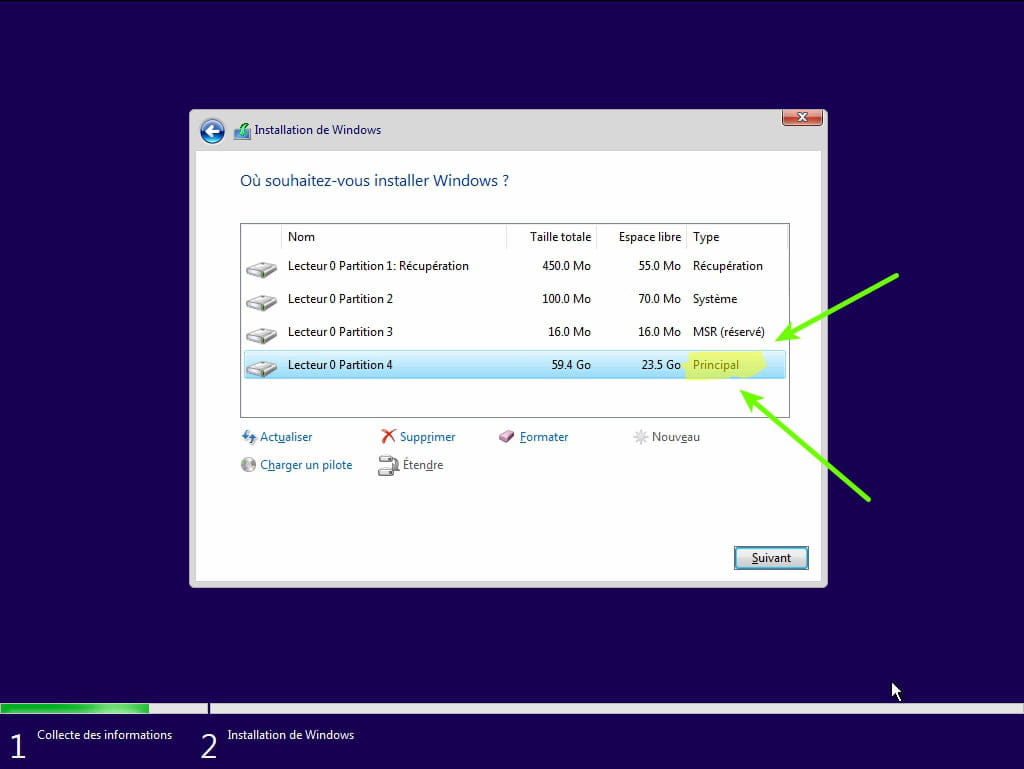
- During the partitioning phase, select the main partition and click next.
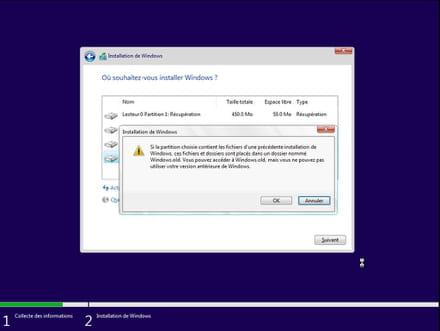
- The installer will tell you that Windows is already present and offer to move it.
- Follow the Windows installation procedure using the tutorial above.
Make sure not to format.
Your user data will be copied to the Windows.old folder.
Once Windows is installed, I recommend following these tips for properly configuring and using Windows: Tips after reinstalling Windows.
--
Please press any key to continue the disinfection... -
Hello. I do have a boot key for W10 that worked previously on this PC.
I have the choice between "install now" and "repair this PC".
I suppose I need to go into "command prompt", but what should I type there? Thank you. -
Hello,
The message indicates that you need to boot from the USB stick at the startup of the PC with the BIOS and not under Windows.