
Sttube.inf
kaneagle Posted messages 86296 Registration date Status Moderator Last intervention -
Hello,
I am facing the problem of an incompatible driver that prevents the memory integrity from being activated. The incompatible driver has been identified as:
STTub30.sys
I have the ability, with the Driver Store Explorer software, to delete "sttube.inf" which contains the incompatible driver, but I have read that deleting certain drivers could cause various problems. I therefore want to be sure that this operation is safe for my computer.
Here is the information I have:
Driver type: USB bus controller
Provider: STMicroelectronics
Driver version: 3.0.4.0
Driver date: 07/05/2012
Size: 64KB
What do you think?
Thank you.
7 answers
-
Hello,
Unless the manufacturer has a Microsoft-certified driver update, which to my knowledge is not the case, the only solutions are to disable memory integrity or to remove this driver.
The latter is the most commonly favored because it is a specific USB hardware controller that is of no use in general cases.
Some have a quick method of renaming it with .old at the end, which allows for its removal; otherwise, see here:
https://www.reddit.com/r/MSI_Gaming/comments/11dl4i2/sstub30sys_driver_incompatible_with_windows_core/?tl=fr
-
It is indeed a generally useless USB hardware controller, but its removal can sometimes prevent the PC from booting up...
Upon careful consideration, I prefer to have a required action notification from Windows Security rather than a blue screen at startup...
Thank you for your response, brucine.
-
Hello,
Windows + R
Type --> devmgmt.msc and OKClick on View
Check --> Show hidden devices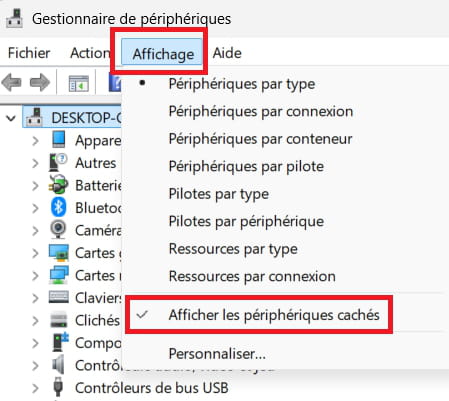
---------------------------------------------------------------------------------------------------------------
Locate the problematic device and also check in --> System devices
Post the no. Hardware ID in your next message.Example image:
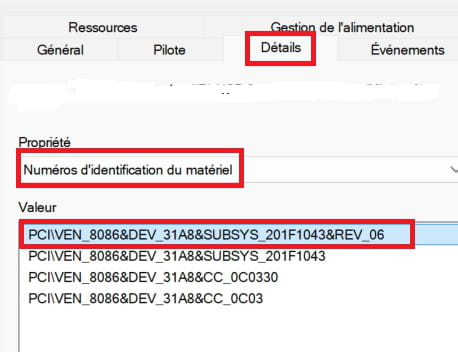
------------------------------------------------------------------------------------------------------------Brand and model no. of the PC?
Windows + R
Type --> msinfo32.exe and OK
Check in Manufacturer and model
Example image: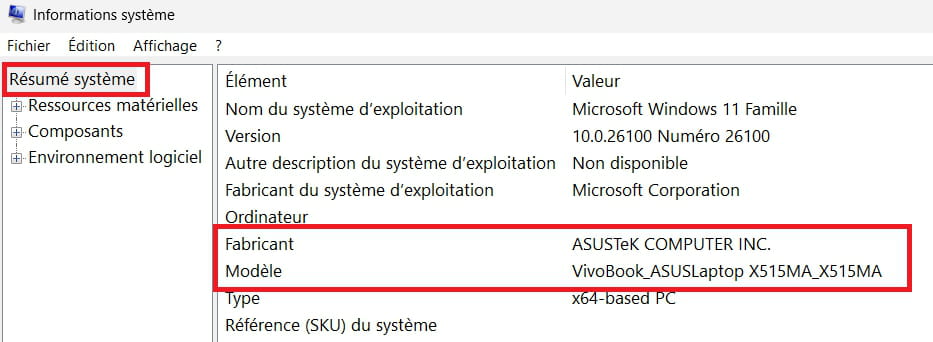
---------------------------------------------------------------------------------------------------------------
Also carry out an sfc:
Windows key + X
Select --> Terminal (administrator)
Type --> sfc /scannow and enter
A system file check will be performed. -
Hello kaneagle,
I've gone through each device, but I can't find any problematic ones in the list.
My computer is a portable Acer, model Predator Helios 500.
The system file check yielded the following result:
"the Windows Resource Protection program found no integrity violations."
I want to specify that I've had this notification since I upgraded from Windows 10 to Windows 11.
-
What do you have in USB bus controllers?
-
In "USB controller" in the device manager, I have:
- Intel(R) USB 3.1 eXtensible Host Controller - 1.10 (Microsoft)
- USB Mass Storage Device
- USB Root Hub (USB3.0)
- USB Composite Device
- USB Composite Device.
-
Go to Windows Update and do the updates.
Go to Advanced options and check under Optional if any drivers, etc. are offered to you....
