Canon MG6250 Printer Functionality on Windows 11
kaneagle Posted messages 86260 Registration date Status Modérateur Last intervention -
Hello,
I just set up a new PC with Windows 11
I can't print with it
Windows recognizes the printer + scanner
I can edit a printer test page
When I start a print job, a window opens to save the document without starting the print
I haven't found a driver for mg6250 on the Canon site for Windows 11
3 réponses

Hello,
See with this link... https://www.canon.fr/support/consumer/products/printers/pixma/mg-series/pixma-mg6250.html?1069142705
In this same link, it is stated...
Unfortunately, your device is no longer supported under the selected operating system... That is to say... Windows 11.

Hello,
Download and install --> 7Zip 64 bits
Download the Windows 10 driver --> PIXMA MG6250
(It might work)
Then, right-click on the driver --> mp68-win-mg6200-1_02-ea24.exe
Select --> 7Zip
Choose --> extract to "mp68-win-mg6200-1_02-ea24\"
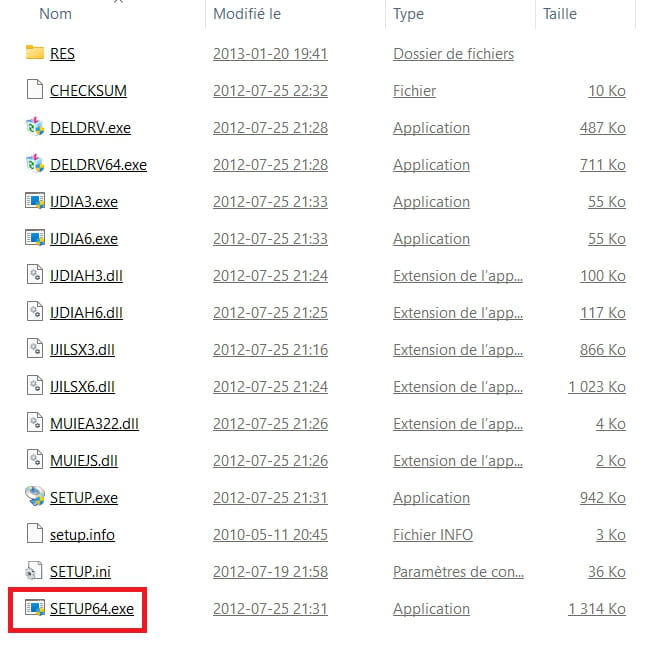
Go to the unzipped driver folder --> mp68-win-mg6200-1_02-ea24
Folder --> DrvSetup
Run the --> SETUP64.exe
Follow the instructions.