
Threat detected - Control center - Aorus Windows 11
Solved
Naudhiz Posted messages 46 Status Member -
Hello everyone,
I recently upgraded my computer to Windows 11, and since then, Windows Defender has detected a threat that I didn't have before.
The threat concerns a program that is pre-installed on the computer and is used to manage different keyboard setups (including colors), fans, display, etc. Since then, this program no longer opens, which is normal as Defender has blocked it.
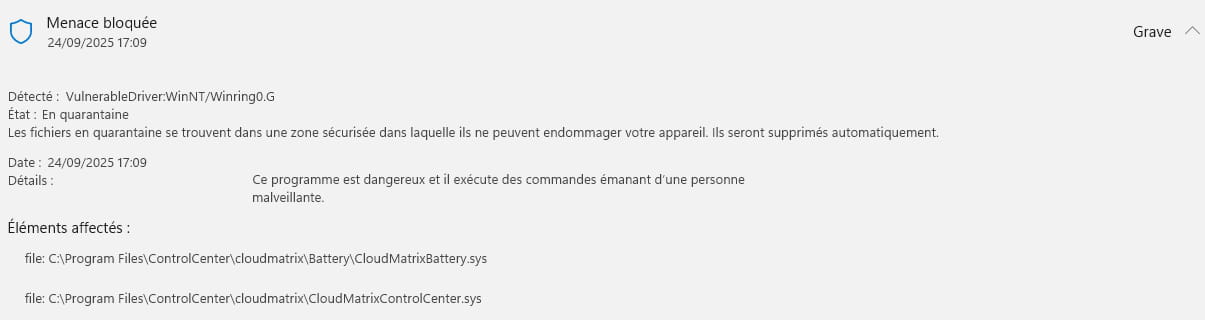
When I look online, some say you need to put an exception in the antivirus, others say it's pointless, and according to Microsoft, this software is meant to recover my data.
So, I'm not sure what to do about the detected threat. If anyone has experienced this problem or has any advice on the issue, I would appreciate it.
Thank you and have a good evening,
Naudhiz
6 answers
-
Hello, @Naudhiz StatusMember
Please read the pinned posts on the Virus forum.
https://forums.commentcamarche.net/forum/virus-7
(Redirected to the Virus forum) -
Hello,
After reading the pin, the .txt files generated by the FRST analysis:
FRST: https://pjjoint.malekal.com/files.php?id=FRST_20250925_p5m5m15f138
Addition: https://pjjoint.malekal.com/files.php?id=20250925_w15s11f11v9b12
Have a good evening
-
Hello,
After researching, CloudMatrixControlCenter.sys and CloudMatrixBattery.sys appear to be false positives.Files found in Gigabyte programs
C:\Program Files\ControlCenter\cloudmatrix\CloudMatrixControlCenter.sysC:\Program Files\ControlCenter\cloudmatrix\Battery\CloudMatrixBattery.sys
You can always send them to Virustotal for reassurance to see more details about the files.
https://www.virustotal.com/gui/home/upload
I saw a "Restriction" on Windows Update, and also on Edge; perhaps a setting is not set to default, changed by yourself, it may be trivial, nothing serious if everything works well with Windows Update and Edge.
@+ -
Hello,
Thank you for the information.
I uploaded the files to Virustotal for verification as suggested. For "CloudMatrixControlCenter.sys", the status of all items is "Undetected". However, for the other one, "CloudMatrixBattery.sys", I have a positive result for: MaxSecure -> Trojan.Malware.300983.susgen.
According to various forums, this would be a false positive. So I assume I can exclude the Control Station from Windows Defender.
Thank you and have a nice weekend.
-
Hello,
If I'm not mistaken, "CloudMatrix" is a HUAWEI software!?
If that's the case, I honestly wouldn't trust it...
-
flo88 Posted messages 28484 Registration date Status Contributor Last intervention Ambassadeur 5 168
Hello
The ControlCenter from Gigabyte/Aorus isn't very useful; it is advisable to simply uninstall it.
-
Hello,
Yes, disabling any Service, Task, or Logon with the cloudmatrix tag using Autoruns in the Filter box may be sufficient.
Look at the second part, regarding Autoruns
https://forums.commentcamarche.net/forum/affich-38206831-alors-vous-voulez-supprimer-les-virus-vous-meme-commentHello,
The application is also launched from the BIOS, and probably in the taskbar because it starts up at boot.
In this last case, if Windows Defender didn't prevent it from launching, its icon (or independently the software that launches it) must have a setting that starts it at boot, which should be unchecked.
We can find it along with a startup entry via Autoruns, just like the corresponding service (run services.msc).
https://learn.microsoft.com/fr-fr/sysinternals/downloads/autoruns
Look for anything that might cause App Center, Gigabyte, or equivalent in the Run entries and services, and uncheck it in Autoruns or set it to Disable-stop in services.msc, or possibly to Manual-stop if you want to start it on demand.
If you want to go further and uninstall it, see there in the BIOS and the programs (in English).
https://www.windowsdigitals.com/how-to-uninstall-disable-gigabyte-app-center-from-bios/
-



