
Hacking Suspicions, Virus
fabul Posted messages 42308 Registration date Status Moderator Last intervention -
Hello,
I ran a scan with Malwarebytes but despite the issues I'm encountering, I'm being told that there's nothing dangerous or malicious on my PC. The problem is that I'm experiencing a lot of BSODs, frequent lags, slow internet in certain games, high temperatures despite having thermal paste applied, and my computer is clean. The components are also recent. I've had other PCs, but I think this one is the slowest despite the date of my previous purchases; I'm having a lot of difficulties with it.
Moreover, I’ve noticed that I have devices installed without my knowledge and hidden in the device manager. I think I might be the victim of hacking or at least remote access. I cannot access GPEDIT, but I previously noticed that I was sharing files without my permission.
Anyway, I want reassurance, but I really think something is off. My internet searches are constantly personalized despite the search engines I have always used.
I shared with the Malwarebytes forum that I had downloaded a tool from touslesdrivers.com, which is recognized by Total Virus as a trojan in over 18/84.
Thank you for reading. I hope you can help me. I want to point out that fixlists and MSERT find nothing alarming on my PC, but I have doubts. For example, updates to the Windows Defender database appear to install and then unexpectedly stop, there are flickers at startup, a very quick black screen as if a command line is executing, sometimes my PC refuses to access the desktop and locks me on the BIOS multiple times.
14 answers
-
Hello @Gucan StatusMember.
Download FRST.
Once downloaded save FRST on the desktop then right-click on FRST and choose Run as administrator which gives you this:

 Wait for the message the tool is ready to run to appear then click on Analyze.
For your information:
 If you get a Microsoft Defender alert, disregard it, click on More info then on Run anyway, see below.

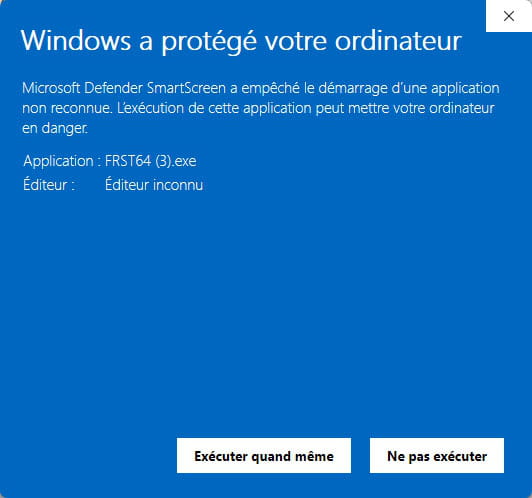
Attention, wait for the messages saying that the analysis is complete to appear.


At the end of the analysis the two reports FRST and Addition will be on the desktop.


Send the FRST and ADDITION reports to https://pjjoint.malekal.com/ or https://www.catupload.com/.
Then attach the two links generated by https://pjjoint.malekal.com/ or https://www.catupload.com/ in your reply.
bazfile
Moderator/Security Contributor.
a hello, a response, a thank you are always appreciated. -
Hello,
I'm really sorry for the delay. I tried to manage the issue and I was also in touch with Malwarebytes support, but without a real solution. I also noticed several Windows users with names like "RESTRICTED".
Have a good day and thank you.
https://pjjoint.malekal.com/files.php?id=20250929_w7h10w14z12o8
https://pjjoint.malekal.com/files.php?id=FRST_20250929_y10m8d12m13g9
-
Hello @Gucan StatusMember.
The additional report is incomplete; it only has the beginning. Referring to the only complete FRST report, there is no infection on the PC.
The problem lies elsewhere; it could come from the Sophos software or a driver. The possibilities are numerous. If I were you, I would uninstall all the Sophos software to see if it’s better without them. If nothing changes, you can always reinstall them.
For your information, Windows 10 already has its own antivirus that is effective and sufficient. It activates as soon as no other antivirus is installed on the PC, so there's no need to add anything else. Since your problem is not infectious, I will redirect your post to the Windows 10 forum.
That’s all from me.
Good luck on the Windows 10 forum.
bazfile
Moderator/Security Contributor.
A hello, a response, a thank you are always appreciated. -
https://pjjoint.malekal.com/files.php?id=20250929_e5y15q13v10f13 %3B=
Here is another scan of addition.TXT
-
As for an infection, my answer remains unchanged, your PC is not infected.
For your information:
In the additional report, we see that there are network devices that are disabled in the Device Manager; these are the WiFi, Bluetooth, and Ethernet network cards.
More details here:
Name: Realtek 8851BU Wireless LAN WiFi 6 USB NIC
Description: Realtek 8851BU Wireless LAN WiFi 6 USB NIC
Class Guid: {4d36e972-e325-11ce-bfc1-08002be10318}
Manufacturer: Realtek Semiconductor Corp.
Service: rtwlanu6
Problem: This device is disabled. (Code 22)
Resolution: In Device Manager, click "Action", and then click "Enable Device". This starts the Enable Device wizard. Follow the instructions.Name: Microsoft Bluetooth LE Enumerator
Description: Microsoft Bluetooth LE Enumerator
Class Guid: {e0cbf06c-cd8b-4647-bb8a-263b43f0f974}
Manufacturer: Microsoft
Service: BthLEEnum
Problem: This device is disabled. (Code 22)
Resolution: In Device Manager, click "Action", and then click "Enable Device". This starts the Enable Device wizard. Follow the instructions.Name: Realtek PCIe GbE Family Controller
Description: Realtek PCIe GbE Family Controller
Class Guid: {4d36e972-e325-11ce-bfc1-08002be10318}
Manufacturer: Realtek
Service: rt640x64
Problem: This device is disabled. (Code 22)
Resolution: In Device Manager, click "Action", and then click "Enable Device". This starts the Enable Device wizard. Follow the instructions.Name: Bluetooth Device (Personal Area Network)
Description: Bluetooth Device (Personal Area Network)
Class Guid: {4d36e972-e325-11ce-bfc1-08002be10318}
Manufacturer: Microsoft
Service: BthPan
Problem: This device is disabled. (Code 22)
Resolution: In Device Manager, click "Action", and then click "Enable Device". This starts the Enable Device wizard. Follow the instructions.That’s all from my side; since your problem is not infectious, do not expect any further response from me.
Have a nice day.
bazfile
Moderator/Security Contributor.
A hello, a response, and a thank you are always appreciated. -
Hello,
Sophos, has it been there before or after the problem?
Antivirus programs are often sources of problems.
You could uninstall Sophos, Malwarebytes too; otherwise, have you seen the number of Sophos and Dell processes?
From Dell Alienware, there may be a process that allows you to change the keyboard backlighting; otherwise, the rest is not very useful.
Number of superfluous processes
Look to manage your startup items, don't be afraid to uncheck truly unnecessary elements with Autoruns
And double-check with Process Explorer (See processes in live)
See the second part further down here:
https://forums.commentcamarche.net/forum/affich-38206831-alors-vous-voulez-supprimer-les-virus-vous-meme-comment
I currently have 102 processes in total in Process Explorer, and nothing resource-hungry; sometimes it can go up to 120 with Firefox open, it fluctuates.
Then check the temperature under load with OCCT Personal
https://www.ocbase.com/download
PS:
And indeed, faulty drivers can create instabilities.
I'm currently looking at Driver Booster Free (No Giveaway for the current version) but be careful; during installation, there are traps to install other IOBit software! Like, you must not click on install a second time during installation! -
Hello,
I'm getting back to you after reinstalling Windows, everything was better, but after a routine scan with the Sophos remove virus tool, it detected a virus in my Kaspersky antivirus. I can't delete the files without changing the permissions, and the issue has caused damage to Microsoft Defender. I no longer have real-time protection active or any protection at all because an administrator changed the rights. I don't even know if it's still present in the system because I only uninstalled the software, and that removed the relevant folder. Attached are the FRST logs.
Thank you for reading, hoping you can help me.
https://pjjoint.malekal.com/files.php?id=20251003_5v7j6u10e6
https://pjjoint.malekal.com/files.php?id=FRST_20251003_r10t5h15m10g10
-
Re Hello,
Still experiencing BSODs or crashes?You didn't really format, but installed Windows as an upgrade, right?
I see in FRSTGroupPolicy\User: Restriction?
Is it an antivirus that did this?
Stop playing around with antivirus software; it causes more problems than it solves. -
Since the discovery of this virus, the PC has been terribly slow whereas after the installation I had regained some fluidity. It should also be noted that I did a "clean all" in cmd because I couldn't install the Windows OS due to an impossible-to-remove boot volume.
Unfortunately, I don't know how to create a Fixlist nor do I have the knowledge regarding its effect on the computer. Microsoft Defender is completely disabled "Unknown." I tried your Tool but it hasn't changed anything.
-
Moreover, Kaspersky is still the antivirus provider even though I've never used it. I had a BSOD during the installation of an antivirus update, but I insisted on reinstalling it, and it worked by removing the internet connection.
Thank you.
-
I don't know if
Start::
CreateRestorePoint:
CloseProcesses:
GroupPolicy: Restriction ?
End::Includes
GroupPolicy\User: Restriction ?
Probably. -
It is common for an antivirus to find viruses in the databases of other antivirus software.
Defender is probably the least intrusive, "probably" I say because I actually disable it; I haven't used commercial antivirus software for over a dozen years.
A firewall (Comodo Firewall 12.2.2.8012) and a script blocker for my browser (NoScript) and RegRun Platinum paid version scan regularly for something new and to verify.
Aside from Comodo Firewall, there’s nothing heavy installed, but a good firewall is important to control the incoming and outgoing connections of all programs to the web.
For Comodo, during installation, you should uncheck everything except the firewall (In Options)
https://download.comodo.com/cis/download/installs/1000/standalone/cispremium_only_installer.exe
MD5: 1eaa9d2233908e517d4f51d94292acb9
Then configure it (Firewall) in Custom mode with Alert frequency level Very High
Methodically disable updates and all other Comodo features (HIPS, VirusScope, Web Monitoring, Device Logging, script scans, etc.) so that none of these elements interfere with your normal actions or burden the system unnecessarily.
NoScript for Firefox can be found here
https://addons.mozilla.org/fr/firefox/addon/noscript/
You must allow each site you visit at least once when prompted for interaction.
PS: When you want to reinstall Windows, do it like this:Use the tool to download the Windows 10 ISO file (For another PC) to create a USB stick (Minimum 8GB) to upgrade, repair, or install Windows
https://www.microsoft.com/fr-fr/software-download/windows10/
Once you have the Windows ISO file, you can create a bootable USB stick using Rufus
If the PC is old, you need to create the stick in MBR mode
If it is recent (Windows 8 or higher) in GPT mode for EFI
Boot from it using the PC's Boot Menu key
You can search Google for "[Brand Model] Boot Menu Key"
Select "Custom Installation" (Not upgrade)
No need to format if there’s space; if there are data, they will be found in a Windows.old folder (Which will be automatically deleted after 10 days)
Install on the same partition, or if you prefer, delete all system partitions and create a new one (This deletes the data).
-
If you're searching with Reanimator, in "Inspection" mode with the Set Filter: "Display All" and type "Kaspersky" in Search
Do you have any results in one or the other tabs? Screenshot?
You can take screenshots with Greenshot
https://getgreenshot.org/downloads/ -
-
You have installed Reanimaror, I saw it on a scan.
It can also detect certain restrictions (Policies or Policy in English)
Start it and click > Fix Problems > Fix Malware issues
If it detects anything, you can still choose right away with the Filter Set button: "Display All but Exclude Signed by Microsoft/Google/Greatis" for a slightly broader view than the default analysis, but more focused on what could be problematic (less known) than Display All
Or (to see Kaspersky items) choose Display All
If it didn't detect any suspicious items, click on Inspection Mode, you will switch to Display All mode
With the Search box, you can find items that match the searched criteria.
So, for each tab at the top in Display All mode, in the Search box, you can type Kaspersky
PS: This .reg key can help to reactivate Defender
https://www.cjoint.com/c/MCtpbSiSIRs
Windows Registry Editor Version 5.00
[HKEY_LOCAL_MACHINE\SOFTWARE\Policies\Microsoft\Windows Defender]
"DisableAntiSpyware"=-
[-HKEY_LOCAL_MACHINE\SOFTWARE\Policies\Microsoft\Windows Defender\Policy Manager]
PS: Just for your information, regarding this .reg script, what Google AI tells me in English
AI-generated preview
This registry file entry deletes theDisableAntiSpywarevalue and thePolicy Managerkey underHKEY_LOCAL_MACHINE\SOFTWARE\Policies\Microsoft\Windows Defender, effectively enabling or resetting Windows Defender to its default settings by removing the Group Policy-based controls that would disable it. It is safe to use this registry file if you want to undo a previous policy setting that disabled Windows Defender.
Explanation of the lines:Windows Registry Editor Version 5.00: This is the header for a .reg file, indicating it's a registry script.
[HKEY_LOCAL_MACHINE\SOFTWARE\Policies\Microsoft\Windows Defender]: This specifies the registry key to be modified."DisableAntiSpyware"=-: The equals sign followed by a hyphen (=-) is a command to delete the specified value,DisableAntiSpyware. Deleting this value removes the policy that would disable Defender.[-HKEY_LOCAL_MACHINE\SOFTWARE\Policies\Microsoft\Windows Defender\Policy Manager]: The minus sign before the key path (-HKEY...) is a command to delete the entirePolicy Managerkey, along with all its subkeys and values.
How to use this information:
- Save the text above into a file with a
.regextension (e.g.,EnableDefender.reg).
- Double-click the
.regfile to run it. - Confirm any user account control prompts and allow the changes to be made to the registry.
- Restart your computer for the changes to take effect.
-

