How to recover bookmarks after windows reset?
Solved
Nadege_64 Posted messages 215 Registration date Status Member Last intervention -
Hello everyone,
Indeed, I intend to reset my Windows, the first time since I have version 11, and I would like to know if it's possible to recover my favorites (bookmarks)?
Thank you in advance.
6 answers
-
Hello,
In the case of Firefox, when we open the bookmark management page, we can save and restore them in json format or export and import them in html format. The first step to take before resetting Windows.
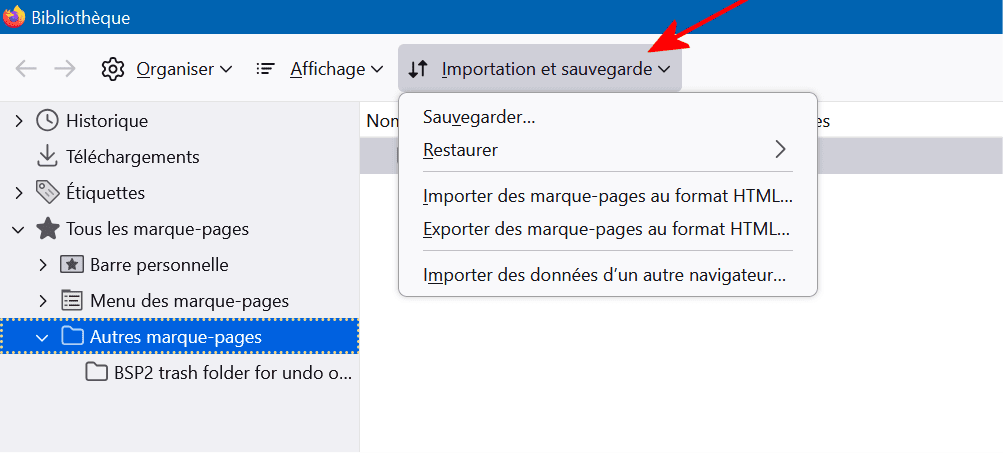
But we can also copy the entire directory of our Firefox profile to find it exactly (settings, extensions, ...) in the new environment. If we haven’t changed its location, we will find the directory in the explorer at the address %APPDATA%\Mozilla\Firefox\Profiles\
-
Thank you Jee Pee for replying to me :)
Have a good day, as for me, I’m going to save my files on an external hard drive.
-
Hello,
that's what I was regularly doing when my schedule allowed it,
up until the end of last August.
See you later,
-
Reset issue: it's stuck at 62%, I'll wait another hour, otherwise I'll open another thread.
See you+
-
Hello,
You can continue here.
Installing Windows from scratch is easy.
Use the link to download the Windows ISO to create a USB drive (at least 8GB) for updating, repairing, or installing Windows.https://www.microsoft.com/fr-fr/software-download/windows11
Once you have the Windows ISO file, you can create a Bootable USB drive with Rufus.
https://rufus.ie/fr/
In GPT mode for EFI.
Boot from it using the PC's Boot Menu key.
You can search on Google "[Brand Model] Boot Menu Key."
Choose "Custom installation" (not upgrade).
* At one point, you can choose the old installation method.
No need to format if there's space; if there is data, it will be found in a Windows.old folder (which will automatically delete itself after 10 days).
Install on the same partition, or alternatively, delete all system partitions and create a new one (this will delete the data). -
A big thank you to jee pee for the information, it really helped me out!!!