
Converting from MBR to GPT
JPhL_01 Posted messages 22 Status Member -
Hello everyone. On a computer compatible with Windows 11, I had reinstalled the Windows 10 partition to avoid having to reinstall everything. But now, I would like to upgrade to Windows 11.
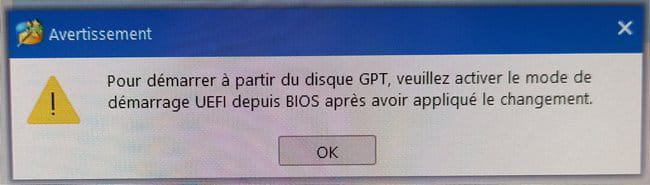
The problem is that the partition is an MBR partition. With MiniTool Partition Wizard, I tried to convert it to GPT, but I am attaching a photo of the error message.
Where do I go in the BIOS to unlock the situation? Thank you for your advice.
Best regards;
JP
2 answers
-
Hello,
To enable UEFI mode, access the BIOS/UEFI during startup (keys Del, F2, or Esc), go to the boot settings, select UEFI Boot Mode, and save the changes with F10.
-
Hello,
It depends on the BIOS and can be found in various places and under different names (for example, as opposed to UEFI Legacy or CSM), here is an example for an AMI BIOS.
https://docs.oracle.com/cd/E50692_01/html/E50102/glsem.html
-
-
