WPD files

thithi13011 Posted messages 14 Registration date Status Member Last intervention -
Hello, WPD files Windows 11 code 10
12 answers
-
Hello,
This does not appear to be WPD (Word Perfect) files but rather the WPD file system.
The error is due to a removable device that is not recognized: no drive letter assigned, incorrect file format, or a corrupted or incompatible driver that needs to be updated from the device manager. -
First of all, thank you for your response
I did not choose this seller at all, as I specified, I bought the printer through the post office. After that, I agree with you that prices should be free ????, but to refuse a return and a refund for a matter of ink cartridges that were used is, for me, unacceptable. I even offered the seller to give him new ink cartridges, and he refused, telling me that now it was the original packaging box that was opened. When you received your printer, did you not open the box and install the ink cartridges to make it work? And if there had been a problem and you contacted the seller to tell him that his printer was not working, what would you have done? Sue him for €89?
-
Hello @thithi13011 StatusMember
Download and install --> Revo Uninstaller
Run it as administrator
Uninstall all the products of the Canon printer
Follow the tutorial closely to uninstall everything properly including leftover folders and registry keys.
For the residual scan, check --> advanced mode
Restart the PC.
Download this driver --> PIXMA MG3650S
Disconnect the USB cable from the PC
Turn on the printer
Launch the driver setup
Follow the instructions. -
Afterward, it's not a problem, I will get my old printer that I still have at home, still from Canon, MX925, hoping to find drivers for Windows 11, but I doubt it, and install Windows 10 LTSC, valid until 2032.
-
I still have at home, always from Canon, the MX925, hoping to find drivers for Windows 11Driver -->> PIXMA MX925 <<--
Disconnect the USB cable from the PC
Turn on the printer
After extracting the driver, go to the folder --> mp68-win-mx920-1_01-ea32_2
Folder --> DrvSetup
Run the --> SETUP64.exe
Follow the instructions.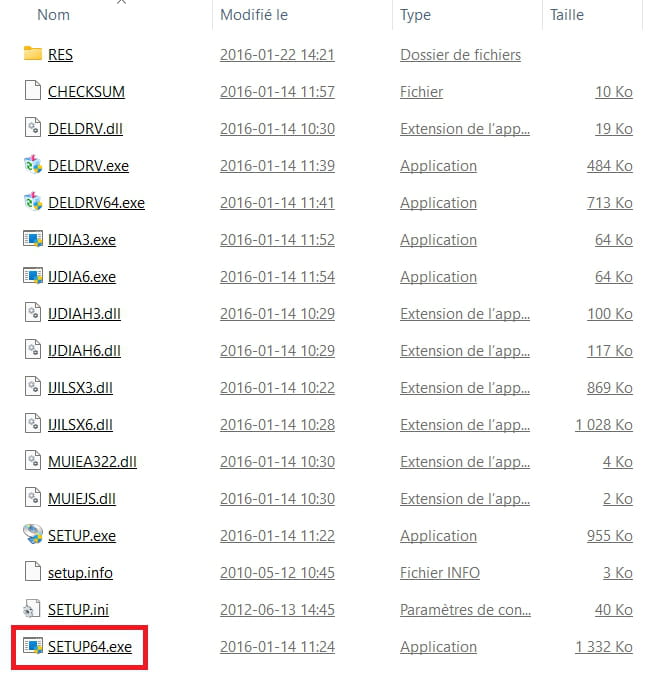
-
Hello, and thank you for your response. Yes, indeed the error is due to the WPD file system. Since my TERRA computer originally ran on Windows 8, of course, I don't have any installation DVDs or CDs. Microsoft is of no help as it doesn't recognize this brand of laptops, and even on the TERRA website, my model doesn't appear. So even by uninstalling the driver, it returns on every restart. I can't find a solution other than to leave the error, and God knows that Windows 11, 24H2, is not up to par. Even by switching to developer mode to test version 25H2, it still doesn't resolve the issue.
-
All my removable devices are working perfectly fine, so I still don't know where the error comes from.
-
And update from the device manager, already done of course first otherwise I wouldn't have turned to a forum.
-
Afterwards, if you yourself haven't found another solution, thank you for your help but just forget it because even I, as a Computer Engineer, can't find any solutions.
-
The error is due to a removable device that is not recognized: no letter assigned, incorrect file format, or a corrupt or unsuitable driver to update from the device manager. I've already done this and it doesn't work.
Thank you for your help, I will try other things and if it works, I will get back to you to let you know.
Best regards,
-
Hello brucine,
I think I found the error but it is still not resolved, it's my Canon printer, the driver provided for the scanner on the installation CD is for Windows 8 and 8.1, over Wi-Fi, it doesn't work but it only works via USB cable. I called Canon customer service and even they couldn't find a solution, they told me to stay connected via USB cable, it's still incredible from Canon not to update a Wi-Fi driver for Windows 11. I even tried compatibility mode on Windows 11, and it still doesn't work over Wi-Fi, so I find myself with a printer that is useless except for transporting it back and forth from my workspace to another room (another office). This printer is the MG 3650S, but I need to use the MG 3000 series version and also install the ws driver, not the wsd one provided on the installation CD to print over Wi-Fi, but nothing at all for scanning. I’m going to throw it in the trash because it's useless to me, bought through the post for €89.99, the seller 1fodiscount, of course, doesn’t want to refund me because, according to him, I used the ink cartridges. And the worst of all is that it was delivered to me by Amazon, and on Amazon, the same printer is sold for €49, which is the price of Canon XL ink cartridges, so either I’m crazy or the seller is? A thief, a scammer, and of course, this printer is no longer on his website, a joke. Besides, all the items sold on this website are twice as expensive as on Amazon, don’t buy anything from 1fodiscout, thieves, scammers, and everything that goes with it, to stay polite!!!
Thank you for your response, if you have one
Best regards,
-
Hello,
Prices are free, and each supplier sells to whomever they please; it is up to the customer to choose, and they have no one to blame but themselves if they later find that they are lower elsewhere.
The Windows 11 drivers will obviously not be on the CD if I understand correctly that Windows 8 was included, but they are presumably available from Canon.
https://www.canon.fr/support/consumer/products/printers/pixma/mg-series/pixma-mg3650.html
If this is not the case, contrary to this assertion, aside from searching for the drivers and software in question on a third-party site, there is nothing we can do about the fact that such a manufacturer has chosen not to update them for such an operating system.
Generally speaking, the printing problem is often simple, whereas the scanning issue, which also involves software, is less so; some models do not support scanning via Wi-Fi which, in any case, does not make much sense (you still have to move to place the original), I am not sure if this is the case here.
Check this possibility and its potential settings in the user manual.
https://gdlp01.c-wss.com/gds/6/0300019366/02/MG3600ser_OnlineManual_Win_FR_V02.pdfMore generally, a Wi-Fi printer is by definition networked.
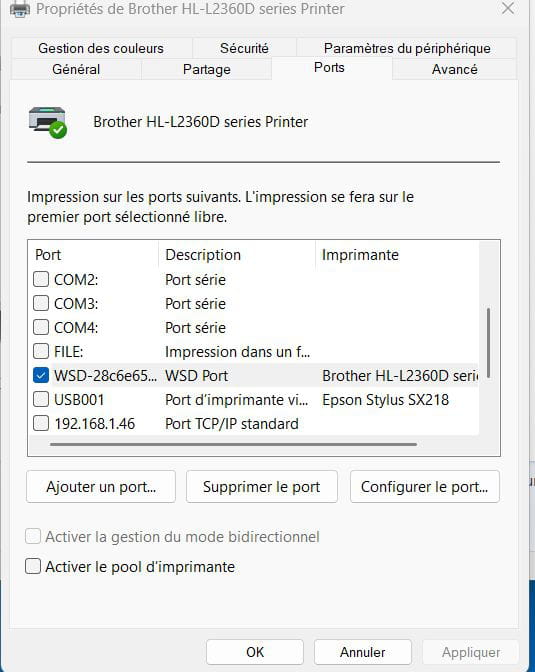
If the WPD port is not working, it may simply be an installation and configuration error.
Mine is connected via Ethernet to the PC, but it could just as easily be connected to another PC on the network or even to the Box, where it will be accessible via a network installation and its IP port.
Well no, normally I don't need to get up, as long as the printer is stocked with sheets and ink cartridges, printing a PDF file or anything else over Wi-Fi doesn’t require me to move. Of course, scanning is different; unless the file is already on the computer, I need to go over, but most of the time, we receive an email attachment and there's no need to move. Yes, just to pick up the printed documents, but generally, it's my secretary who takes care of that, not me.
Thank you very much for the information, because this printer is a very good machine, 5 ink cartridges, the possibility of replacing 2 color ink cartridges with GOLD and SILVER ink, a tray replacement for printing CDs, with a tray that can print 2 cards of the credit card type at the same time, manual double-sided, purchased on Amazon for not much, features: wifi, cable, fax, true duplex on top, 50 pages capacity, front side, 150 pages capacity, can print at the same time on top and bottom, scanner 4800dpi, bought for €460 back then, a wonderful printer for its time.
-