
Formula with text inside
Solved
Hello,
Is it possible to get a correct result by entering the following formula: =B20*B22, knowing that:
B20 : 5320 m2
B22 : 11 €/m2
and this without adding a column (my table does not allow it)
My result displays as follows => #VALUE!
Thank you all.
Have a nice day.
8 answers
-
Hello,
If your data is formatted correctly, you can simply do =B20*B22
however, if m² and €/m2 have been added manually, your data is recognized as text, so you need to extract each numeric value
=LEFT(B20;FIND(" ";B20)-1)*1
and
=LEFT(B22;FIND(" ";B22)-1)*1
which results in the completed formula
=(LEFT(B20;FIND(" ";B20)-1)*1)*(LEFT(B22;FIND(" ";B22)-1)*1)
See you
Mike-31
I am responsible for what I say, not for what you understand... -
Moderator
Hello,
Another way to proceed is to enter the values 5320 and 11 without units and then format the cells to add a unit.
Enter 5320 then right-click on the cell and choose Format Cells.
Then select Custom and type 0" m2" in the Type field. Confirm.
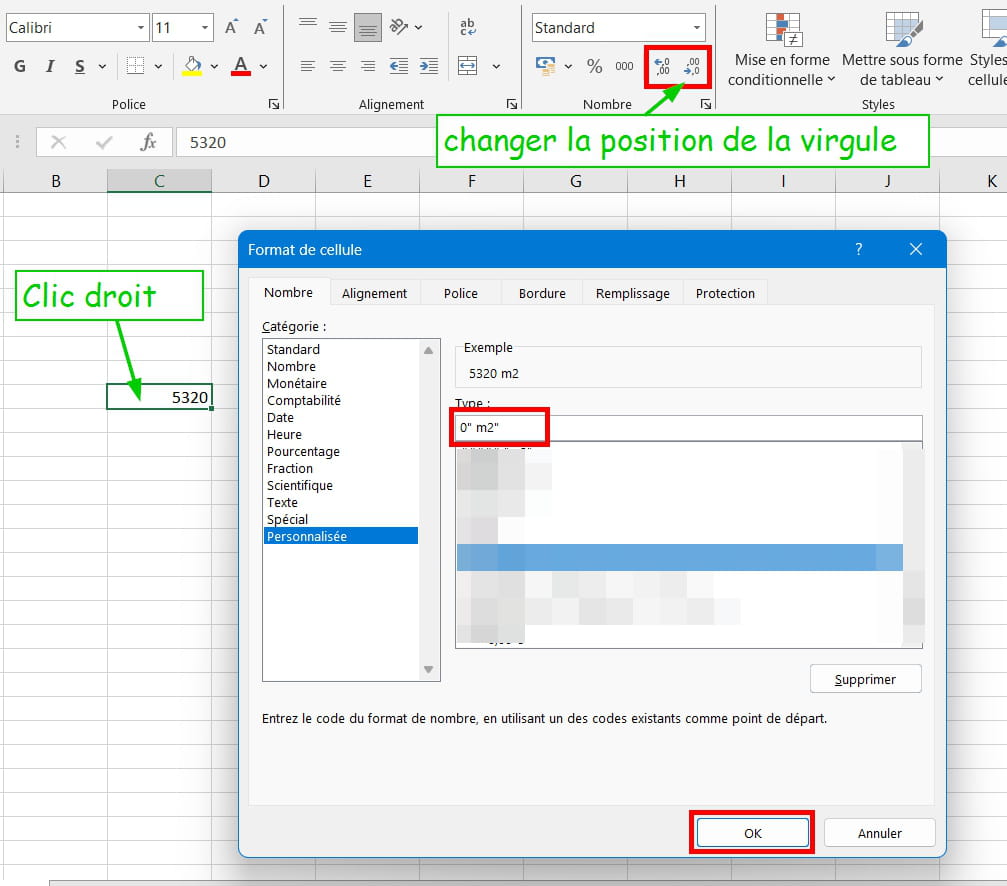
Do the same for the cell containing the price per m². In Type, you will write 0" €/m2"
You can now use your formula to perform the calculation.
For the cell that contains the result, you will apply formatting using the currency format and the result will be in €.
What one conceives well is clearly expressed,
And the words to say it come easily.
(Boileau)-
-
Moderator@Severine33130
Before being formatted, the cell contains only a number (no unit).
When formatting, be careful with spaces in Type. Do not add any!
-
-
Re,
how is it not working! To get 55, there is a space after the 5, which makes it 5 3230 so that’s 5*11=55
either you have spaces lingering in your entries or?
retrieve my example from this link and compare differently formatted values in j3 and L3
or with the values you provided in your request
https://transfert.free.fr/QL5jMmn
or to handle an indefinite number of spaces
=(LEFT(SUBSTITUTE(B20;" ";"");LEN(SUBSTITUTE(B20;" ";""))-2)*1)*(LEFT(SUBSTITUTE(B22;" ";"");LEN(SUBSTITUTE(B22;" ";""))-4)*1)
Later+
Mike-31
I am responsible for what I say, not for what you understand...-
-
-
@Severine33130
Have you looked at and tested my post No. 5?
-
@Severine33130
Hello Severine,
In Excel, mixing text and numbers in the same cell is rarely a good idea. But it's up to you...
Best regards. -
@eugene
Hello,
It's not clear why.
It can be more or less complex when there are strings to extract depending on their length or position, but there are a multitude of trivial examples.
-
-
Hi again,
To address your issue, it would be wise to have your file on hand to see what's wrong.
With Excel, nothing is impossible.
See you later,
Mike-31
I am responsible for what I say, not for what you understand... -
Hi,
to send a file you can use
then do not send a file with personal data, in two columns simply enter several types of data that are problematic and copy the link in a reply.
See you later,
Mike-31
I am responsible for what I say, not for what you understand... -
Hi,
Your data is correctly used, in the initial BdD tab cell B23 you entered a numeric value of 5320 with a custom format Standard" m²"
in cell B25 the entered data 11 is also formatted Standard" €/m²"
In C25 the formula =B23*B25 returns 58,520.00 € because it is formatted in monetary format with a thousand separator.
I don't see where the problem is, everything is correct
See you later
Mike-31
I am responsible for what I say, not for what you understand... -
Hi,
In cell B11 you have a date 22/05/2019 and in B12 you have 13/01/2022.
What do you want to do with these dates and in which cell, and what result do you expect from these dates?
See you soon,
Mike-31
I am responsible for what I say, not for what you understand...-
Hello,
Likely reference to this discussion and where it works:
https://forums.commentcamarche.net/forum/affich-38209065-date-qui-ne-fonctionne-pas#dernier -
I found your error and what you wanted to do, in the Fiche OP tab cell C60 you did not correctly address your target cell
=IF(ISBLANK(B11),"REP 1","REP 1 of "&TEXT('BdD initiale'!$B$11,"dd/mm/yyyy"))
try it like this and the same for cells C61 and C62
=IF(ISBLANK('BdD initiale'!B11),"REP 1","REP 1 of "&TEXT('BdD initiale'!$B$11,"dd/mm/yyyy"))
-
@brucine
The formula has been correctly modified in C122, but not in C140 and C141 (date formatting) and in C60 to C62 (it should refer to cell B11 of the initial database).
-
@Mike-31
Fabulous!!!! I love it when everything goes smoothly.
Thank you for your patience.
I'm so bad with formulas that I should stop making tables like this..... but it's so convenient once everything is set.
Again, a big thank you.
Have a great weekend!
-
-
You can merge the cells Fiche OP from C60 to J60 with left alignment, and do the same for REP 2 and 3 on lines 61 and 62
Change the status of the discussion to resolved
Have a good weekend
See you later
Mike-31
I am responsible for what I say, not for what you understand...


