
Adguard installed but won't start
Hello,
In 2021, I purchased a lifetime license for Adguard for 3 PCs, and I activated it on one PC.
I had lost the license key and my Gmail had been hacked. I took some risks and went back yesterday, and I was able to recover the license key.
On my Lenovo laptop, I was able to activate Adguard (the latest version) without any problem, but on the desktop PC (Megaport) that I bought three and a half years ago, I am encountering an issue.
Adguard was installed successfully, but when I double-click on the desktop icon, the software doesn't launch.
I tried running it in Windows 8 compatibility mode, but it's the same.
However, when I go into the task manager, there is an Adguard process running, and when I expand it, there is an Adguard service running, but I can't bring up the software window, and it doesn't appear in the list of programs running in the background either.
I followed the advice from the technical support which told me to perform a system scan; I did this and the Windows tool repaired some corrupted files.
I uninstalled Adguard by removing the remaining registry keys with a software and reinstalled Adguard, but it still refuses to launch, or at least the software window does not appear.
I specify that I have an official license of Windows 11 Pro, and due to a series of software bugs, I restored an old backup from the time I had installed and activated Windows 11, and then installed all my programs and antivirus.
Now, everything works well, except for Adguard.
I also specify that I have a software called AVG Tuneup running in the background, and I remember that I had enabled Adguard's sleep mode, but I did not disable sleep mode before uninstalling it; could this have an impact on Adguard's proper functioning?
When I reinstalled Adguard, I opened AVG Tuneup and disabled Adguard's hibernation, then closed AVG Tuneup which was running in the background, but the Adguard software still refuses to launch, or rather the window does not appear.
I don’t see what more I can do, and technical support doesn’t seem able to help me further.
Do you have any suggestions to help me, please?
Thank you in advance.
Sincerely.
22 answers
-
Hello,
An AI from the forum replied to me, but I would like to get help from the forum members.
Has anyone found a lead, please?
Thank you in advance.
Best regards.
-
Moderator
Hello,
Which antivirus are you using? It might be conflicting with AdGuard, preventing it from launching.
Try temporarily disabling the antivirus and whitelisting the processes Adguard.exe and AdguardSvc.exe.
As for AVG TuneUp, I recommend uninstalling it. Such programs are not really useful and can sometimes cause issues with Windows.
-
Hello HelpiOS,
Thank you very much for your response and for your help.
I am using Bitdefender Total Security.
As for AVG TuneUp, it bothers me because I recently purchased a one-year license, but I trust you, I will remove it.
Do you think that AVG TuneUp could have created conflicts with some of my programs before I restored an old backup?
There were quite a few programs that wouldn’t launch anymore, even after reinstalling Windows via the update manager, but nothing worked, and I had to restore an old backup made with EaseUS Todo Backup.
Best regards.
-
Hello HelpiOS,
I did as you told me.
I even performed an advanced uninstallation with a specific tool that the Adguard development team designed and recommended I use, then I reinstalled Adguard, but the problem persists, it won't launch...
Best regards.
-
Moderator
I think we should try uninstalling AdGuard using Revo Uninstaller. Select the advanced mode when uninstalling to remove all registry keys and leftover directories.
For AVG TuneUp, an uninstallation with Revo should also be tried. It's quite possible that AdGuard is blocked due to an outdated setting that is still active on the PC. Also, here is how to cancel the subscription.
Restart Windows once they are completely uninstalled.
-
Good evening HelpiOS,
I uninstalled Adguard, but with Iobit Uninstaller which I have a license for (that I received), is it a good tool?
I did the same for AVG Tuneup, I uninstalled it with Iobit Uninstaller.
I don't see how to cancel my subscription because I don't have an AVG account.
I purchased AVG Tuneup from a reseller on Ebay.
In the Iobit Uninstaller software, there is an option that allows scanning for leftover files and uninstallation issues.
Should I uninstall Iobit Uninstaller?
Thank you for your help.
Sincerely.
-
Moderator
Yes, iObit Uninstaller is also a good tool. You now need to choose the option to scan for any remaining residual traces to complete the uninstallation.
As for AVG, it will not be possible to request a refund since the software has already been activated with the license key. However, I don't believe there is a subscription in this case. The pro version will not renew automatically once it has expired.
-
Hello HelpiOS,
I scanned for traces and it found plenty that it deleted, also for AVG TuneUp.
I also did the "advanced uninstall" with the tool that the developers provided me, but the problem remains the same.
It should also be noted that I haven't updated Windows for some time.
I blocked them with a tool from the Sordum site because after some Windows updates, there are bugs or crashes galore.
Installing them might perhaps resolve the problem with launching Adguard; I'll try this afternoon.
Best regards.
-
Moderator
Hello Eglantier3333,
Did the updates resolve the issue?
If the problem persists, and since it seems you are using different tools that modify the system's functioning, it would be better to reinstall Windows following these instructions to start fresh with a clean version.
-
Good evening HelpiOS,
There were 8 updates, including 4 very large ones, but installing them did not resolve the issue.
I won't be able to reinstall Windows for a while, as I am currently taking an online course and a family member is using the desktop computer a lot.
Best regards.
-
Hello HelpiOS,
I tried as an administrator and it doesn't solve the problem either.
It's a mystery...
Best regards.
-
Oh no... :(
It won't be anytime soon.
In any case, thank you for your help.
Best regards.
-
Moderator
Hello Eglantier3333,
I have another lead to try.
Simultaneously press the Windows + R keys and type msconfig.
Go to the Services tab and check Hide all Microsoft services.
Then click on Disable all to disable all services associated with third-party programs. Click Apply > Ok and restart.
Now, only Microsoft services will be active.
Let me know if that changes anything.
-
Good evening HelpiOS,
Thank you for continuing to offer me your help.
I had planned to back up the PC tonight, it takes at least a good hour and a half, on the external hard drive.
So, I will try your suggestion tomorrow during the day.
Best regards.
-
Good evening HelpiOS,
Your solution hasn't brought anything new; the problem remains the same.
However, thanks to your solution, I noticed that many Microsoft services are stopped and most are disabled, which I saw in your solution and in the Services tool in the control panel.
Could it be that Adguard is using a Microsoft service that is disabled?
Thank you in advance.
Best regards.
-
Moderator
Hello,
In (Search for in the start menu) Event Viewer
> Windows Logs
> Applications
Do you have any clues right after a failed launch of the program? -
Hello Fabul,
Thank you for offering your help.
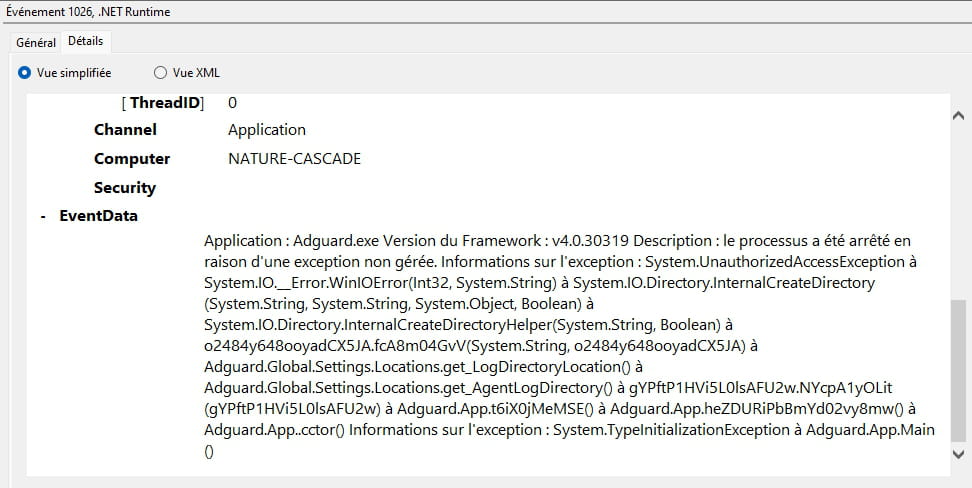
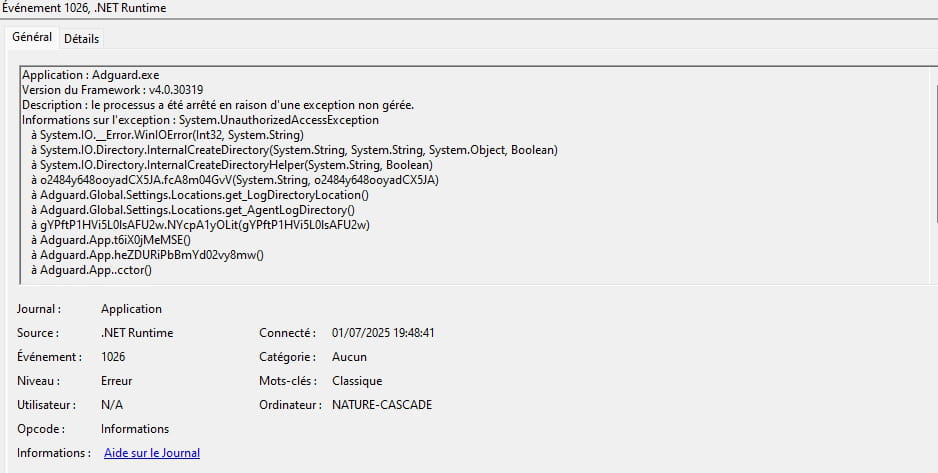
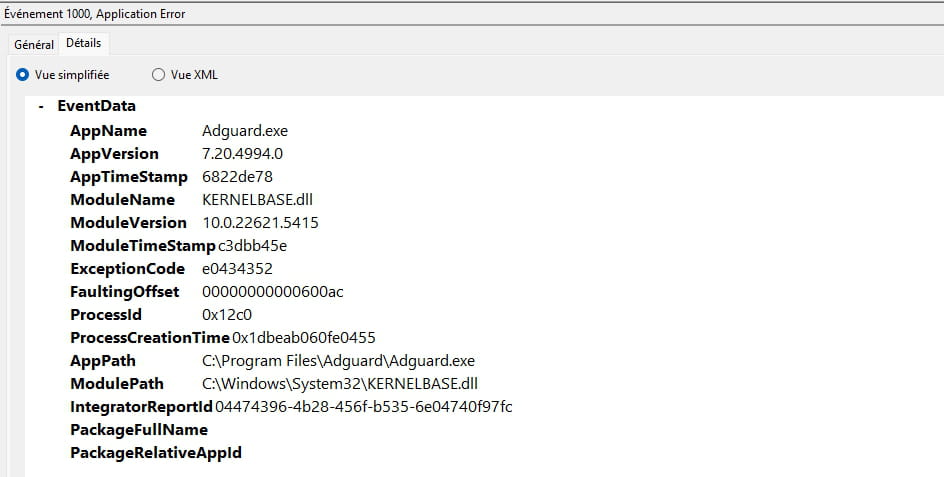
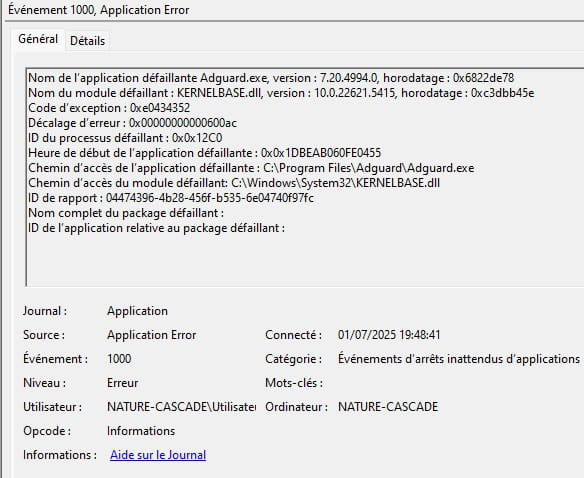
I checked the Event Viewer as you suggested, and there are indeed errors indicated regarding the failed program launch.

Sincerely.
-
Moderator
Hello again,
This KERNELBASE.dll error often occurs with outdated operating systems and programs that no longer support the installed version of Windows that is not up to date.
Which Windows 11 is it, 24H2? (Autumn 2024?)
We can check with Winver.exe
If it's neither Windows nor a troublesome antivirus that is out of date, AdGuard's support might be better able to help you, perhaps. -
Hello again Fabul,
It's about Windows 11 Pro. I installed the latest update this morning.
What's strange, and what I forgot to mention at the beginning of the thread, is that before I uninstalled Adguard to reinstall it afterwards, it was working at first; I ran it a few times...
I'll check with Adguard support, but they seem to be out of ideas; they haven't replied to me anymore...
Best regards.
-
Moderator
Try installing the Microsoft .NET Desktop Runtime versions 5 to 9 or 10
In x86 and x64 versions under .NET Desktop Runtime X.X.XX
https://dotnet.microsoft.com/en-us/download/dotnet/5.0
https://dotnet.microsoft.com/en-us/download/dotnet/6.0
https://dotnet.microsoft.com/en-us/download/dotnet/7.0
https://dotnet.microsoft.com/en-us/download/dotnet/8.0
https://dotnet.microsoft.com/en-us/download/dotnet/9.0


- 1
- 2