
Online PDFs open with Soda
ifffick Posted messages 3 Status Member -
Hello, how can I prevent online PDFs from opening with Soda?
I don't have Soda on my computer and the default application for opening PDFs is Adobe.
Thank you in advance
Yves
2 answers
-
Hello Yves,
Are you using Windows or Mac? What is your browser?
-
Hello,
Soda didn't come alone...
Chrome's options allow you to choose to open or download a PDF:
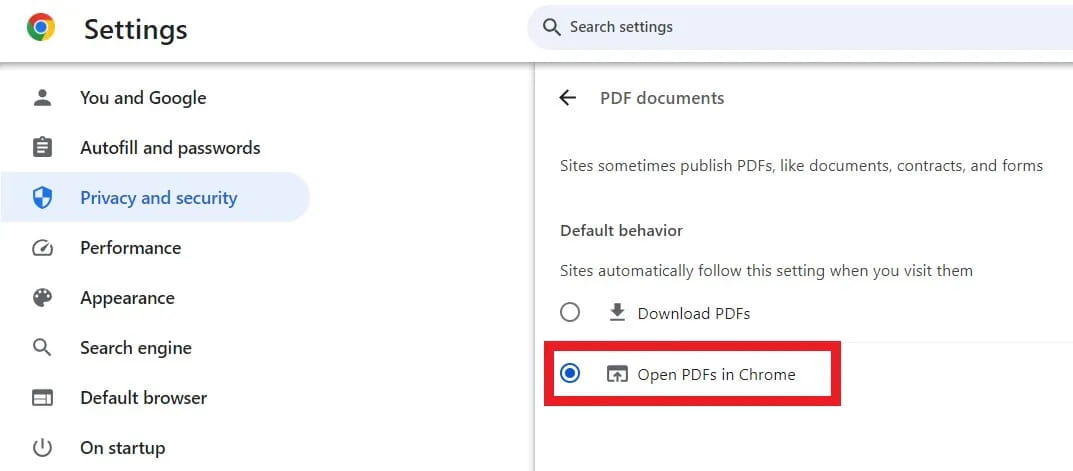
The Athenians will reach out if the second item has become open with Soda, which is, to my knowledge, coded in the browser and I don't know where to correct it.
The expedient way would then be to start by replacing with Download, but this will probably not solve the problem if that’s not what we want when we go back to offering Chrome.
There doesn’t seem to be any solution other than removing the Soda Chrome extension if it exists, then resetting the browser in the settings and clearing the cache and cookies, but the price to pay may be the disappearance of favorites and passwords unless we first make an external copy of the Chrome profile to be able, in a second step, to overwrite the affected files.Hello and thank you very much, the solution was indeed in the Chrome settings, in the "extensions" menu, I just had to remove soda.
Thank you, thank you, thank you
-
