
Eradicate WPS Office
Solved/Closedbazfile Posted messages 58520 Registration date Status Moderator Last intervention -
Hello everyone,
For the past few days, I have been harassed by WPS OFFICE and WPS PDF.
I have no use for them.
I uninstall them with Revo uninstaller and they reappear the next day.
Does anyone know how to get rid of this intruder?
Thank you in advance for your help and advice.
22 answers
- 1
- 2
-
Hello,
I think it must be a software on your computer that is forcing this installation of WPS Office. What is your antivirus?
-
Hello again,
Sorry for my late response.
Norton 360 has been my antivirus for years.
However, on the bottom line of the screen, there is a logo "360 Total Security Free".
I didn't know it was an antivirus.
I can't find any trace of this 360 in the installed programs... ?
However, in the list of programs, I have WPS Office and WPS PDF.
Yet I haven't downloaded anything for months...?
To be continued. -
Hello,
It is possible that 360 Total Security was installed without your full knowledge when you downloaded another software that offered third-party software during its installation. 360 TS, for its part, may install WPS Office.
Since you are already paying for a subscription to Norton 360, it is unnecessary, and even counterproductive, to keep two antivirus programs on the system. This can create conflicts between the antivirus programs and cause slowdowns or other issues on the computer.
If you prefer to switch to an equally effective and free antivirus solution, Windows already has a built-in antivirus that automatically activates when no other antivirus is installed and active.
To uninstall 360 Total Security, if you see its shortcut on the desktop, you can use Revo Uninstaller and switch to hunter mode via the options, then target the 360 icon with this mode. It will then offer to uninstall it. Choose the "advanced scan" mode to completely remove it.
As another method, go to C:\Program Files (x86)\360\Total Security\Uninstall.exe to launch its uninstallation.
Once removed, you can uninstall WPS Office.
-
Hello,
The antivirus is: Norton 360
-
Hello,
This plan is great, I managed to delete everything
To be continued just in case
Thank you for everything
-
Hello
The removal of WPS OFFICE and 360 TOTAL SECURITY worked well, but unfortunately, they are back...
On the bottom bar of the screen:
On the left, the WPS logo. With a right-click, I can't close the window or remove it from the taskbar, and an ad appears "WPS Pro + AI 3 days free"
On the right (hidden icons) the 360 TOTAL SECURITY logo
It's quite disturbing, for example: I was in the process of changing a password on a site when a WPS Office installation page appeared?
Yet my only web consultations are: Orange mail, Google News, eBay
I remain interested in removing these intruders.
Thanks to everyone and best regards-
I am redirecting your post to the Security forum. In the meantime, I suggest you run a scan with Malwarebytes to ensure there are no malware present.
-
-
Hello to both of you
@dobyone StatusMember, please do => This <= and post the links after this message
-
Malwarebytes
www.malwarebytes.com-Log Details-
Scan Date: 06/16/2025
Scan Duration: 16:29
Log File: 50dfa282-4abe-11f0-95ab-64006a4102e4.json-Software Information-
Version: 4.6.17.334
Component Version: 1.0.2390
Update Package Version: 1.0.100183
License: Free-System Information-
Operating System: Windows 7 Service Pack 1
Processor: x64
File System: NTFS
User: AXEL-PC\Axel-Scan Summary-
Scan Type: Threat Scan
Scan Initiated By: Manual
Result: Completed
Objects Scanned: 143729
Threats Detected: 5
Threats Quarantined: 5
Time Elapsed: 6 min, 11 s-Scan Options-
Memory: Enabled
Startup: Enabled
File System: Enabled
Archives: Enabled
Rootkits: Disabled
Heuristics: Enabled
PUP: Detection
PUM: Detection-Scan Details-
Processes: 0
(No malware detected)Modules: 0
(No malware detected)Registry Keys: 2
PUP.Optional.DriverPack, HKLM\SOFTWARE\WOW6432NODE\DRPSU, Quarantined, 2723, 472300, 1.0.100183, , ame, , ,
PUP.Optional.DriverPack, HKU\S-1-5-21-1779280994-3619252267-4112778954-1000\SOFTWARE\DRPSU, Quarantined, 2723, 472301, 1.0.100183, , ame, , ,Registry Values: 2
PUP.Optional.DriverPack, HKLM\SOFTWARE\WOW6432NODE\DRPSU|CLIENTID, Quarantined, 2723, 472300, 1.0.100183, , ame, , ,
PUP.Optional.DriverPack, HKU\S-1-5-21-1779280994-3619252267-4112778954-1000\SOFTWARE\DRPSU|CLIENTID, Quarantined, 2723, 472301, 1.0.100183, , ame, , ,Registry Data: 0
(No malware detected)Data Streams: 0
(No malware detected)Folder: 1
PUP.Optional.DriverPack.BITSRST, C:\USERS\GEOFFREY\APPDATA\ROAMING\DRPSU, Quarantined, 5127, 820473, 1.0.100183, , ame, , ,Files: 0
(No malware detected)Physical Sectors: 0
(No malware detected)WMI: 0
(No malware detected)
(end)-
Malwarebytes has detected DriverPack as unwanted software. It is not really malicious; it is used to update drivers. However, it is not necessary to update them if the computer is running properly.
Now, please run a FRST scan as requested by MisteryBean (whom I thank for his intervention) by following these instructions. This scan will help understand the cause of the return of these programs and provide you with a fix.
-
-
attached files
Results of the Additional Analysis by Farbar Recovery Scan Tool (x64) Version: 07-06-2025
======================== -
Hello,
Thank you very much.
A beautiful gesture of kindness; it's comforting in this tormented world.
-
RE_
Uninstall Adobe Flash Player 17 ActiveX
*****************************
--> Copy what is found here https://textup.fr/851135ME from start:: to end:: (without pasting it anywhere)
--> Open FRST (or FRST64) as an administrator and click on Fix
If FRST seems to freeze or is unresponsive, let it run--> The PC will ask to restart, accept
--> A fixlog file is created in the same location as FRST, post it like the other reports
--> Let me know if you still have the problem.
-
Hello
With FRST I didn't get anything on the desktop?
However, I got a file on Notepad that I copied into Word and sent with the link: https://uploadnow.io/f/XxFl7Qb
Best regards
-
Why are you talking to me about the office when you're launching FRST from downloads?
Executed from C:\Users\Geoffrey\DownloadsSend the reports to https://pjjoint.malekal.com/ or https://www.catupload.com/.
And not in DOC but in TXT (notepad)
-
Hello, I have sent the files via: https://uploadnow.io/f/n73zypF
Regards
-
-
Hello,
For your information
https://forums.commentcamarche.net/forum/affich-38206247-eradiquer-wps-office?full=1#p38206247
Uninstall Malwarebytes and Norton, synonymous with trouble.
Try to remove what you can, the "Rootkit" or malicious processes with UnHackMe (In French) (In a 30-day trial version), otherwise a lifetime license, which I prefer to a Malwarebytes license.
This tool more often pinpointed the real issue for me, a matter of preferences.
https://greatis.com/unhackme/download.htm
A quick scan is almost always as effective as a full scan.
Or RegRun Reanimator (In English) (Free)https://greatis.com/security/reanimator.html
Click on:
> Fix Problems
> Fix Malware IssuesBe careful, they detect risky elements, sometimes good, sometimes bad, sometimes important too, it's important to sort them out, by deductions or Internet research and/or VirusTotal* analysis of executable files or drivers, to only delete viruses or unnecessary items.
* https://www.virustotal.com/gui/home/upload
There are tabs at the top to see the different sections.
It shows details such as types, names, and locations of files; pay attention to both the location and the names of files, these are important clues.
Whether an item is marked in red (Often bad), blue or yellow (Unknown or Dangerous?) or green (probably harmless), it is up to the user to judge the relevance of what it detects.
You can use right-click > Copy to Clipboard to copy the detection text. (It helps in research)
Select the items to delete and not the others and click the red button to delete them, and confirm, continue by clicking Next to check in all tabs where there are detected items.
Then at Finish, if needed, click the "Restart is Required" button to restart Windows.
If it does not show what you want to detect with the default scan, to refine your search, use Filter Set or Inspection Mode and Filter Set and choose "Display All but Exclude Signed by Microsoft/Google/Greatis."
But be extra cautious about what you delete.
-
Hello,
Thank you for the UnHackMe tool.
I still have the 360 Total Security logo on the taskbar.
As for the uninstallation, it's fine to remove Malwarebytes, but why remove Norton 360 at the risk of being left without antivirus, which is a bit risky.
Regards-
Re Hello,
Norton had or has an antivirus called Norton 360
It's confusing.
Then Defender (Windows Security) will take over at no additional cost.
If it's Norton 360 Total Security, it would be better to uninstall it rather than remove it hastily.
With UnHackMe and RegRun, it is almost imperative to use Inspection Mode and the Filter Set button to ensure everything is analyzed.
In the tutorial under the PS here:
https://forums.commentcamarche.net/forum/affich-38206831-alors-vous-voulez-supprimer-les-virus-vous-meme-comment
You're welcome,
@+
-
-
Hello again,
I wanted to make a separate post, but a moderator deleted it claiming my dialogue was still ongoing, so I'm adding to it because nothing that has been suggested on the forum seems to work as these intruders return every day.
While browsing the net, I found "flyhunter.5" which is supposedly free, but you have to provide your credit card details.
Since I oppose this practice, I couldn't remove the intruders listed below that it found for me:
Xempire.com
Lust.goddess.com
Trojan.FlyStudio
To be continued ….-
Hello @dobyone StatusMember.
I am the moderator who deleted this second duplicate on your part.
Your issue has been addressed by MisteryBean, who is a security contributor, and I would like to point out that he is still waiting for your response since June 17.
https://forums.commentcamarche.net/forum/affich-38199361-eradiquer-wps-office#p38204844
The least you could do is respond to him, considering that he took the time to create a correction script for you and took care of your problem.
-
-
Re Hello,
Do not install any pseudo anti-malware as you mentioned, remove that with Revo Uninstaller Free in advanced mode.
In your next response below, post the links to new FRST and Addition reports with the latest version of FRST from the provided link.
https://forums.commentcamarche.net/forum/affich-38063320-a-lire-avant-toute-demande-de-desinfection -
Hello,
Follow-up
Today, without me doing anything, WPS Office was installed automatically.
I found a wps.exe download in my downloads; a download that I didn't make and that I deleted.
This is starting to be concerning.
To be continued -
RE_
OK for the fixlog and the FRST report. I'm missing the Addition report.
-
Hello
For your information
Since July 15th, when I turn on the PC, or when resuming from a screensaver, instead of the Microsoft logo, I have a logo that looks like the one from Facebook (F) with an "I" in a circle on the right.
I can’t shake the feeling that someone has taken control of my PC.
It’s unsettling and I still need help.
Regards
-
@dobyone StatusMember.
If you want to be helped, provide the reports requested by @MisteryBean StatusModerator, Security Contributor, I remind you of the procedure.
Download FRST.
Once downloaded, save FRST on the desktop then right-click on FRST and choose Run as administrator, which gives this:

 Wait for the message the tool is ready to run to display, then click on Analyze.
For your information:
 If you get a Microsoft Defender alert, disregard it and click on More information, then on Run anyway, see below.

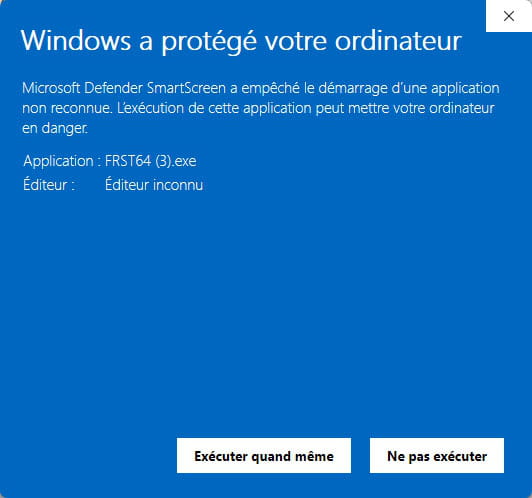
Warning, wait for the messages stating that the analysis is finished to appear.


At the end of the analysis, the two reports FRST and Addition will be on the desktop.


Send the FRST and ADDITION reports to https://pjjoint.malekal.com/ or https://www.catupload.com/.
Then include the two links generated by https://pjjoint.malekal.com/ or https://www.catupload.com/ in your response.
-




- 1
- 2