
Page cannot be deleted
MPMP10 Posted messages 47607 Registration date Status Member Last intervention -
Hello,
It's impossible to remove the first page from the comment site; it works from my computer.
2 answers
-
Hello,
Try this.
https://support.google.com/pixelslate/answer/95314?hl=en
https://www.commentcamarche.net/telecharger/utilitaires/19335-resetbrowser/
Try to be more specific, what exactly are you referring to? Are we talking about the homepage in the Google Chrome browser, or is it something else!
-
I opened the site "How it works". I can't delete it, it reappears every time I open Google. I've tried everything, it keeps coming back!
Thank you
-
Have you tried using ResetBrowser?
Try clearing the cache in your browser.
https://kinsta.com/en/knowledge-base/how-to-clear-browser-cache/
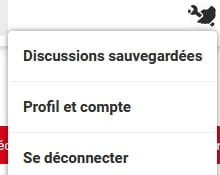
And what happens if you log out of the forum?
Left-click on your avatar in the top right corner.
-
