
Cccleaner procedure not found in dynamic link library
brucine Posted messages 25162 Registration date Status Member Last intervention -
Hello,
I have a message "The procedure entry point EventSetInformation could not be found in the dynamic link library ADVAPI32.dll" when launching CCleaner version 6, free. The program does not open.
Does anyone have any idea what could be causing the problem?
I am on Windows 7 Pro on a Win32 PC
Thanks in advance
3 answers
-
Hello,
You have checked its compatibility with your operating system because 7, whether it's pro or not, has become obsolete for some software.
Moreover, Ccleaner is not used much these days.
-
Hello.
See this page.
Windows 7 has been over for almost 5 years, Microsoft has stopped support so there are no more updates, which makes Windows 7 increasingly obsolete and inhibits the normal functioning of certain software.
If your PC allows it, upgrade to Windows 10, see the tutorial at the end of the message.
As for CCleaner, it is by no means essential on a PC; people use it indiscriminately without really knowing what it is for, some even think it's an antivirus, which is saying something! See this page.
Tutorial for upgrading to Windows 10.
Go to this page and click on Download the tool now.
Open the tool and do as indicated below:
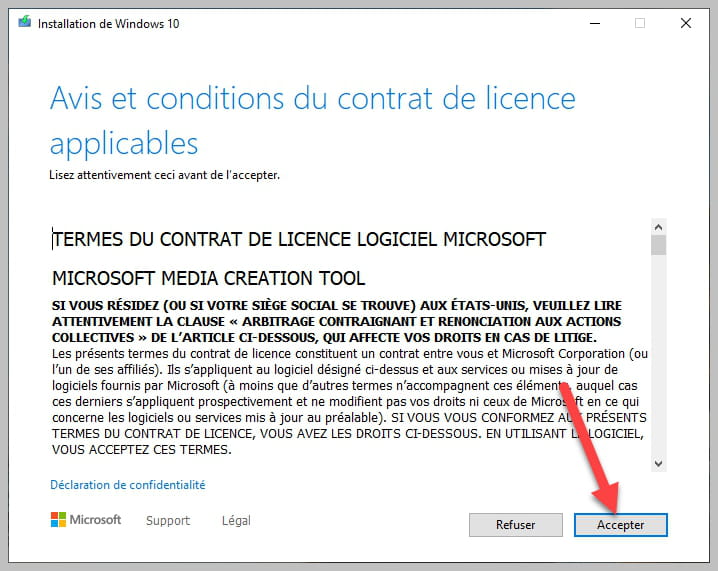


Be sure to leave it checked as shown in the photo.
bazfile
Moderator/Security Contributor.
A hello, a response, a thank you are always appreciated.-
Hello,
That said, and whether it serves any purpose is another question, I looked out of curiosity on the publisher's website which claims that version 6 is compatible with Windows 7 and 8, but it may be a typo or blind optimism.
If we really want it and the blockage is due to the latest version, we should be able to easily find archived older versions; it has been around since at least XP.
-
-
Ccleaner was already installed on the PC and was functioning 15 days ago.
I know that W7 is no longer supported and that more and more software are becoming incompatible; for instance, my Avast free no longer updates the antivirus database for this reason.
The message received for Ccleaner, however, does not seem to fall under this issue. I uninstalled and reinstalled the software without any notifications of incompatibility, but it does not launch, showing the same library link problem message.
My PC is compatible with W10; I upgraded 5 years ago, but it was so slow that I reverted back to W7 in early 2023.
No worries, too bad for Ccleaner.
-
Hello,
Another user had the same problem.
Try the version 6.24 from May 2024 to see, I'm sending you the recompressed Portable version from 70MB to 36MB with 7-Zip
https://1fichier.com/?r50es5wfjqgp7dpjy8fg
Then in the Search, type Task Scheduler
And completely delete the CCleaner tasks, especially Crash Reporting
And you can prevent this task from coming back with this .bat file (by running it)
Disable CCleaner Crash Reporting https://www.cjoint.com/c/NHbmqmjwBshHello,
That said, I tested it on my virtual machine (Windows 7 Pro 64 "SP2") while taking the usual precautions to avoid installing all the adware and junk that comes with it, Ccleaner 6.28 installed and ran without a hitch and without any error messages (maybe we should look for the cause elsewhere?).
-


